Message Deletion Confirmation
piechar
-
dubcek Posted messages 18627 Registration date Status Contributor Last intervention -
dubcek Posted messages 18627 Registration date Status Contributor Last intervention -
Hello,
I installed the latest version of Thunderbird, 78.04.1, on my Huawei Notebook D14.
I am encountering a problem: in the Trash, when deleting messages, the confirmation window for deleting messages no longer appears, so when I click on delete, the message disappears. This means there is no more security if I accidentally put a message in the Trash.
I hope to get some assistance with this issue.
Best regards.
Configuration: Windows / Chrome 86.0.4240.183
I installed the latest version of Thunderbird, 78.04.1, on my Huawei Notebook D14.
I am encountering a problem: in the Trash, when deleting messages, the confirmation window for deleting messages no longer appears, so when I click on delete, the message disappears. This means there is no more security if I accidentally put a message in the Trash.
I hope to get some assistance with this issue.
Best regards.
Configuration: Windows / Chrome 86.0.4240.183
6 answers
-
Hi,
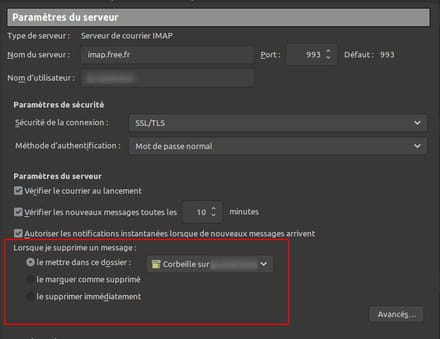
Check how message deletion is configured in the account settings:
--
_______________________________ ☯ Zen my nuggets ☮ _____________________________
Make an effort for the environment, close your windows and adopt a penguin… ???? -
Hello zipe 31.
First of all, thank you for your help.
I checked my laptop, in the server settings, and the configuration is indeed the same as what you recommended.
Everything is checked.
In the "Recycle Bin" section, my Orange email address appears.
However, if I click on "Recycle Bin," I can select "Incoming Mail."
According to your explanation, I think I should stay with my Orange email address since my service provider is Orange.
Following the setup I followed based on your information, the request to delete messages still doesn't work.
Thanks again for your intervention.
Best regards. -
hello
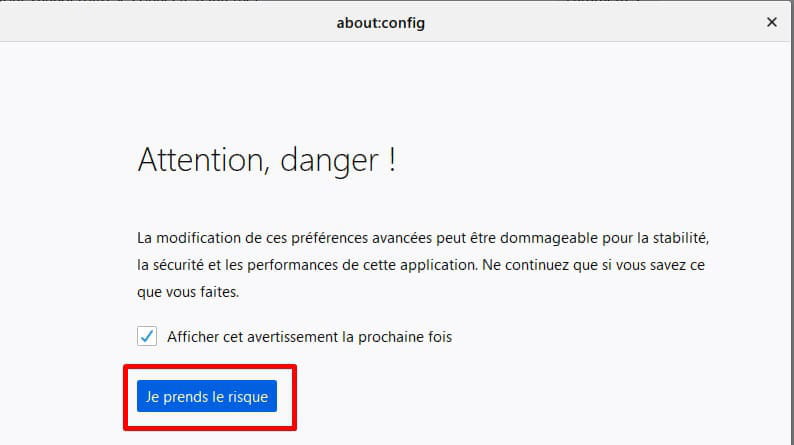
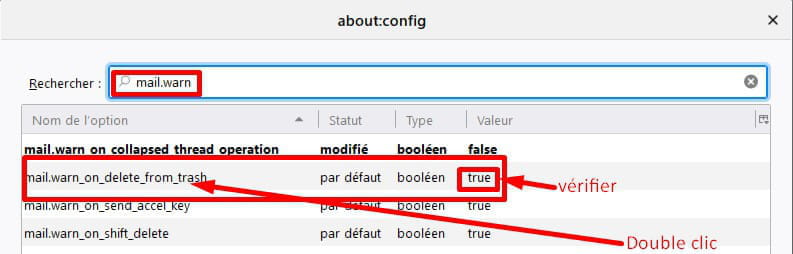
in Tools -> Options -> General -> Configuration Editor (at the bottom)
search for
mail.warn_on_delete_from_trash
set it to True -
Hello Dubce
First of all, thank you for your help.
Since I am not a pro in computing.
I go to the lines in the top left, I go to tools, but I can't find configuration editor.
If you don't mind, could you please give me the exact steps to follow so I can get there?
Thank you in advance.
My apologies for these in-depth requests
Best regards to you -
-
Hello Dubcek.
Thank you for your help and the way you explained to me how to do the procedure.
As a result, by following your instructions, it now works.
I was on flash instead of true.
Thanks again for your help.
Have a good day.
Best regards.