USB detected but not visible
Solved
Memel191
Posted messages
12
Status
Member
-
fabul Posted messages 42294 Registration date Status Moderator Last intervention -
fabul Posted messages 42294 Registration date Status Moderator Last intervention -
Hello everyone,
I have a problem with my USB stick, it's new, I opened it once on my computer without any issues and then I used it on my printer to scan my files directly onto it.
It worked well for at least 30 scans, then suddenly the printer stopped detecting USB sticks. I thought it was full, and when I plugged it into the computer, it made the usual noise but no folder is accessible.
On the other USB ports, it's the same; my other USB sticks are still functioning. And "The best drivers for your device are already installed".
I checked the device manager and here’s what it looks like in the image.
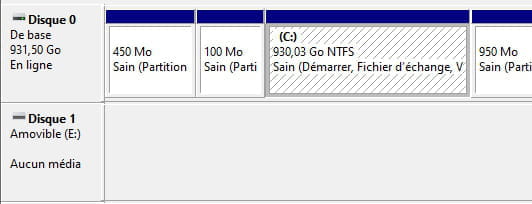
I looked at several tips on forums but nothing works; I can't do anything since it doesn't detect any media on this "disk drive". I tried disabling/enabling, uninstalling/installing, and in the command prompt, I ran "clean" on the "disk"; it shows there's a disk but with the status "no media" instead of "online", then at the moment of clean, it indicates "error of virtual disk service. There is no media in the device".
Until now, I have always managed to find solutions for my computer problems by looking at previously posted topics, but I admit I'm at a dead end here.
Thank you for your help
The device USBSTOR\Disk&Ven_NAND&Prod_USB2DISK&Rev_0.00\6&35dc4085&0 has been configured.
Driver Name: disk.inf
Class GUID: {4d36e967-e325-11ce-bfc1-08002be10318}
Driver Date: 06/21/2006
Driver Version: 10.0.18362.1
Driver Provider: Microsoft
Driver Section: disk_install.NT
Driver Ranking: 0xFF0006
Corresponding device identification number: GenDisk
Overridden drivers: disk.inf:GenDisk:00FF2002
Device Updated: false
Parent Device: USB\VID_FFFF&PID_1201\5&13dd0ef&0&1
I have a problem with my USB stick, it's new, I opened it once on my computer without any issues and then I used it on my printer to scan my files directly onto it.
It worked well for at least 30 scans, then suddenly the printer stopped detecting USB sticks. I thought it was full, and when I plugged it into the computer, it made the usual noise but no folder is accessible.
On the other USB ports, it's the same; my other USB sticks are still functioning. And "The best drivers for your device are already installed".
I checked the device manager and here’s what it looks like in the image.
I looked at several tips on forums but nothing works; I can't do anything since it doesn't detect any media on this "disk drive". I tried disabling/enabling, uninstalling/installing, and in the command prompt, I ran "clean" on the "disk"; it shows there's a disk but with the status "no media" instead of "online", then at the moment of clean, it indicates "error of virtual disk service. There is no media in the device".
Until now, I have always managed to find solutions for my computer problems by looking at previously posted topics, but I admit I'm at a dead end here.
Thank you for your help
The device USBSTOR\Disk&Ven_NAND&Prod_USB2DISK&Rev_0.00\6&35dc4085&0 has been configured.
Driver Name: disk.inf
Class GUID: {4d36e967-e325-11ce-bfc1-08002be10318}
Driver Date: 06/21/2006
Driver Version: 10.0.18362.1
Driver Provider: Microsoft
Driver Section: disk_install.NT
Driver Ranking: 0xFF0006
Corresponding device identification number: GenDisk
Overridden drivers: disk.inf:GenDisk:00FF2002
Device Updated: false
Parent Device: USB\VID_FFFF&PID_1201\5&13dd0ef&0&1