Bluetooth and Wireless Disappeared
Solved/Closed
Petaouchnok2
Posted messages
162
Status
Member
-
pistouri Posted messages 19010 Registration date Status Contributor Last intervention -
pistouri Posted messages 19010 Registration date Status Contributor Last intervention -
Hello,
Following issues with Windows 10, I performed a factory reset, hoping everything would work better, but since then, I can no longer find the Bluetooth and Wireless features on my HP 15 Notebook, Windows 10 operating system, version 1903 updated.
I've searched through Windows features but found nothing.
The Bluetooth and Wireless icons
no longer appear in the notification area either.
By tapping feverishly on the Esc key at startup of Windows 10, I was able to access the BIOS home screen but not the part where you can enable or disable (Enable-Disable) the different features.
Do you have any idea what I should do?
Thank you.
Following issues with Windows 10, I performed a factory reset, hoping everything would work better, but since then, I can no longer find the Bluetooth and Wireless features on my HP 15 Notebook, Windows 10 operating system, version 1903 updated.
I've searched through Windows features but found nothing.
The Bluetooth and Wireless icons
no longer appear in the notification area either.
By tapping feverishly on the Esc key at startup of Windows 10, I was able to access the BIOS home screen but not the part where you can enable or disable (Enable-Disable) the different features.
Do you have any idea what I should do?
Thank you.
Related links:
- temporarily locked Facebook account
- I don’t have the notifications access feature.
- "This function is currently not available."
- I don’t have Hyper V on my computer.
- The attempted action is prohibited because the user has disabled Facebook games.
- An error has occurred. We are working to correct it as soon as possible.
17 answers
-
Hello,
are the drivers present in the device manager?
Sincerely, -
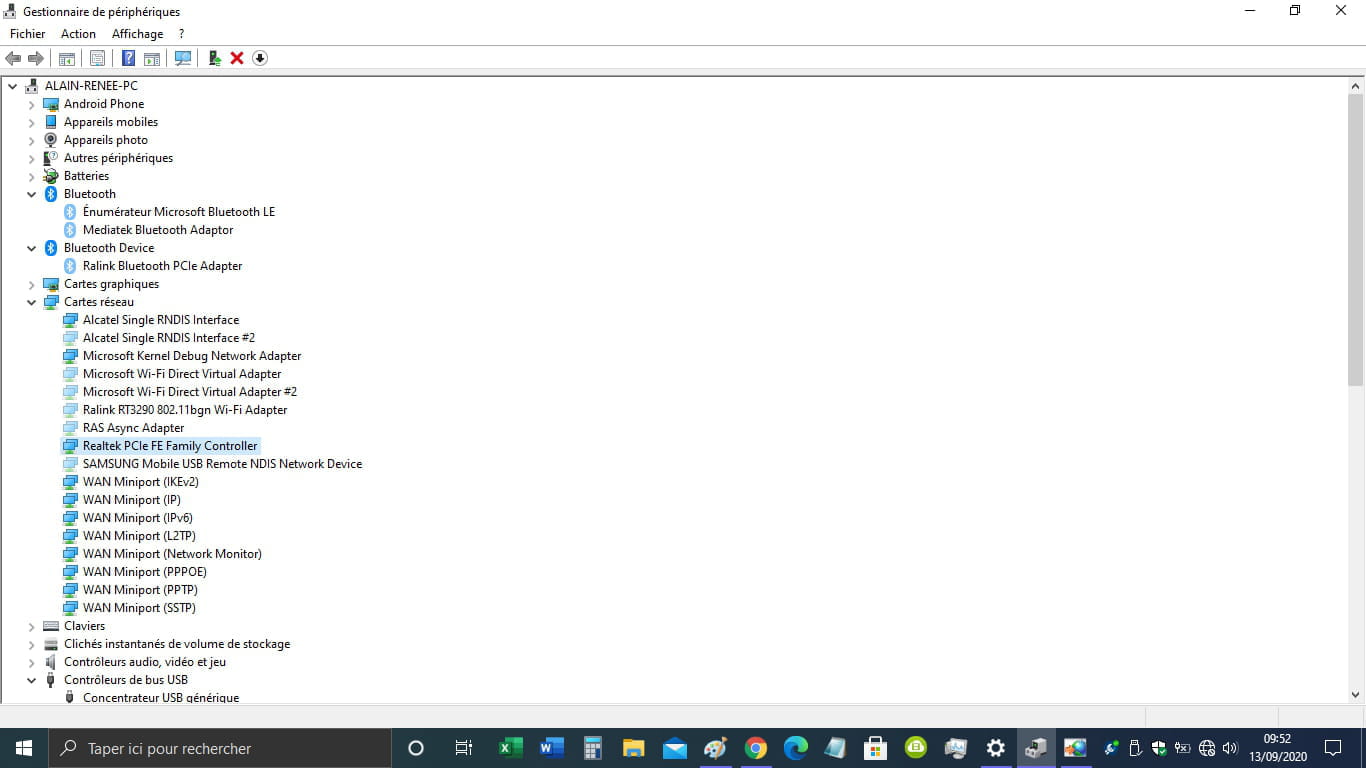
The drivers appear "faded" in the manager...
As if they had been disabled in the "bios"? -
"Should I delete all partitions"
Yes, delete all partitions if it is your main computer. -
pistouri Posted messages 19010 Registration date Status Contributor Last intervention Ambassador 8 730
Hello,
I'm sending you your link (blank page) --► Windows 10: a bug prevents drivers from loading, here's how to fix it
Hope this is the right one.
Info 1:
In one of your screenshots from September 13, 2020, we see a globe next to the time, which suggests connectivity issues, such as airplane mode being activated.
Time has passed since, check if the box is unchecked.
Image from version 2004:
Info 2
''I can't find the Bluetooth and Wireless features on my HP 15 Notebook, Windows 10 version 1903 updated.''
==►Microsoft blocks 1909 Realtek Bluetooth drivers update
You are 2 versions behind !!
Try the upgrade ==►Download and install Windows 2004
==►Update Assistant
If needed --► USB Bluetooth 4.0 Adapter
See you +
-
Hello,
the globe is because there was no network at that time, which is very common since I am in the middle of the bush and the network is very unstable, to be polite, upgrading to Windows 10 took three days.
I have version Windows 1909 not 1903, that's a typo.
Windows update makes its updates daily.
Windows 2004 the installation attempts failed. I will try again.
-
-
pistouri Posted messages 19010 Registration date Status Contributor Last intervention Ambassador 8 730
Hello,
If you have the optional update KB4577062 in your Windows Update history, there is a bug that prevents you from upgrading to version 2004.
You will see the preparation for the update and after a restart, you will receive a message stating that the 2004 update will not be installed.
First, check if KB4577062 (dated September 19, 2020), which is an optional update.
Go to Settings -►Update & Security -►Windows Update
Then --►View update history.
Solution 1
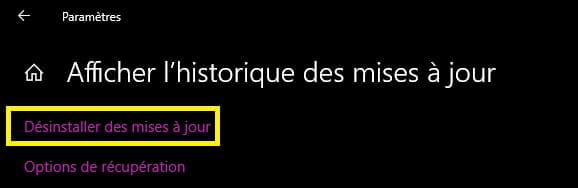
To upgrade to the new Windows 10 version 2004, uninstall KB4577062
Then, the function update should be visible again, restart Windows Update --►Check for updates.
Solution 2
Download or save the ISO with the Media Creation Tool
To save some time (I'm in the middle of nowhere) because it’s very slow on Microsoft's servers, go to ==►adguard
Select 32 or 64 bit depending on your version.
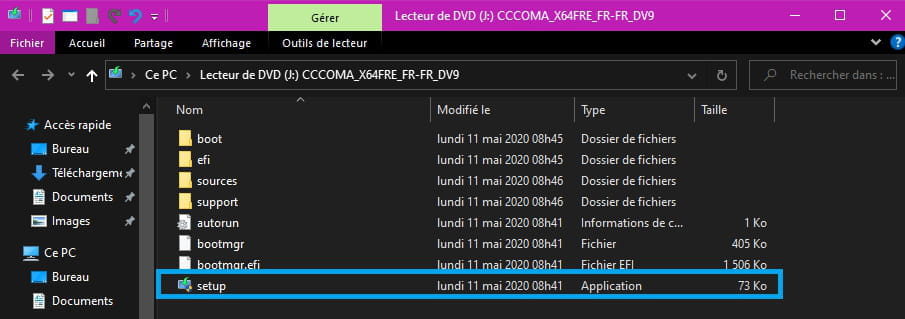
Once the ISO is downloaded, right-click and then click on → mount
Windows Explorer will open
Run →setup
You can do this with or without an internet connection.
If you have a third-party antivirus, uninstall it first; Windows Defender is sufficient.
If all goes well, the upgrade will install in 1 or 2 hours, which is faster than Microsoft's Media tools.
In your case, it may take a bit longer.
►Source
See you and be patient.
--
pistouri-
Windows update downloaded the KB4577062 update immediately after I uninstalled it. It’s not looking good.
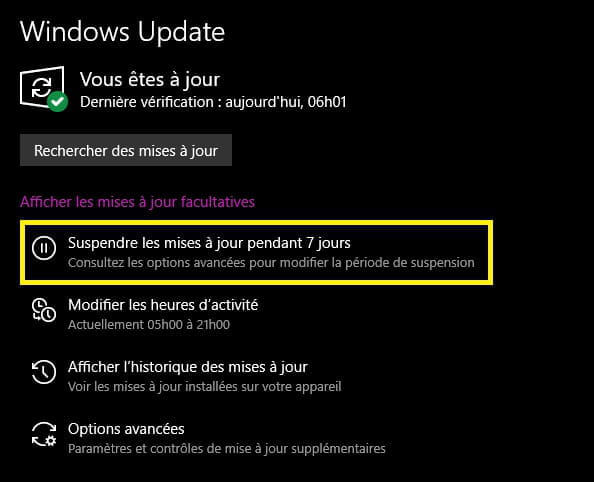
- Try to block it, I can't remember the name of the line in Windows Update options if it's there.
It's something like ► Suspend for....
Then perform the procedure with the ISO to mount to launch the Setup. - Or launch the ISO directly
Info:
==► Block updates with Windows Update Minitool
==►Win Update Stop
==► Kill-Update
Or disconnect your internet connection by disabling your Ethernet or Wifi network adapter.
Or remove/disconnect the Ethernet cable and install from the ISO.
You can reconnect the cable during installation if prompted.
-
Hello Pistouri, by changing the smartphone and especially the USB cable, the connection has become stable.
I was able to update Windows 10 from 1909 to Windows 10 20H1, which is currently running
as well as the last two optional updates
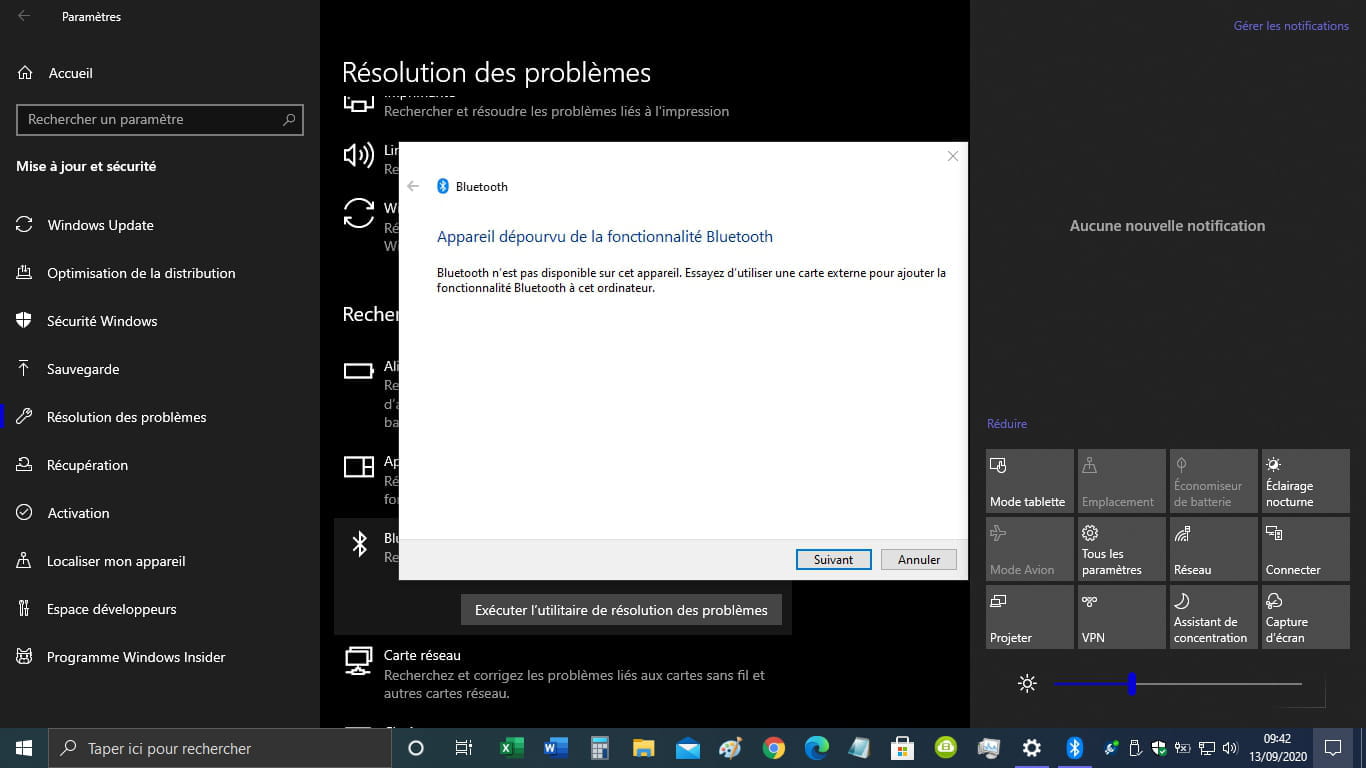
But I still have the message "Device lacking Bluetooth functionality."
In the Services MSC:
- the Bluetooth support service
- Properties Startup Type Automatic
- delayed start,
- Log on: This account, Local Service.
- the Windows Mobile hotspot service - Properties Startup Type Automatic,
- Log on: This account, Local Service.
Thank you.
-
-
pistouri Posted messages 19010 Registration date Status Contributor Last intervention Ambassador 8 730
Detect HP drivers ==►drivers for HP 15-r006nk
Click on ---►Detect my drivers
Priority for :
- Bluetooth
Microsoft Bluetooth LE Enumerator
Mediateck Bluetooth Adaptor
- Wireless LAN Drivers
A+
-
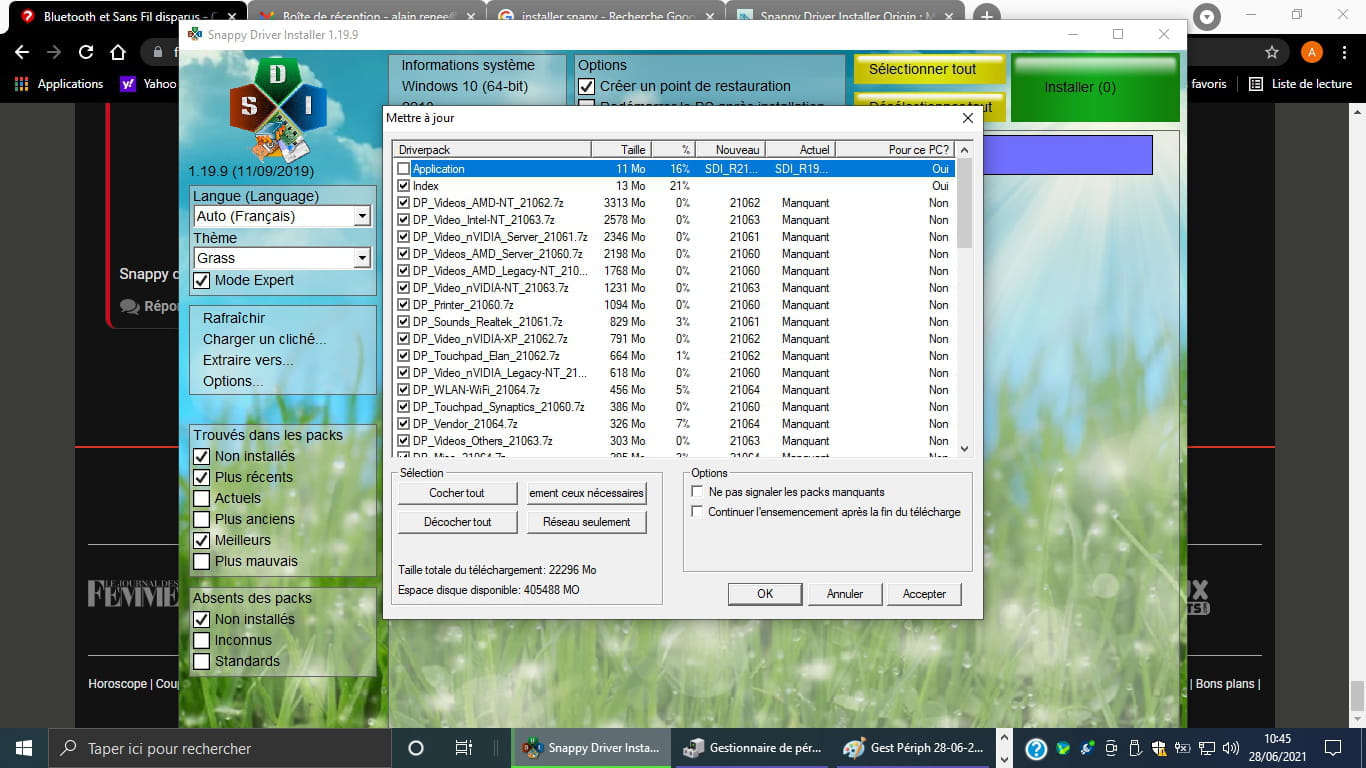
What Snappy found in 4 screenshots, I had launched it before reading your last message
 :
:
-
-
-
-
-
-
pistouri Posted messages 19010 Registration date Status Contributor Last intervention Ambassador 8 730
Try to install the driver for the Wi-Fi card
Wi-Fi Card Ralink RT3290 802.11bgn Wi-Fi Adapter (HP Pavilion 15-roo6nk) ==► Wi-Fi Ralink
--
log cutter-
The installation of the driver is blocked by the system,
Message: " This application has been blocked for your protection."- ==► Program blocked by your computer's protection
- Unblock the program
==► Lower the UAC
Lower the level by one notch
==► disable SmartScreen
-
-
There is a wealth of articles on the web on this subject,
after consulting them, does the problem still persist?
Best regards,-
-
Hello,
Without any other solution, I tried to reinstall Windows 10 using the Reset feature.
Eventually, my PC only boots to the Recovery screen
Your computer needs to be repaired
An error has occurred
Error code: 0xc0000034
You need to use recovery tools, etc.
With my USB key inserted, I press F1 to access the recovery environment
I choose to use USB
The installation of Windows 10 starts
Install now
I enter the key
I choose custom installation to delete everything
On the Where do you want to install Windows? screen
I select Partition 3, 194 GB
I get the message:
The installer could not use the existing partition because the system volume does not have enough free space.
I would like to clear everything and reinstall..
Do I need to delete all System, MSR, Recovery partitions and the two main partitions for the reinstallation to proceed?
Thank you if anyone has a solution. -
-
Hello and thank you for the advice
I deleted everything, and the installation went on without any issues.
Windows 10 is downloading its updates for version 1909.
I ran the troubleshooter to check if Bluetooth is back, but I still get the message:
Device lacking Bluetooth functionality.
I imagine that the Wireless is also disabled.
My problem is not resolved. -
-
-
pistouri Posted messages 19010 Registration date Status Contributor Last intervention Ambassador 8 730
Hello,
Following #39
►I was able to update Windows 10 1909 to Windows 10 20H1 which is currently running
Unless I'm mistaken ==► download the May 2021 update
Version 21 h 1
Check:
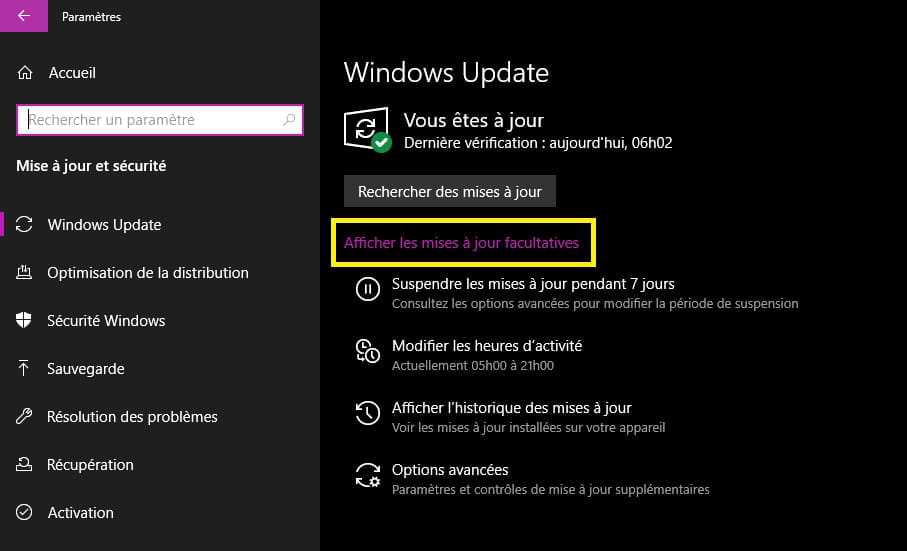
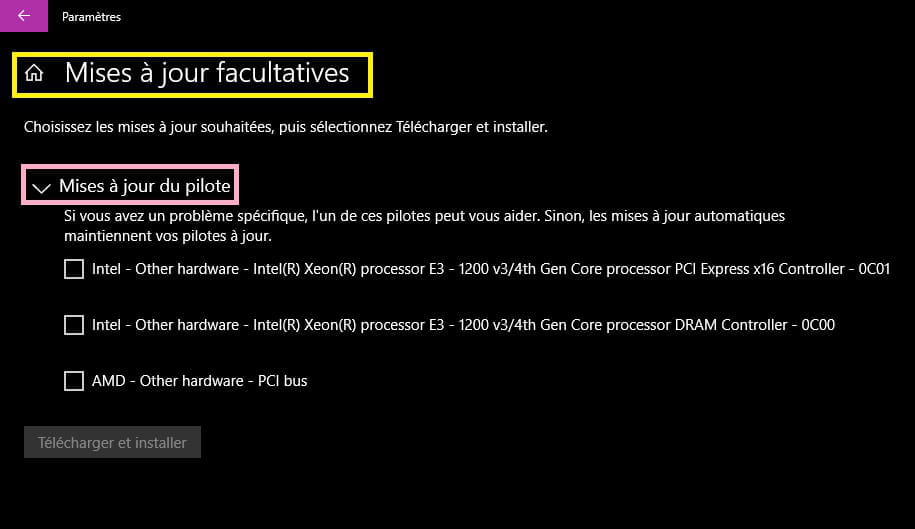
Settings > Update & security > View optional updates.
Finally click on "Driver update" to list the available updates.
Post a screenshot.
Download Snappy
Take stock of the available drivers (Wireless....Realtek...ralink...)
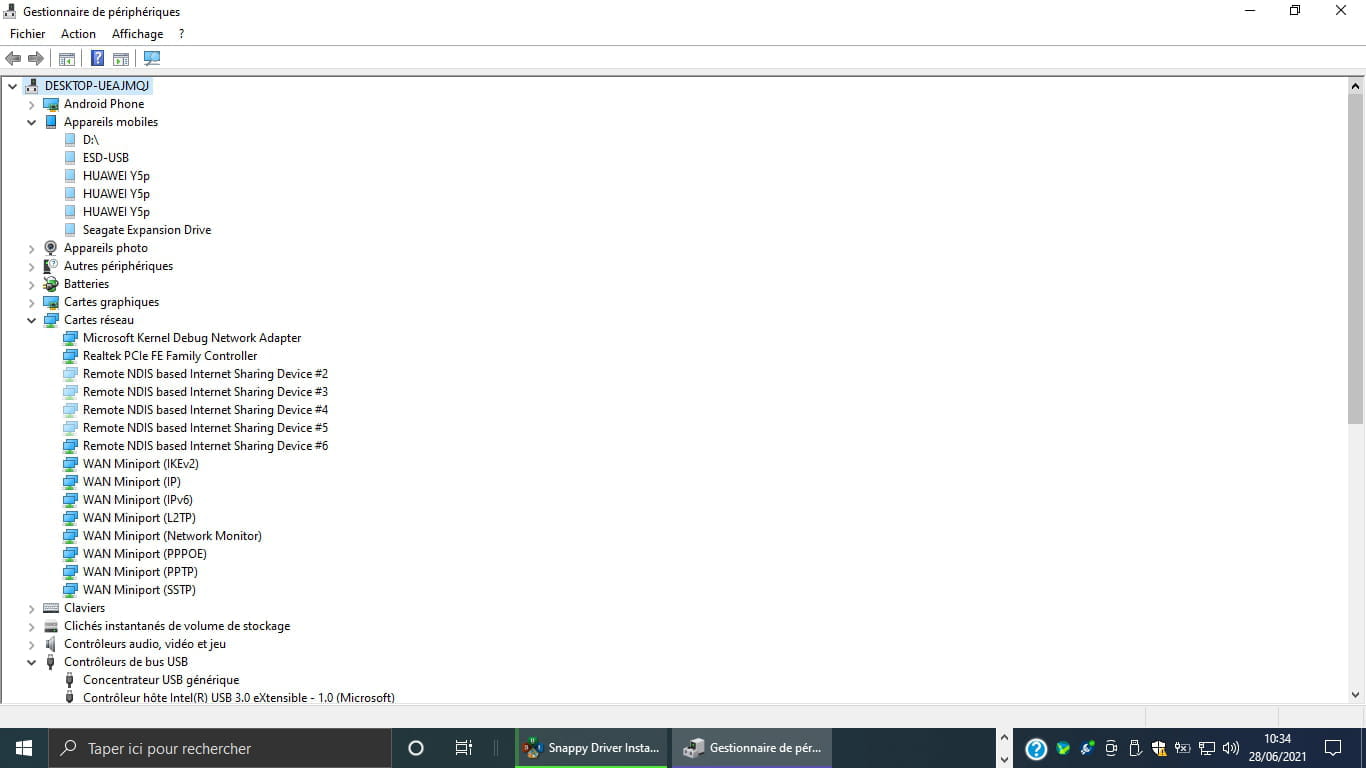
Post another screenshot of the device manager
Go to View -►Show hidden devices
Network adapter
Bluetooth
Bluetooth Device
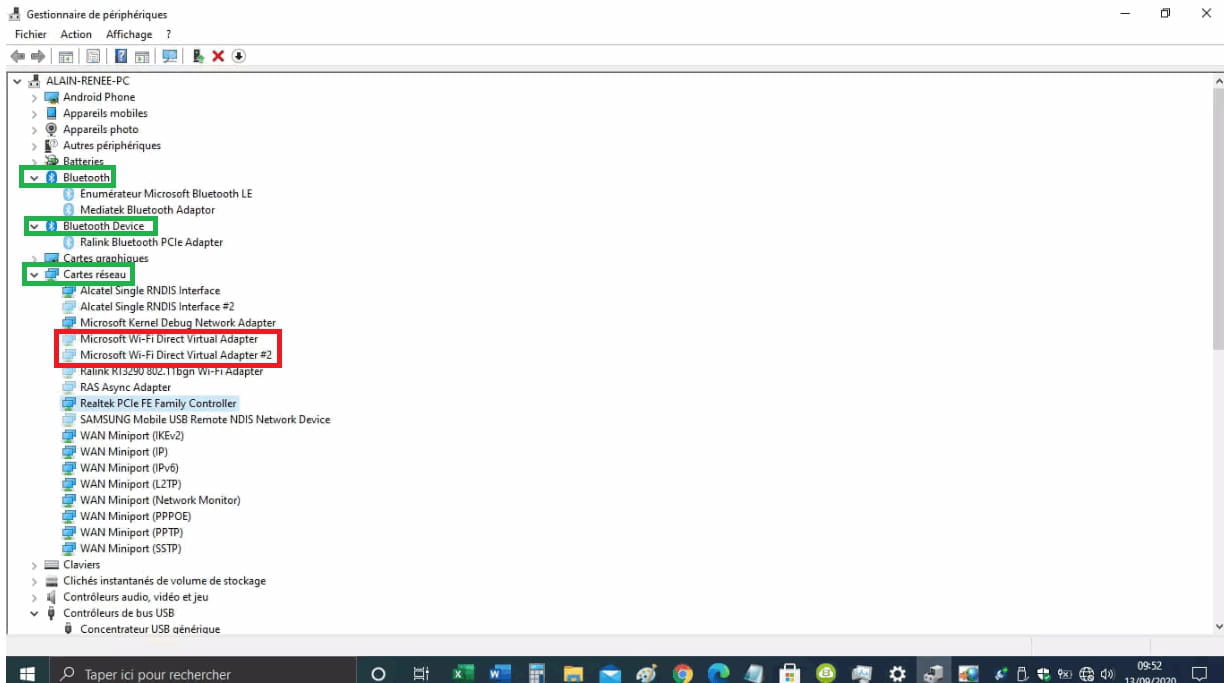
Ps:: In network adapters it seems you have 2 times Microsoft Wifi direct virtual Adapter
That was before you installed 21 h 1
Have you checked in the BIOS if Bluetooth is enabled?
Often, it's in the Advanced or Security tab
On (enabled) and off (disabled)
Idea
Buy a Bluetooth USB dongle
Contact HP support (forum).
A+
--
pistouri-
Hello pistouri,
-Windows version 21H1 is installed.
-"Show optional updates.
Finally, click on "Update the driver" to list available updates."
There are no optional updates at the moment, below is the last one installed.

-
-
-
I do not see any Bluetooth mention in the BIOS, which was actually the main point of this post.
I was not able to take a screenshot with my screen using my USB drive formatted in FAT32 nor found an Advanced tab.
But I have:
- BIOS Boot Menu (UEFI)
F1 System Information
F2 System Diagnostics
F9 Boot Device Options
F10 BIOS Setup
F11 System Restore
F12 Network Boot
By pressing F10, I access Insyde H2O - Installation Utility Rev 5.0
Language < French >
Virtualization Technology < Disabled >
Action Keys Mode < Enabled >
USB 3.0 Configuration on Pre-se < enabled >
Boot Options
In the Security tab, the following are displayed:
Administrator Password < Not set >
Power-On Password < Not set >
There is no Advanced tab. -
Hello,
In the BIOS, Bluetooth is often found under the Security section or the Advanced tab.
==►Enable Bluetooth in the BIOS
Return to this HP site
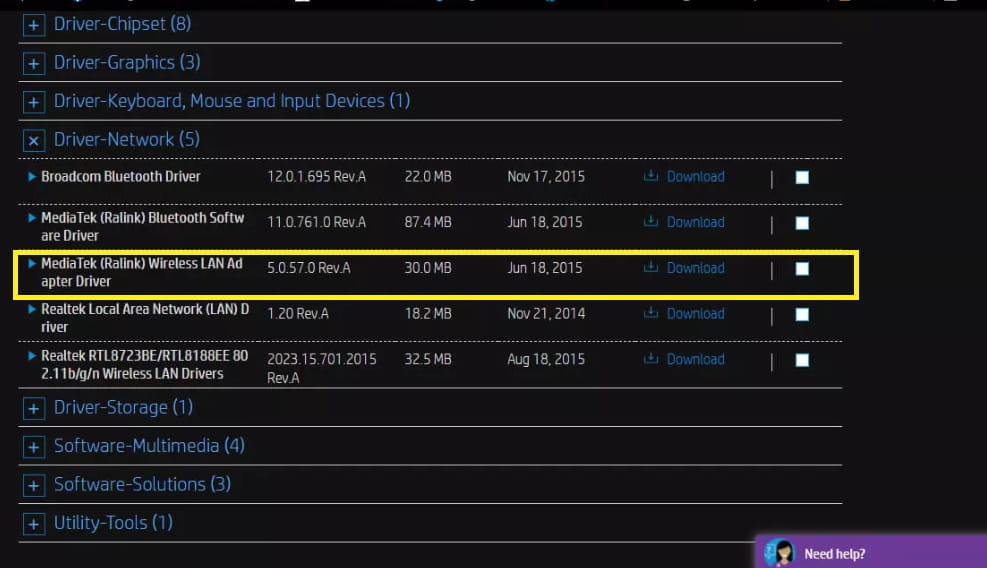
Scroll down the page and expand -►All drivers
Try the network drivers
-Broadcom Bluetooth
-Bluetooth MediaTek (Ralink)

Or here for Windows 10 64-bit.
See you+
-
-
pistouri Posted messages 19010 Registration date Status Contributor Last intervention Ambassador 8 730
Hello,
You posted the update history on your capture #41
This is not the right path.
Check:
Settings > Update & Security > View optional updates.
Finally, click on "Driver Update" to list the available updates.
Post a screenshot.


A+
--
pistouri -
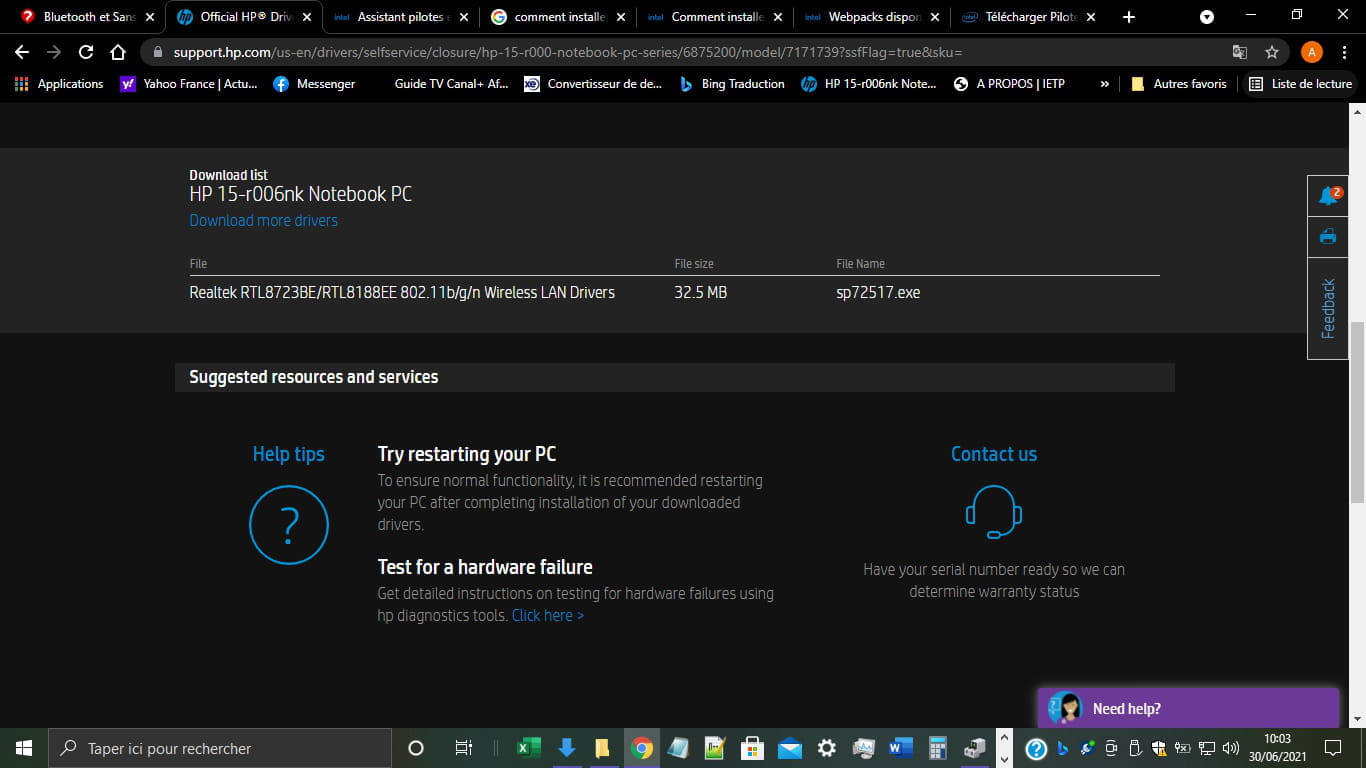
I just checked, the download of the Realtek RTL8723BE/RTL8188EE 802.11b/g/n Wireless LAN Drivers - sp72517.exe in the SWSetup folder of Windows 10 is proceeding normally.
sp72517.exe appears correctly at the top of the column in the screenshot of the SWSetup folder.
The only issue is that the date is 08/11/2020 instead of 30/06/2021.
But there is still no Realtek RTL8723BE/RTL8188EE 802.11b/g/n Wireless LAN Driver in the Device Manager.


-
pistouri Posted messages 19010 Registration date Status Contributor Last intervention Ambassador 8 730
Have you restarted the PC?
--
scalpel-
-
-
-
Hello pistouri,
When running Revo Uninstaller, I see the drivers
-HP Wireless Button driver
-Mediatek Bluetooth Driver
-Broadcom Bluetooth Driver
The installation dates of these drivers are well before yesterday and range from 2018 to 2020.
If I uninstall all the network card drivers using "Add and Remove Programs" or Revo Uninstaller,
in what order should I reinstall the 5 HP network drivers?
Thank you. -
Hi,
Create a system restore point regardless of whether Revo does it or suggests it to you.
These are the original drivers offered for your PC on the HP site.
If some drivers failed to install, it’s due to the certificate or the kernel, and consequently, Windows 10 blocks them at the antivirus level.
Or drivers that are too old and not compatible with W10.
You have drivers in the Update catalog ==► here
Most are in CAB or MSU format and it's not easy to install them, as you don't have anything in Device Manager (missing Bluetooth, for example) that would be the ideal path for installation.
Try ==► How to install CAB and MSU updates
The order of reinstallation doesn't matter.
The order you mention is valid, namely:
-HP Wireless Button Driver (Wi-Fi)
-Mediatek Bluetooth Driver
-Broadcom Bluetooth Driver
I rarely recommend Driver Booster, which you can uninstall with Revo.
Test it to see what drivers it finds.
Attention!!! All boxes are checked by default.
Imperative --►Create a restore point
This is to get an idea; don't install anything if you don't see, for example, Bluetooth (Mediatek Bluetooth).
See you!
-
-
What is blocking the installation of the drivers?
Microsoft Kernel Debug Network Adapter date from 2006
Realtek PCIe FE Family Controller date from 2014
The five network drivers offered on the HP website are newer. -
NLA (Network Location Awareness) is missing.
After reading the topics:
https://www.1formatik.com/2230/comment-activer-desactiver-service-configuration-automatique
https://forums.commentcamarche.net/forum/affich-35280453-probleme-wifi-windows-10
I checked in the Services MSC that the following services are started:
• Application Layer Gateway Service
• Radio Management
• Automatic Network Connection started
• NLA (Network Location Awareness)
• Plug and Play
• Remote Access Connection Manager
• Remote Access Connections Manager
• Remote Procedure Call (RPC)
• Telephony
The other services in the list are started. -
Hello pistouri,
I’ve got a m... that only types 666, the number of the Beast,
and it has taken control of the cursor.
I regain control of the cursor by pressing Ctrl.
That’s how the problems started at the origin of this post, last year.
I did a complete reinstallation from the cd Windows 7 and I’m going to do it again.
We’ll see if my wireless card reappears.
"To be continued..."
Thanks to all. -
-
pistouri Posted messages 19010 Registration date Status Contributor Last intervention Ambassador 8 730
Hello,
Thank you for your response.
I hope the invoice isn’t too steep.
Have a nice day.
--
pistouri