
Printer connection impossible
Solved
santorin
Posted messages
107
Status
Member
-
DUPAMEL -
DUPAMEL -
Hello. I just acquired a new desktop PC with a Windows 10 system version 1909 (18363.1016) 64 bits. Unfortunately, I can't connect my two printers. One is directly connected (HP Deskjet 6122) and the other is Wi-Fi (HP Deskjet 2700 series). My PC refuses to add my first printer even though it appears on the list. I have tried all the suggested maneuvers (troubleshooting, etc.,) but nothing works. Moreover, I have to be connected to the Internet to be able to print. Curious. Is there a possibility to print without being connected? (This is my second question). As for the second printer via Wi-Fi, I enter the code it gives me and then I remain without any response from that sending (plus, being connected to my box via Wi-Fi (Provider - Free), I find myself disconnected from the Internet every time. It’s a big hassle. Thank you for your help in advance. Best regards. Santorin
22 answers
- 1
- 2
Next
-
Hi
For the HP Deskjet 2700, you put your router in pairing mode (or WPS, depending on the router) and press the Wifi button on the printer for more than 3 seconds; the light will start flashing until the Wifi connection is established, at which point it will become solid
It then automatically connects to the router and installs under W10.
(All this is indicated when you print the configuration sheets from the printer)
I bought one 3 days ago and didn't do anything else to install it via my Freebox (in WPS mode) and under W10. -
My PC A is connected to a Freebox version 5 (I think). The printer is simply connected to the PC and then PC B works a few meters away via Wi-Fi. Nothing special.
-
Hello. For the first issue, I have no solution other than updating the drivers. For the HP Deskjet 2700 series, have you tried connecting it via USB?
-
Hello kaumune. I haven't tried this method, but I easily set up my printer via WiFi. To be able to print, it gives me a code by printing a sheet. With this code that I indicate afterwards, the connection remains in failed mode... I'm open to any other suggestions. Best regards. Santorin
-
Sorry, I didn't understand anything
It installs easily but fails when you want to print ?????
If it is installed correctly, you don't need to provide any code to print
How did you install it if you didn't do it via WPS and which box? -
In my opinion, he installs it with the Windows 10 utility and not with the printer driver, and the same goes for his Wi-Fi key (or provided CD, but not for Windows 10).
The code would be the Wi-Fi connection code. -
Possible but as I mentioned in my first response, for the HP 2700, there is no need for a W10 utility, driver, or Wi-Fi security key.
Indeed, if on top of that, there is a problem with the PC's connection to the local network, it's going to work less well .. :-) -
??? I have nothing HP in the startup or in the Windows services.
Makes sense, the printer is connected to the router, not to the PC
After all, it's just a classic network print (TCPIP or IPP, both protocols are implemented in the HP Deskjet 2700) -
-
-
Hello everyone,
If I may, you should update Windows before connecting your printers. The latest version is 2004, and you have version 1909.
Best regards
--
"He who wants to do something finds a way; he who doesn't want to do anything finds an excuse."
"Before blaming others, examine yourself." -
Hello everyone ;-)
Santorin, make sure you properly install your wifi key with the correct driver provided in your other thread.
Because if you don’t mention everything and look for a wifi printer connection issue without having a correct wifi key, it won’t work, and we won’t know where the problem might come from.
--------
properly install your wifi key on your desktop,
https://forums.commentcamarche.net/forum/affich-36825149-cle-usb-wifi#p36825276
then your printer with the driver here:
https://support.hp.com/fr-fr/drivers/selfservice/hp-deskjet-2700-all-in-one-printer-series/29378157
There is the recommended one, but I would rather go for the Software-Utility (1) which seems lighter and doesn’t require account creation and such. (to see)
If you don’t do it this way and don’t know what drivers are, they are small programs that act like a user manual for Windows 10, so it knows how to use the device.
Auto message
Without regular responses from you... you can always refer to article 22 ;-)
Mini Reminder to the volunteers who help you: Reply, Respect, Politeness,... -
Here are the results. I just followed the instructions from gugu01. I installed the wifi key and the printer driver. I used the HP Smart utility app. I added my printer as a wifi device. I can communicate with it since it prints a WPS PIN code that I then enter. And after that, I get no results. I receive messages saying that my printer is offline and also I get disconnected from the wifi when I run a diagnostic. It's unmanageable. I'm still here to listen, though. Best regards. Santorin
-
I would add that the prints sent to the printer appear in the queue. Doesn't this prove that my printer is connected? Unlike the message I have: printer offline.
-
Yes, indeed, it seems logical. Do you see a solution to my problem after all?
-
Ah yes, I understand your last message better now (why make it simple when you can make it complicated). To lend a bit of credit to the fact that I missed this information, everything at my place is currently broken. So I'm trying to manage, but within my abilities. As a result, I went back to your first post following the direction, and of course, it doesn't work. I have a paper output telling me that I need to activate the wireless radio. All that's left is to figure out how to do it. Nothing in the documents that came with my purchase indicates how to do this. But I think it's a good lead. Thank you very much anyway. Best regards. Santorin
-
So to lend some credit to the fact that I missed this info, everything at home is currently down
??? Your printer is down?
Is your Freebox down?
That's all you need to achieve the Wi-Fi connection between the printer and the box
Nothing indicates this in the documents that came with my purchase
Me neither
You briefly press the I (letter i) button on the printer
It prints out various information
If you press and hold the same I button for 3 seconds, it prints instructions on how to connect the printer to your box via Wi-Fi (not to your PC)
What I mentioned in my first response
If you had done it, it would take a maximum of 5 minutes to get the printer working on your PC(s)- The information indicates that the printer is not connected to any network. But I might have another lead by explaining my setup. I currently have a desktop PC connected to this printer (this PC is not equipped with a Wi-Fi adapter). I will call it A, and on the other hand, I have another desktop PC (called B) that initiated this search to print via Wi-Fi. This PC (B) is of course equipped with the famous Wi-Fi adapter, for which I have updated the driver. I installed the HP Smart app on PC A to configure the printer. The setup assistance tells me that my printer is not connected to any network. When I hold the Wi-Fi button for more than 3 seconds, I get nothing but an infinitely blinking blue light. The question is the following: Could it simply be that my PC A is not equipped with a Wi-Fi adapter?
When I hold down the Wi-Fi button for more than 3 seconds, all I get is a blue light that keeps blinking endlessly
As I've already told you, it's normal; by pressing for more than 3 seconds, you put the printer in WPS mode (automatic Wi-Fi connection)
If you have a Freebox V5, it doesn't have the WPS function
So, you need to manually create the Wi-Fi connection from the printer to the box using HP Smart from PC A connected via USB to the printer if I understood correctly
In HP Smart:
Printer Settings, at the bottom right
On the next screen on the left, Advanced Settings
Next screen, Wireless Setup Wizard
Next screen, Next
It will search for wireless networks
You check your Freebox and click on Next
It asks you for the Wi-Fi security key, which you can find on a label under the box
And the Wi-Fi connection from the printer to the box is established
Then you start PC B (Wi-Fi) and it will find and install the printer- I also have the same issue; I want to connect my printer to my PC, and it says network not found. How can I solve this problem? I hope this printer works with a USB cable to my PC. I have an HP Deskjet 2700. If it only works via Wi-Fi, I will be disappointed because I've always connected it directly to my PC.
-
-
Give more information about your local network and your router.
-
We're getting lost and don’t quite know what’s happening.
A misunderstanding is coming for this code issue, which is normally not requested in association with the box.
There must be a mistake somewhere.
By the way, which internet box do you have?
Please confirm the model you have by checking this page
https://www.free.fr/assistance/1347.html
(because for a v5, I don’t know if they still exist and if they had a WPS pairing button)
-------------------
Watch these videos:
> for unboxing and setting up the printer.
Make sure you haven’t left any protection that could be causing an issue, for example.
https://www.youtube.com/watch?v=82EzhOAHTfo
> for the smart app, but here it's just about the wifi reset procedures for the printer that we're interested in.
Because after a bad attempt or if too much time has passed before pairing, some need a reset as I see it. (starting clean)
https://www.youtube.com/watch?v=82EzhOAHTfo
and
> here, a particular person explains the general rule for connecting your printer to your box.
https://www.youtube.com/watch?v=82EzhOAHTfo
There you go, let's try with images, it might resonate more with you.
If you get stuck at any step, you can also refer to the video and the timestamp where it gets stuck
(so we're visualizing and discussing the same thing, a reference point)
Auto message
Without regular feedback from you...you can always refer to article 22 ;-)
Mini Response towards the volunteers who help you: Answer, Respect, Politeness,...-
He claims to have a V5 (it's true that he doesn't seem sure about the model), and as I wrote, this box doesn't support WPS
I have detailed the steps to manually connect the printer to the box via HP Smart
Performed on a test PC with W10 2004 that had never seen the Deskjet 2700 before.
First, connected via USB for the manual Wifi connection setup with HP Smart, then removed the USB cable, installed a USB Wifi adapter to connect to the local network, and the printer was recognized and installed automatically. -
Yes, let him follow your instructions.
V5 thought there were almost none left, that in case of a breakdown or arrival of fiber, he would exchange it for a Crystal or mini.
So to be confirmed.
Simple video reference as indicated
because it seems to me that he does not do exactly what is indicated, and if something like WPS is missing and he doesn't understand what we're talking about, a misunderstanding is likely.
So it's not to be followed, but just to help him visualize, as a reference, so that everyone speaks the same language. ;-) -
Indeed, he doesn't seem to follow what he's being told... ;-)
From my very first response, he should have asked how to set his box to WPS. -
When you don't know, you don't see what you're talking about and it adapts (which is the starting point)
The last video clearly shows the button and the handling at the boxing level, plus the boxing identification at the beginning, to be sure of the model and know if this button exists or not, after that it should roll on its own to follow the explanations and correct itself. ;-) -
Yes, but the video is not really related to his installation (Orange box) and he already has the necessary software (HP Smart)
This is going to complicate things even further... :-)
-
-
I'm not sure if a WIFI printer can be connected to a Freebox V5.
-
Hello to both of you, and thank you again for this wealth of information and also for your great patience, which is starting to wear thin. This is the third day I've been stressing out over this connection. So here’s where I stand: Following Kaumune's instructions closely, I was able to connect my printer to the Freebox without any problems. I restarted everything: the internet connection, the printer, and my PC No. 2. When trying to print from PC B, I got an error message saying "the printer is temporarily stopped." I tried again by restarting PC B, and then got the message "the printer is on pause." I removed all visible printer additions on PC B. I restarted and tried printing again, thinking my PC had detected my printer... but no. Do I need to add my printer via Wi-Fi on PC B? Without further ado, I added it, and then my printer spit out a blank page while my PC was waiting for me to enter a WPS PIN code. I'm not touching anything else while waiting for more info if you still have a bit of patience with me. I should also add that during all these manipulations, I keep getting disconnected from the Wi-Fi. Thank you in advance. Best regards, Santorin.
-
ok
Kaumune would have the same as you, he will go over it step by step with you
(he can do the test at home in parallel)
Wait for his nap to be over or the end of the aperitif, or if it’s the beginning of the aperitif it will be late for his return.
Yes, he starts very early with the aperitifs :-) (just kidding, I have no idea)
In the meantime, while waiting for his return ...
However, please be clear about things when we ask
You say you have > "on a Freebox version 5 (I think)"
The "I think" is unnecessary ...
(Sorry for my earlier link to identify the box, it’s not the one I meant to put, my mistake, it leads to something else)
So, to keep it simple and sure, here are the boxes in images with their names, and come back to indicate your model of box with certainty.


So which one do you have?
(click on the images to enlarge) -
????
The printer should install itself on PC B (and on PC A as well, by the way)
Is PC B properly connected to the Freebox via Wi-Fi?
Do you have internet access with it?
Let's first check the configuration of this PC:
Press and hold the Windows key, press the R key and release everything
Type (or copy/paste this to avoid typos) in the dialog box that opened
cmd /k ipconfig/all > tt.txt & notepad tt.txt
then click OK
Copy/paste what appears on the screen into your next response
(If you do not have internet access on the PC in question, save the report displayed in Notepad on a USB drive and transfer it with this drive to the PC you use to access the forum)
Then, provide us with a screenshot of the printer properties on PC B, Ports tab, like the second one below


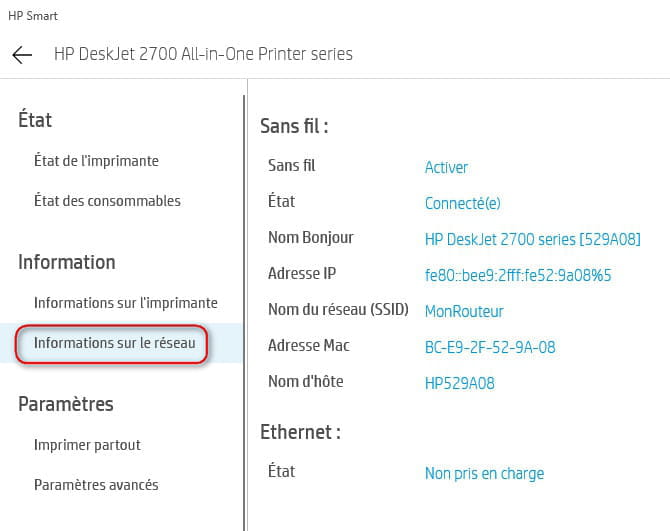
Also, include a screenshot of the printer configuration in HP Smart
Printer Settings === Information === Printer Information

And network information

and
-
-
Click on the small landscape icon.
-
Here is the link for the internet connection request from my PC B.
https://www.cjoint.com/c/JHDrAI1eYiQ
I couldn't find the settings for my printer because I need to enter the Wi-Fi security code for that. I filled in the one I always use to connect to my Wi-Fi box, and it has always worked. Why doesn't it accept it for the printer? My box is indeed a V5, and I have no code number written underneath. Another piece of information: when I add the printer from my PC B, it cuts off the Wi-Fi. I remain at your disposal. Best regards. Santorin-
It's unmanageable for me without the requested reports
Even with the printer turned off, we have access to its configuration
so it's not a matter of the wifi code
You do not have to manually add the printer, for the umpteenth time, it should do it automatically
Obviously, contrary to what you say, you haven't followed the instructions given otherwise we wouldn't be asking you for the wifi security key
You can provide the requested HP Smart reports from PC A
You should get help from an outside expert who has the required skills, right now we're going in circles on poorly understood and/or poorly executed actions
-
-
No, the printer does not want to connect on its own.
Here are the parameters requested from PC A.
https://www.cjoint.com/c/JHDsfwc0c6Q
https://www.cjoint.com/c/JHDsg1tMg5Q
https://www.cjoint.com/c/JHDshxl8snQ
Best regards.
Santorin-
The printer is finally configured correctly on Wifi
On PC A, you can uncheck the USB port and check the WSD port, and you no longer need the USB cable
It doesn't install automatically because it is already (poorly) installed
Remove it on PC B, restart it
Go to Windows settings (Windows key + I key)
Printers and scanners (on the left)
Add a printer or scanner (on the right)
and click on Add a printer or scanner, Windows will find it, click on it and do Add device and Windows will install it
-
-
Hello Kaumune. Thanks again for your help. I just did the indicated steps and I am still facing the same issue. That is to say: when I try to add, my PC B asks me to enter the WPS PIN code that the printer gives me. This time, I didn't enter it since I believe I remember that this code shouldn't be entered. I remain at your disposal. Best regards. Stubborn.....Santorin
-
More ideas
If you deleted it, I don't see why you would be asked for a PIN code
I strictly followed the steps I gave you
There was never any mention of a PIN code
Your responses are too vague
Please provide us with screenshots:
1 - Of the printers installed after you deleted the 2700
2 - Of what you are doing to add the printer step by step
On PC A, did you do what I told you? Does the printer work on the WSD port?
-
-
Hello Kaumune.
Yes, the printer is now working on the WPS port of PC A.
Here are the screenshots for the printer installation on PC B.
We can see that it is not finding my printer.
I remain at your disposal.
Best regards.
Santorin.
https://www.cjoint.com/c/JHFguEUgtaQ
https://www.cjoint.com/c/JHFgvfAhjVQ-
Yes, the printer is now working on the WSD port of PC A.
It's WSD not WPS
We can notice that it does not find my printer.
It's because the WiFi of your PC B is not connected to the router if it can't find the printer! (certainly due to your attempts to connect to the printer's WiFi Direct)
You are not answering the questions and not providing the requested information
Of course, if you connect to the Direct printer, it will ask you for a code as I explained in my last response!
It is more and more obvious that you are not reading the messages we are sending you and that you are replying hastily!
It has never been a question of connecting you to the printer's WiFi Direct!
-
-
I follow exactly the instructions you give me. I don't see any questions you asked me that I haven't answered. You tell me "It's WSD not WPS."
For my part, I read WPS in the blue window (screenshot a bit higher).
I followed the instructions you gave me step by step and at each result, I took a screenshot. So I don't see what more I can do. We agree that my PC cannot find the printer. You explain to me that my PC is not connected to my router! Yet I am connected via Wi-Fi from my PC B. What would I be connected to then? To be continued if you don't mind.
Sincerely, Santorin




- 1
- 2
Next