
Incomplete options window on Windows Media Player
Solved
JeremyBZH
Posted messages
9
Status
Membre
-
GTM -
GTM -
Hello,
I have an issue with Windows Media Player that I had never encountered before getting Windows 10...
As you can see in the images, the window is not complete.
If I want to extract music, I can't change the destination folder because the button to change it is inaccessible. (I tried to catch it with the tab and enter keys but to no avail)


I have a 15" Lenovo laptop (IDEAPAD S145-15API-147)
It is up to date with the updates.
On another forum, I was asked if I was indeed on an admin account, which I am, but I didn’t get any further response after that.
Thank you in advance
Configuration: Windows / Chrome 84.0.4147.125
I have an issue with Windows Media Player that I had never encountered before getting Windows 10...
As you can see in the images, the window is not complete.
If I want to extract music, I can't change the destination folder because the button to change it is inaccessible. (I tried to catch it with the tab and enter keys but to no avail)


I have a 15" Lenovo laptop (IDEAPAD S145-15API-147)
It is up to date with the updates.
On another forum, I was asked if I was indeed on an admin account, which I am, but I didn’t get any further response after that.
Thank you in advance
Configuration: Windows / Chrome 84.0.4147.125
14 réponses
The incomplete window bug of the CD extraction settings indeed prevents you from choosing the extraction target, here is the solution:
1. Left-click on the link that appears in "Extract music to this location"
2. Press the TAB key on your keyboard
3. Press the SPACEBAR on your keyboard
Magical! You can change your extraction target on your PC.
Finally, Microsoft could still fix the display bug...
1. Left-click on the link that appears in "Extract music to this location"
2. Press the TAB key on your keyboard
3. Press the SPACEBAR on your keyboard
Magical! You can change your extraction target on your PC.
Finally, Microsoft could still fix the display bug...

Hello,
Where exactly?
If this message hadn't come up, I wouldn't have even noticed the bug.
Surely the latest updates of Windows 10 that crashed the program.
I found it!!
In the last selected folder, there is a hidden configuration parameter file.
It follows the folder when you move and rename it.
Media Player closely monitors the modifications.
I noticed it with the Xbox companion's video capture folder that did the same thing when moving its folder.
Thanks for keeping me busy for 5 minutes. :)
1. Left-click on the link that appears in "Extract the music to this location"
Where exactly?
If this message hadn't come up, I wouldn't have even noticed the bug.
Surely the latest updates of Windows 10 that crashed the program.
I found it!!
In the last selected folder, there is a hidden configuration parameter file.
It follows the folder when you move and rename it.
Media Player closely monitors the modifications.
I noticed it with the Xbox companion's video capture folder that did the same thing when moving its folder.
Thanks for keeping me busy for 5 minutes. :)

I specify the steps to extract CDs in WMP to bypass the display bug in Windows 10.
- Extraction Settings Menu > Additional Options...
- Tab <Extract Music>
To change the location :
- Left-click on the default (or already set) extraction link you want to modify
- Press tab then the space bar
To change the file name options :
- Left-click on the default (or already set) extraction link
- Press 2 times on tab then the space bar
- Extraction Settings Menu > Additional Options...
- Tab <Extract Music>
To change the location :
- Left-click on the default (or already set) extraction link you want to modify
- Press tab then the space bar
To change the file name options :
- Left-click on the default (or already set) extraction link
- Press 2 times on tab then the space bar
Hello Pistouri.
I think a video is needed to explain it.
So in WMP I had changed the folder path to This PC/User/Music/Music 2 before this surprise.
If I move Music 2 or rename it, WMP automatically takes the folder path after closing it.
If I delete it, it will revert to Music.
But I don't dare delete it because if I create another folder, it won't be recognized as the extraction path.
Well, I assume because in unmasking the system files, I didn't find any .ini indicating the location.
Only the .ini files for the albums and their traditional cover configuration.
I think a video is needed to explain it.
So in WMP I had changed the folder path to This PC/User/Music/Music 2 before this surprise.
If I move Music 2 or rename it, WMP automatically takes the folder path after closing it.
If I delete it, it will revert to Music.
But I don't dare delete it because if I create another folder, it won't be recognized as the extraction path.
Well, I assume because in unmasking the system files, I didn't find any .ini indicating the location.
Only the .ini files for the albums and their traditional cover configuration.
I,
I believe it's necessary ►I don't dare ►Well, I suppose
Try to have one made.
Thanks for the explanation ''If I move music ''....
I'll move on to practice to verify it.
I would like this quoted by Gilles94450 :
See you later
I believe it's necessary ►I don't dare ►Well, I suppose
to have a video to explain it
Try to have one made.
Thanks for the explanation ''If I move music ''....
I'll move on to practice to verify it.
I would like this quoted by Gilles94450 :
Well, Microsoft could still fix the display bug...
See you later
pistouri
Posted messages
19008
Registration date
Status
Contributeur
Last intervention
Ambassadeur
8 719
Hi jmarion,
Your tutorial is clean and well explained for working around the problem.
Rightly, JeremyBZH says that the window is not complete; in fact, the option is missing.
I think it should be reported on the Microsoft forum so that a fix in an update can be deployed.
The issue is that the link previously provided to work around the bug, if it is one, dates back to 2016; as a result, it’s been 4 years since it hasn’t been fixed.
Moreover, Windows Media Player is a Microsoft product.
By the way, Microsoft is bombarding us with security updates at the moment, particularly for Internet Explorer, and the problem is that Microsoft itself advises against the use of IE.
I hesitated to suggest another path, but I don’t think it’s valid for extracting music in a different path on drive C or partition D.
I believe this exclusively concerns downloads.
Windows 10, in one of its latest versions, 1909, seems to allow changing the download location from Settings.
To do this:
Settings → System → Storage
At the bottom right, the line → Change where new content is saved


Section → The new music will be saved to the following location:

You just have to click on the box for drive C
In my case, it doesn’t give anything at all, no choice available, probably because I don’t have a D partition.
But I repeat, it shouldn’t be possible for the path chosen for extracting music with Windows Media Player.
See you later!
Your tutorial is clean and well explained for working around the problem.
Rightly, JeremyBZH says that the window is not complete; in fact, the option is missing.
I think it should be reported on the Microsoft forum so that a fix in an update can be deployed.
The issue is that the link previously provided to work around the bug, if it is one, dates back to 2016; as a result, it’s been 4 years since it hasn’t been fixed.
Moreover, Windows Media Player is a Microsoft product.
By the way, Microsoft is bombarding us with security updates at the moment, particularly for Internet Explorer, and the problem is that Microsoft itself advises against the use of IE.
I hesitated to suggest another path, but I don’t think it’s valid for extracting music in a different path on drive C or partition D.
I believe this exclusively concerns downloads.
Windows 10, in one of its latest versions, 1909, seems to allow changing the download location from Settings.
To do this:
Settings → System → Storage
At the bottom right, the line → Change where new content is saved


Section → The new music will be saved to the following location:
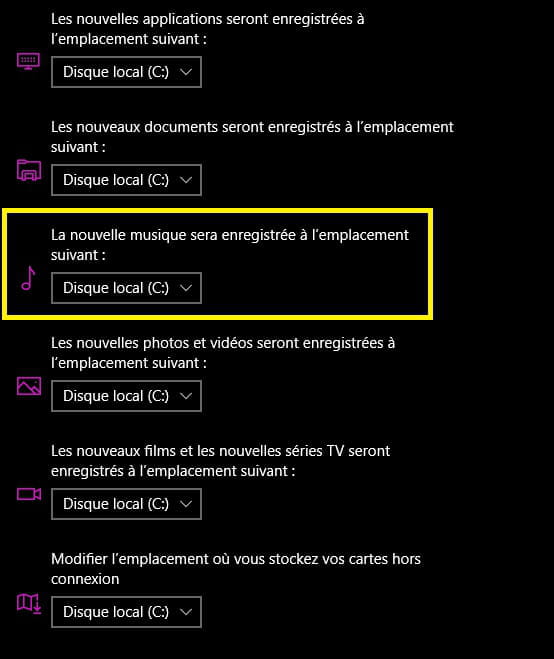
You just have to click on the box for drive C
In my case, it doesn’t give anything at all, no choice available, probably because I don’t have a D partition.
But I repeat, it shouldn’t be possible for the path chosen for extracting music with Windows Media Player.
See you later!

Hello,
For your information: The problem has been mentioned here, without a solution: https://answers.microsoft.com/fr-fr/windows/forum/all/fen%C3%AAtres-de-configuration-tronqu%C3%A9es-dans/c9ce7a46-6320-4ebb-a858-da7f99c32538?page=1
--
What is well conceived is clearly expressed,
And the words to say it come easily.
(Boileau)
For your information: The problem has been mentioned here, without a solution: https://answers.microsoft.com/fr-fr/windows/forum/all/fen%C3%AAtres-de-configuration-tronqu%C3%A9es-dans/c9ce7a46-6320-4ebb-a858-da7f99c32538?page=1
--
What is well conceived is clearly expressed,
And the words to say it come easily.
(Boileau)

Hello ....
Having Windows 10 + WMP, I just noticed that indeed there is no longer the Modify option located to the right of Extract from music in this location ... C:\Users\Utilisateur\Music

You have to change the path manually, but how?
I will search and come back here if I find the solution
Edit ► The only solution I found is to do it manually because by default the music is extracted to the following path ► C:\Users(User name)\Music\Album title (of the extraction)
You copy/paste your extractions and put them in the folder you want ...
Personally, I haven't found any other solutions with Windows 10, and I don't think there is one ...
See you later for your comments... but if none ► Resolved
Having Windows 10 + WMP, I just noticed that indeed there is no longer the Modify option located to the right of Extract from music in this location ... C:\Users\Utilisateur\Music

You have to change the path manually, but how?
I will search and come back here if I find the solution
Edit ► The only solution I found is to do it manually because by default the music is extracted to the following path ► C:\Users(User name)\Music\Album title (of the extraction)
You copy/paste your extractions and put them in the folder you want ...
Personally, I haven't found any other solutions with Windows 10, and I don't think there is one ...
See you later for your comments... but if none ► Resolved
I am aware of this possibility.
Still, it is not normal to lack access to the "edit" function.
It is clear from my first photo that the texts are cut off.
My computer is a month and a half old. I've noticed this since the beginning. I emailed Microsoft, and have yet to receive a response.
Still, it is not normal to lack access to the "edit" function.
It is clear from my first photo that the texts are cut off.
My computer is a month and a half old. I've noticed this since the beginning. I emailed Microsoft, and have yet to receive a response.
pistouri
Posted messages
19008
Registration date
Status
Contributeur
Last intervention
Ambassadeur
8 719
Hello,
To try: It is necessary to change the path manually, but how?
Source
Create a folder first in your chosen location in Windows Explorer in order to → Include the folder at the end of the procedure.
In the Music folder for example, which seems logical (creating a folder or subfolder).
P.S.: I greet jmarion in passing
See you later
To try: It is necessary to change the path manually, but how?
Method 1
1. Open Windows Media Player and click on the Organize menu.
2. In the Manage Libraries sub-menu, click on Music.
3. Click on Add, choose the directory containing your music, and click on Include Folder, then confirm with OK.
-------------------------------------------------------------------------------------------------------------------------------------------------------
Method 2
If that still doesn't work, do this:
1. Open Windows Media Player and click on the Organize menu.
2. In the Manage Libraries sub-menu, click on Music.
3. Select the Music folder, click on Delete, then confirm with OK.
4. Click on Add, choose the Music directory, click on Include Folder, then confirm with OK.
5. Restart your computer.
Source
Create a folder first in your chosen location in Windows Explorer in order to → Include the folder at the end of the procedure.
In the Music folder for example, which seems logical (creating a folder or subfolder).
P.S.: I greet jmarion in passing
See you later
Hello everyone ... and to my friend pistouri...
What I did
1► I completely emptied the WMP library
2► I deleted all the folders containing music via the organizer (Personal example ► French Varieties - International - Compilations ... etc...)
3► I created a folder in the directory containing all the music which I renamed Extraction CD - WMP
4► I added this folder via the library organizer and therefore it is at the top of the list since it is alone
See screen image below


5► I reorganized my library by adding everything I had deleted
6► Now when I extract a track from a CD, it goes directly into the folder D:\My Music\Extraction CD - WMP
As far as I'm concerned, this suits me very well because I don't have to look for where the extracted tracks are downloaded since everything is in the same Music folder of the player D:\!
If I want to include these tracks or others, I do that by copying/pasting from the Extraction folder to the folder where I want to place the new tracks and for me it's perfect once everything has been done ...(a bit long to do .. but I'm fine with it!)
Catch you later!
What I did
1► I completely emptied the WMP library
2► I deleted all the folders containing music via the organizer (Personal example ► French Varieties - International - Compilations ... etc...)
3► I created a folder in the directory containing all the music which I renamed Extraction CD - WMP
4► I added this folder via the library organizer and therefore it is at the top of the list since it is alone
See screen image below


5► I reorganized my library by adding everything I had deleted
6► Now when I extract a track from a CD, it goes directly into the folder D:\My Music\Extraction CD - WMP
As far as I'm concerned, this suits me very well because I don't have to look for where the extracted tracks are downloaded since everything is in the same Music folder of the player D:\!
If I want to include these tracks or others, I do that by copying/pasting from the Extraction folder to the folder where I want to place the new tracks and for me it's perfect once everything has been done ...(a bit long to do .. but I'm fine with it!)
Catch you later!
pistouri
Posted messages
19008
Registration date
Status
Contributeur
Last intervention
Ambassadeur
8 719
Thank you very much Gilles94450
--
pistol
--
pistol
Hello.
Here, I quickly made the video requested by Pistouri
I want to clarify that
After the end of the video, I restored the original settings.
The two songs located in the extraction folder were organized into the existing album.
CD extraction with Windows Media Player
--
This is a public community. To protect your privacy, do not post any personal information, such as your email address, phone number, credit card number ....
Here, I quickly made the video requested by Pistouri
I want to clarify that
After the end of the video, I restored the original settings.
The two songs located in the extraction folder were organized into the existing album.
CD extraction with Windows Media Player
--
This is a public community. To protect your privacy, do not post any personal information, such as your email address, phone number, credit card number ....
pistouri
Posted messages
19008
Registration date
Status
Contributeur
Last intervention
Ambassadeur
8 719
Hi Jag,
Great job on the video.
Thank you.
--
pistouri
Great job on the video.
Thank you.
--
pistouri
Hello
I can't find a solution for
Incomplete options window on Windows Media Player can you help me fix this issue on Windows 10 Home I'm having the same problem
Thank you
I can't find a solution for
Incomplete options window on Windows Media Player can you help me fix this issue on Windows 10 Home I'm having the same problem
Thank you
Est-ce qu'il y a une application comme un lecteur multimédia gratuit sous Windows 10 Famille
Mais pas VLC. Je n'en veux pas de VLC comme
application.
Mais pas VLC. Je n'en veux pas de VLC comme
application.
Hello and THANK YOU because with your help I was able to add a new folder to store my recordings, then setting it as the default folder as indicated in point 3.
Thanks again