0x8000FFF Unrecoverable failure on an external hard drive
Solved
Joachim
-
seb77150 Posted messages 6285 Registration date Status Member Last intervention -
seb77150 Posted messages 6285 Registration date Status Member Last intervention -
Hello everyone,
Today I used my hard drive as usual, but at one point it refused to let me copy/create folders on it...
With the error message:
When I try to create a folder:
An unexpected error is preventing you from creating the folder. If the problem persists, use the error code to search for assistance regarding this error.
Error 0x8000FFFF: catastrophic failure
When I try to copy a folder:
Unable to read from the source file or disk.
[info about the said file]
For those it might help, I use this external hard drive for my hacked Wii.
(to store games and software)
I'm a bit stuck...
I hope you can help me ^^
Thank you
Today I used my hard drive as usual, but at one point it refused to let me copy/create folders on it...
With the error message:
When I try to create a folder:
An unexpected error is preventing you from creating the folder. If the problem persists, use the error code to search for assistance regarding this error.
Error 0x8000FFFF: catastrophic failure
When I try to copy a folder:
Unable to read from the source file or disk.
[info about the said file]
For those it might help, I use this external hard drive for my hacked Wii.
(to store games and software)
I'm a bit stuck...
I hope you can help me ^^
Thank you
9 answers
-
Hi, download CrystalDiskInfo to check the hard drive status and then give me the result.
-
Good evening,
You mentioned: "...I use this external hard drive for my hacked Wii. (so to store games and software)". So, are these pirated games that you're saving? -
Hey, thanks for your message ^^
Here you go:

Hoping you can do something ^^' -
Damn.
I don't know why my cable got disconnected...
Even though I didn't touch it...
The progress bar turned yellow.
And now my external hard drive isn't even recognized by my PC... -
Hello to both of you!
Personally, I already find several suspicious things.
1) Possible explanation for your game copies /
This disk is MBR, GPT is better
BUT ABOVE ALL it is in FAT 32, which limits the file copy size to a maximum of 4 GB.
(Your games probably exceed this)
2) Why sell a new hard drive?
> The guy thought after 10 to 15 hours, "Oh, I don't like this disk, I’m going to get another one and sell this one."
or
> Defective new disk, too expensive to return under warranty to China for example where he might have bought it.
(most likely)
> The reference of this hard drive yields little results online except for a model that seems quite old and only 100 GB.
Reference that can only be mounted as an external hard drive and not sold separately. (cannot be found online)
But it’s suspicious.
If this case opens easily, could you read and provide the reference noted on it?
Auto message
If you are here, it’s because you don’t know, so... ;-)
Mini tête-à-tête with the volunteers who are helping you: Reply, Respect, Politeness,...-
Hey, so for the hard drive, I found it on Facebook Marketplace for 45fr to be precise.
(I still have the seller in contact (I asked him about the "shock" but no response since this morning...))
For the Wii, it absolutely needs to be FAT32.
Yep, that's what I think too regarding the reason for the sale.
Afterwards, he might have needed it less, but I wouldn't know why :/
As for the case, I’m not sure if I can open it...
It’s all black with a white top.
And on the bottom: Mobile HDD (written in "big" letters)
And the Warm tips
I can send you photos if necessary.- From the disk inside, yes, that would be good.
Or rather not to touch anything and get a refund.
As for the Wii, I had to format it to NTFS; if I remember correctly, it's in the crackers (the robot is going to censor "ers"), because I have games over 4 GB and it was a problem.
(well, you notice it quickly, you check those that don't work if they are over 4 GB or not)
Personally, Windows and other software don't give me the format, the hard drive is only usable with WBFS Manager. - I will check with the seller. (since it was a private sale I can only get a refund from him :/)
but if he was already aware that it was defective, I doubt he will reply at all :/
For now, I have no games that exceed 4GB. but indeed NTFS works too from what I've seen. (but I was advised to use FAT32)
-
-
-
Seb77150 doesn't seem to be here, I'm just saying this while waiting for his return.
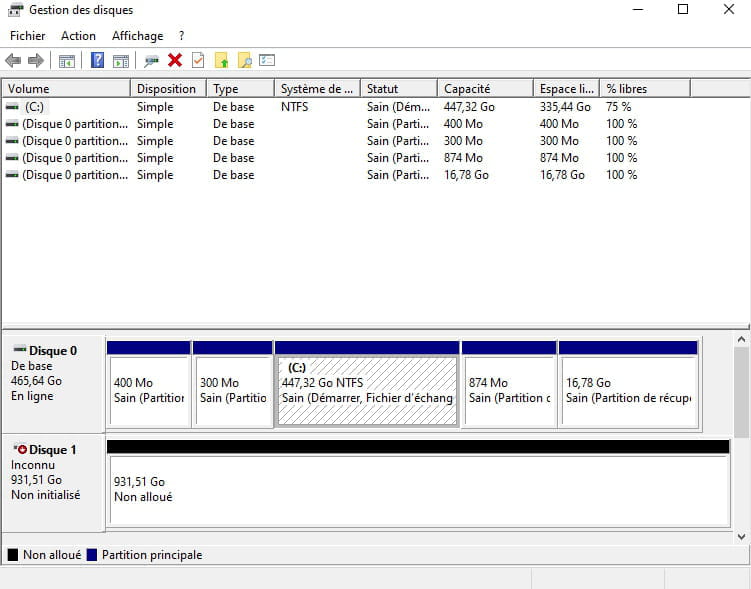
> click on the red arrow and initialize the disk
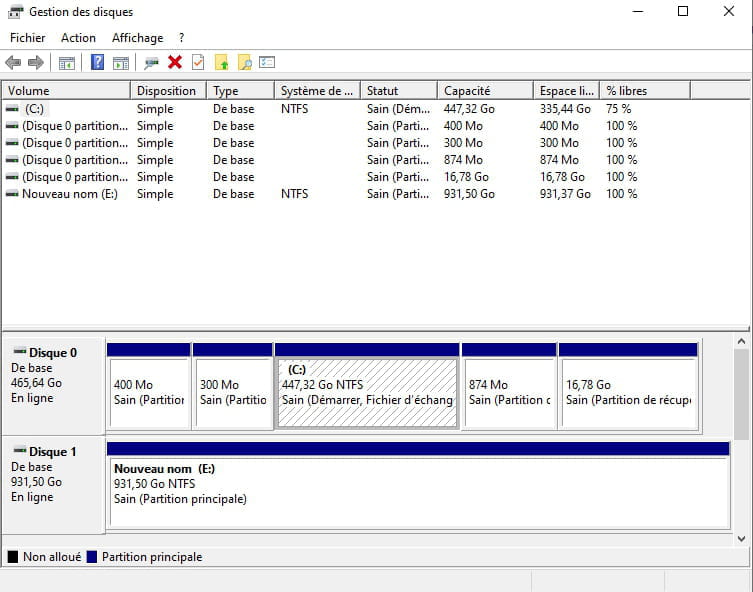
> then right-click on the space that will still be unallocated and choose to create a simple volume.
The disk should reappear under Windows.
Exit management, re-enter and provide a new screenshot. -
-
-
It was either NTFS or ExFat.
After that, I have a FAT32 format at hand.
Do I have to first change it to ExFat?
(and reformat, the process that takes 10 hours? x) )
For the red arrow, that was before creating a simple volume ^^
It just disappeared on its own without me doing anything.
Thanks for your help by the way ^^ -
-
-
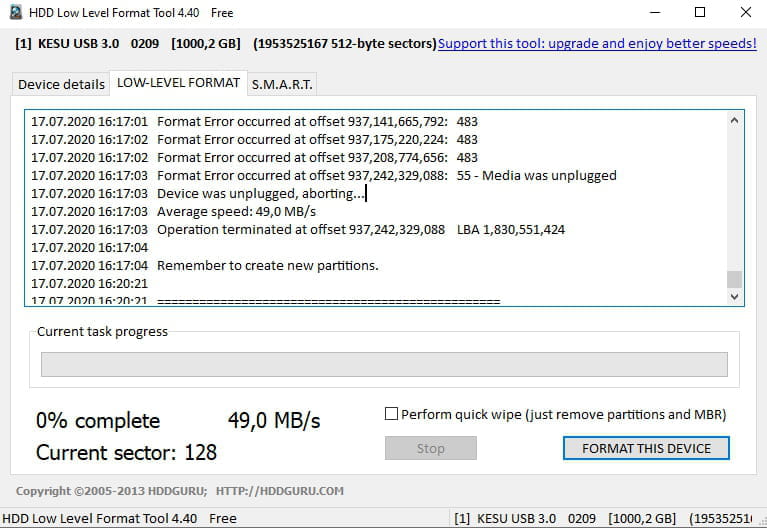
Here is the CrystalDisk test

(And here is what it showed for formatting)
-
AOMEI Partition will do it in FAT32.
Windows doesn't do it on such a large volume.- a broken disk is broken.
(the problem is physical)
If you don't return it and therefore don't get your money back, you can still consider opening it up and putting a new hard drive inside.
(around 40 euros for a 500 GB, 60 for 1 TB)
You'll need to check if the casing has a standard SATA connection internally
(generally yes, only a few external hard drives have a "proprietary" connection specifically so they can't be used as external cases for other hard drives)
(I'm allowing myself to make comments in response to highlight the information, so that seb77150 understands what was done with his return, and for other readers. Collapsing the comments isn't great)
-
-
yeah okay.
Actually, I'm not going to try to open it myself.
I'm going to give it to someone close to me who knows better than I do (well, I don't know anything x)) and who will see what they can do.
But in any case, I'm resigned to buying a new external hard drive :(
I don't know if you want us to continue anyway.
In any case, thank you very much for your help seb77150 and gugu01 ^^-
You're not planning to get refunded then?
When I talk about dismantling the case, it's for recycling purposes, and it might also be useful when your PC crashes, for example—you could slide your HDD in and read it on another PC, recover your data, and reinstall if needed without fear of losing your data.
If it opens, the repurchase will be an internal HDD to slide in.
If you throw everything away, the purchase will be a complete external HDD.
An external HDD is simply a box with an electronic board inside to power/manage data input/output, and a hard drive (like the internal ones).
Two possible sizes: the large HDD is 3.5 inches or the smaller, more common one is 2.5 inches.
The connection is rather standard, which is SATA.
For you, it seems like a 2.5-inch SATA HDD would be good.
Image for illustration:
(it's probably not your case, but the idea is there)
Case held by screws
or
just clipped (not supposed to be dismantled, but it happens; sometimes one or two clips get scared but that isn't a problem. You shouldn't go at it with a screwdriver and mess everything up ;-) )
Even if you have an old PC that’s no longer in use, or one that's dead lying around, if it has a 2.5-inch SATA internal HDD, you can put it in. -
But for me, this kind of second-hand purchase is local, with the name or address or phone number of the person (or all this info. Hand to hand)
And in case of a problem, he goes to take it back and refunds me ;-) -
Yes, I will still try to get a response from the seller first.
I sent a message this morning and it hasn't been seen. (whereas before the purchase, the seller was very responsive (even when he was at work...))
The hypothesis that he sold it because it was defective, which you suggested, is possible. And in that case, I doubt he will ever respond to me x(
The case is just clipped on. By the way, there's a corner that's lifting compared to the others...
I'm going to show it to someone close to me, and if they tell me it's really dead (which already seems to be the case), I will keep it aside just in case (if the seller hasn't responded to me). -
The disk inside is faulty, that's for sure.
The case can be useful and fit another hard drive inside.
(The hard drive inside may be old and well-used. The written references on it would have been interesting. It's piquing my curiosity, I might be pushing it a bit, but the information test seems suspicious to me.) -
-
-
Well, after this message, he stopped talking to me :/
And he doesn't see my messages... So I think he has "muted"/blocked me.
So I know where I can stick my refund x)
Anyway, thanks for all your help :D