Some websites or downloads inaccessible with Firefox
Solved
breton856
Posted messages
36
Status
Member
-
breton856 Posted messages 36 Status Member -
breton856 Posted messages 36 Status Member -
Hello,
I am a fan of Firefox, but I admit that I regularly have to use another browser to achieve my goals.
Some sites do not open, or some downloads are inaccessible.
For example, yesterday I wanted to download a version of Linux here:
https://sourceforge.net/projects/toutoulinux/files/6.xx/
When I click on download, I get the message "Your download will start shortly..." with a countdown that always stops at 5 seconds and gets stuck there. I tried disabling uBlock, then I restarted in safe mode, tried in private mode, no luck, I thought that being cautious it was the ad-blocking, anti-tracking extensions, preventing third-party cookies, etc., that were blocking me, but even accepting everything is the same.
With Chrome, it’s the same on this site; impossible to download.
Yet with Edge and Opera, it works.
Do you also have these recurring issues with Firefox, which may be a bit too secure at times and blocks everything?
Thank you for your responses.
Configuration: Windows / Firefox 73.0
I am a fan of Firefox, but I admit that I regularly have to use another browser to achieve my goals.
Some sites do not open, or some downloads are inaccessible.
For example, yesterday I wanted to download a version of Linux here:
https://sourceforge.net/projects/toutoulinux/files/6.xx/
When I click on download, I get the message "Your download will start shortly..." with a countdown that always stops at 5 seconds and gets stuck there. I tried disabling uBlock, then I restarted in safe mode, tried in private mode, no luck, I thought that being cautious it was the ad-blocking, anti-tracking extensions, preventing third-party cookies, etc., that were blocking me, but even accepting everything is the same.
With Chrome, it’s the same on this site; impossible to download.
Yet with Edge and Opera, it works.
Do you also have these recurring issues with Firefox, which may be a bit too secure at times and blocks everything?
Thank you for your responses.
Configuration: Windows / Firefox 73.0
11 answers
-
pistouri Posted messages 19010 Registration date Status Contributor Last intervention Ambassador 8 726
Hello,
The practical sheet from CCM suggests → Toutou linux
Firefox
As for UBLOCK, uninstall it and install AdGuard AdBlocker
It will block all the ads.
You'll still have the countdown.
I use IDM so there's no waiting, it's almost direct.
And check the security settings of Firefox.
For example, on the site sourceforge.net, you have a shield at the beginning of the address bar.
You can disable it.
And in the options, you can customize.
It might also be your antivirus that blocks the download.
Google Chrome
Google Chrome blocks downloads that are not secure or from unknown sources.
Tip:
When a download is blocked, go to all downloads, select the rejected file, and click on restore.
Another solution with a flag (It's a hidden setting).
Clear everything in the address bar and copy/paste:
chrome://flags
In the search box, copy/paste:
treat risky downloads over insecure connections as active mixed content
Set to → Disabled
Click on Relaunch at the bottom of the window.
Or clear everything in the address bar and copy/paste:
chrome://flags/#treat-unsafe-downloads-as-active-content
Or you can reset Firefox and Google Chrome with ResetBrowser.
And add to Google Chrome the extension AdGuard AdBlocker.
P.S.: I greet Fabul in passing.
A+
-
pistouri Posted messages 19010 Registration date Status Contributor Last intervention Ambassador 8 726
There are plenty of inaccessible links or sites, and it's general
Download AdwCleaner Linux
Download Malwarebytes Linux
Check if you have the latest updated version of Firefox.
If you don't have Firefox 73.0.1
→ Firefox Linux 32 bit
→ Firefox Linux 64bit
Check if the network card and graphics card drivers are up to date.
Or reset via the command line
''I thought that other people would tell me they also have the problem, but apparently not''
Wait, why not some Linux specialists, which I'm not.
See about a check-up of your PC in the Forum Virus and security.
A helper will take care of you.
Strange that Edge is the only operational browser.
Try with Midori
Cheers
--
Pistouri -
Hello,
No problem downloading from your link with Firefox
https://sourceforge.net/projects/toutoulinux/files/6.xx/
Downloads\SlaXen-6.0_RCX_NoPAE-2015-05-29.iso
162.91MB
Without disabling anything, the download starts normally
Your issue probably comes from your settings. -
pistouri Posted messages 19010 Registration date Status Contributor Last intervention Ambassador 8 726
Hello,
Regarding the profile issue with Firefox.
The portable version works but not the Firefox (Releases) version.
Check to see if you have multiple profiles.
Press Windows + R and type → %APPDATA%\Mozilla\Firefox\Profiles\
Don't delete anything for now.
You should see a profile with your default username or a profile named ''Default''
Now we are going to use the Firefox Profile Manager.
You will also see your default profile which you can try to select and launch.
If it doesn't open, create a new profile.
To launch the command Windows + R and type → firefox.exe -P
See the image
The profile manager window doesn’t appear sometimes.
If the profile manager window still doesn’t open, it is possible that Firefox is running in the background, even if it’s not visible.
Close all instances of Firefox or restart the computer and try again.
After that you can delete the corrupted profile.
Once Firefox is open, check if you see multiple profiles.
To do this, clear everything in the address bar and copy/paste → about:profiles
Then press the Enter key.
The default profile should have your username.
It is possible to create another one.
Another solution, but you haven’t gone all the way with Revo.
Once uninstalled with Revo, you need to check all the registry keys and delete them by checking the advanced scan box during uninstallation.
Now you need to delete the remnants of Firefox.
1/ Show hidden files
Open Windows Explorer
View → check Hidden items
2/ Delete the MOZILLA directory if you see it
Drive C:\users\your username\AppData\Local
-Open the LOCAL folder → delete the Mozilla folder
Similarly in Drive C:\users\your username\AppData\Roaming
Open the ROAMING folder → delete the Mozilla folder
3/ Hide hidden files again.
Restart the PC
Reinstall Firefox.
See you later
--
pistouri-
Thank you, pistouri, for your help.
In the end, after completely uninstalling, this download works, then shortly after, Firefox synced with my online account and reinstalled everything (plugins, extensions, etc.)
Thus, it stopped working again.
After disabling synchronization, I did a repair with Firefox, it seems to work, but if I resynchronize Firefox, it will start again; there is surely a setting that I’m missing, so with this synchronization, it transmits that faulty setting to all my devices.
Now that it works, I need to erase my Firefox sync data to resynchronize this working profile.
Thanks again
Problem considered solved.- Using Firefox Sync with an account was lagging a lot, without knowing why, probably due to the synchronization in progress, I'm not sure if it was due to the ADSL connection.
Between Ethernet and Wi-Fi, we need to look into this, because I don't think it's the amount to synchronize.
Now that I have fiber, I haven't tried again.
→ Delete my Firefox sync data.
Good question.
Deleting and recreating the account as an idea.
You can mark the subject as resolved.
Have a good day.
-
-
pistouri Posted messages 19010 Registration date Status Contributor Last intervention Ambassador 8 726
Hello,
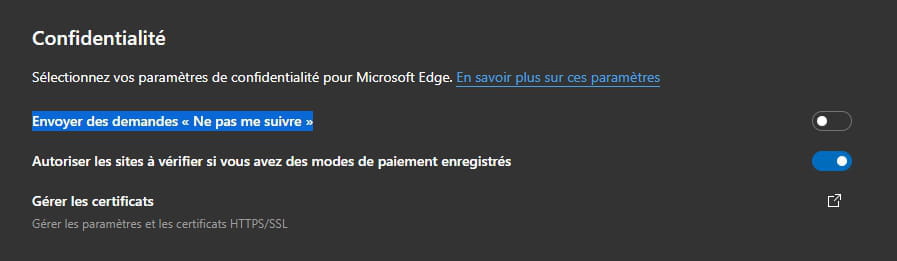
In the privacy settings, I see this:
→ Send "Do Not Track" requests
It's disabled on my side; I don't remember if I unchecked the box.
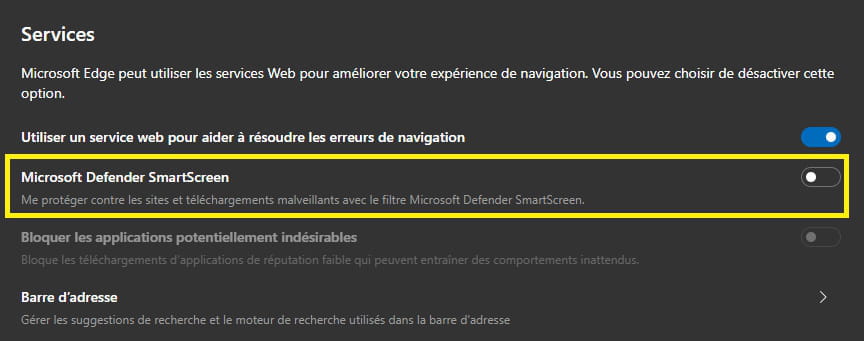
However, the Defender SmartScreen filter blocks some downloads.
Erase everything in the address bar of the new Edge Chromium and copy/paste:
edge://settings/privacy
Then press Enter.
Section Privacy for Send "Do Not Track" requests
Section Services (at the bottom of the page) for Microsoft Defender SmartScreen
For Firefox:
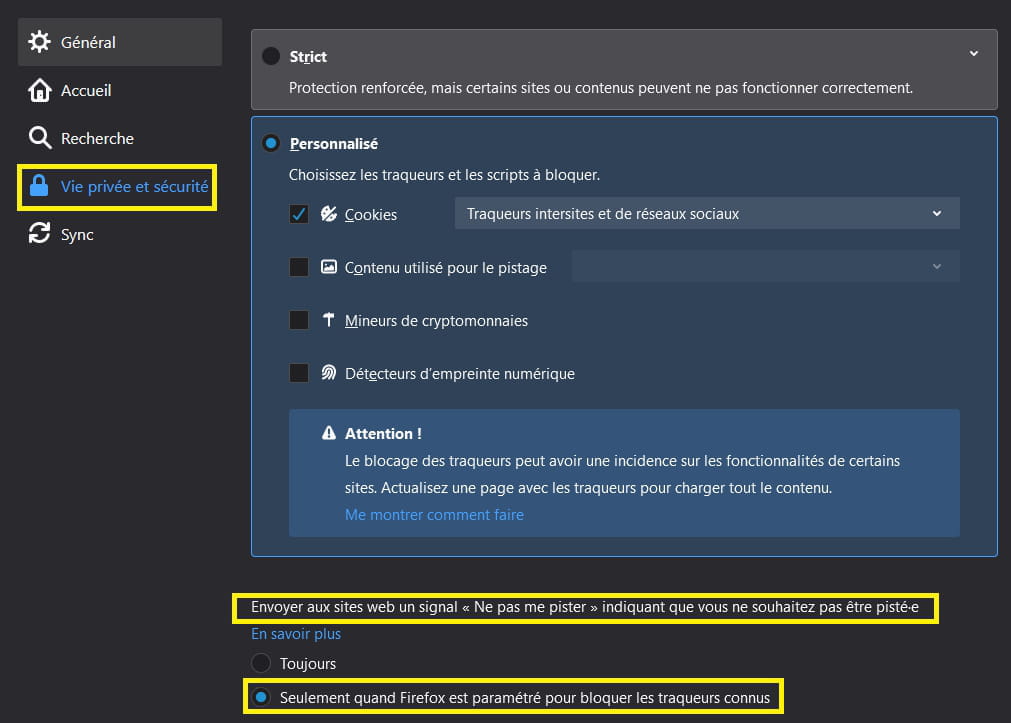
Erase everything in the address bar and copy/paste:
about:preferences#privacy
Then press Enter.
Send websites a "Do Not Track" signal indicating that you do not want to be tracked
In any case, it's nice to have found and mentioned it on the forum.
See you later
--
pistouri -
Hi,
Just click on "Problems Downloading?"
Then "Direct Link" -
Hello pistouri and thank you for your help.
Disabling the shield didn't change anything, I had already reset several times and it's the same, there are plenty of links or sites that are inaccessible and it's widespread, I use Firefox on Linux and Android smartphone too and it's the same, which really makes me think that Firefox is a bit too secure.
I also tested by disabling the antivirus.
Thinking that I was securing too much, I changed the settings to accept all cookies, allow tracking, etc., but still the same result.
Don't worry too much about me, I figure with Firefox I have security; when I have a problem, I find the alternative of using Edge if the site seems serious.
Thanks for the link, but I was able to download with Edge without any issues.
I thought other people would tell me they have the problem too, but apparently not, I must be cursed!! -
Hi, I just tried a reset with the browser reset, weirdly for chrome and internet explorer it offers a reset but for firefox it suggests reinstalling it, which I did, but after that, I couldn't start firefox which no longer finds any profiles.
So I decided to cleanly uninstall firefox with revo uninstaller and then reinstall it from scratch.
I still have the same issue.

I just tested with a portable firefox without extensions and with its default settings and it works, I will have to compare the settings to see what's wrong!
Good night -
-
pistouri Posted messages 19010 Registration date Status Contributor Last intervention Ambassador 8 726
After disabling synchronization, I did a repair with Firefox, it seems to work, but if I resynchronize Firefox, it will start again, there is probably a setting I'm missing.- Just remove the device in the Sync settings, close Firefox, and the Sync will update, then synchronization will be possible.
Remove a synced device from your Firefox account.
Then reconnect.
Click on the Firefox account icon.
Sync settings in the menu that opens.
Click on the Edit button → in the Sync section: ENABLED.
The Choose what to sync pop-up window appears.
Click on Sign out → A confirmation box appears...
Click on the Sign out button.
- Desperate, I rebooted my box and there was a miracle!
Source.- Create a new profile (message 8 for the procedure).
...A+...
--
pistouri -
Hi
Finally, I'm back because today I installed the Chromium version of Edge.
I had fun testing this download that was giving me trouble, and this time Edge, which used to accept it in its old version, is also refusing this download, which gets stuck at 5 seconds.
If it helps, I finally found the reason for the problem: Edge Chromium has a default setting that also exists on Firefox that sends a request to sites not to be tracked. If you disable this option on Edge Chromium or Firefox, the download goes through without any issues.