Fixed line messaging
Solved
Hugoine
-
jeannets Posted messages 28443 Registration date Status Contributor Last intervention -
jeannets Posted messages 28443 Registration date Status Contributor Last intervention -
Hello,
I hope you don't mind me reaching out to you again as you have been very helpful in the past.
I just switched to fiber with Bouygues and everything is going well, but on my landline, I have a voicemail and I had to give a new access code to Bouygues, but the old SFR one is still showing up. I don't know how to disable it; it doesn't work anymore but remains stored and memorized.
Do you have a solution?
Thank you in advance for your valuable advice.
Best regards.
I hope you don't mind me reaching out to you again as you have been very helpful in the past.
I just switched to fiber with Bouygues and everything is going well, but on my landline, I have a voicemail and I had to give a new access code to Bouygues, but the old SFR one is still showing up. I don't know how to disable it; it doesn't work anymore but remains stored and memorized.
Do you have a solution?
Thank you in advance for your valuable advice.
Best regards.
6 answers
-
jeannets Posted messages 28443 Registration date Status Contributor Last intervention Ambassador 6 615
Good evening,
Here’s what I find on a Gigaset AL370 that resembles its menus.
Menu==>Messages
Press the down key:==> Alarm--Audio settings--Voice Message==>OK
Press the down key:==|
Listen to message
Answering machine
Call filtering
Announcements
Long message
Call pickup
Voice Mail Res.===> OK and there you see the number for the service provider's voicemail, so 3103
The "C" key (on the left) deletes the numbers one by one...
Then dial your number (611 I believe)==> OK and it displays "saving."
And there you go, you can return or wait 30 seconds for it to go back to the start
And now, by pressing and holding the 1 key, it will automatically dial the voicemail number...
The menus may be slightly different, but just a little, it should be a very similar process. -
Hi,
it's cool to give your access codes like that to everyone on the internet ....
Where does this 3103 actually fit in?
in your directory?
What's the model of your phone?
-
it's a gigaset duo a400
before, when I pressed and held the 1 (or the envelope), 3103 would appear and I could access my messages. currently, I can no longer do this with my new box because my voicemail code has changed, but when I do the same action, 3103 still shows up on the screen, even though it is no longer valid
thank you for responding so quickly, that's nice
-
-
jeannets Posted messages 28443 Registration date Status Contributor Last intervention Ambassador 6 615
Hello,
You must not confuse the access code and the voicemail number...
It's written in the manual how to enter the voicemail phone number...
This procedure changes depending on the model of the phone...
If you don't have the manual, it can be downloaded from the manufacturer's website of the landline phone. -
jeannets Posted messages 28443 Registration date Status Contributor Last intervention Ambassador 6 615
Yes, but you shouldn't share your access code online.... The whole world knows your code now..
It’s number 660 to access the Bouygues voicemail... See the Bouygues site https://www.assistance.bouyguestelecom.fr/mobiles/repondeur/personnalisation-utilisation-repondeur
All phones call voicemail by long-pressing the "1" key, but you need to have memorized the voicemail number beforehand... so 660... for it to work. -
Hello,
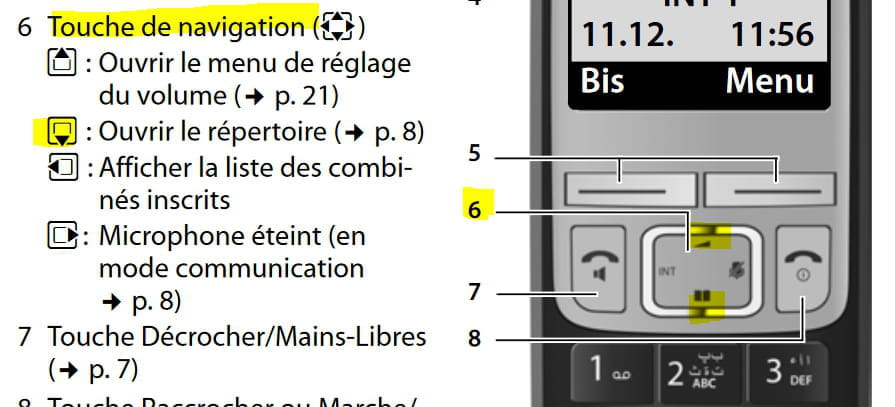
Menu (right arrow) > scroll down to "Messaging" (down arrow) > OK (touch screen) > scroll down to "Key 1 Configuration" > OK > "External Messaging" type 661 > OK
--
Very difficult to catch a black cat in a dark room.
Especially when it isn't there...-
Hello
I just tried, but on my device I don't have configuration key 1; it's a Gigaset Duo A400
No matter what I do, the 661 is never recognized, the old code keeps coming back, and of course, it rings busy since I changed operators; however, it does pick up messages
Moreover, I just noticed that the envelope key for the missed call signal no longer flashes when there is a message, so I'm forced to call the voicemail after each missed call to see if there's a new message. Not very practical, but oh well...
Thanks to everyone for all your valuable advice; I am elderly, and it helps me a lot.- Ah... I made a mistake, I gave the path for A400A
Try
Menu (right arrow) > scroll down to "Messaging" (down arrow) > OK (touch screen) > scroll down to "External Messaging" > type 661 > OK
See manual on page 20: https://gse.gigaset.com/fileadmin/legacy-assets/A31008-M2201-R101-3-UZ19_fr_MEA_20-06-2012.pdf
-
-
For missed messages, see the notice on page 9 "Call Journal/External Messaging"
--
It's very difficult to catch a black cat in a dark room.
Especially when it's not there...-
Hello,
I did it but I don’t understand
if I press the menu I get the alarm on the screen and I can't do anything
if I press the indicated buttons without pressing menu it works but I can't do XY because it’s the 9 that gets entered
I don’t understand anything, it's driving me crazy, there must be a trick I haven’t figured out
Thank you for taking the time to respond, it’s me who isn’t skilled.
-