The barcode is blurry when printed
Solved
lovy95
Posted messages
16
Status
Member
-
Jojolaguitare Posted messages 12012 Registration date Status Member Last intervention -
Jojolaguitare Posted messages 12012 Registration date Status Member Last intervention -
When I print a fuel voucher, the barcode is blurry and unreadable at the gas station checkout.
My system is Windows 10.
Canon Pixma MG 5752 printer.
Thank you in advance for your help and I look forward to hearing from you again.
Thank you.
My system is Windows 10.
Canon Pixma MG 5752 printer.
Thank you in advance for your help and I look forward to hearing from you again.
Thank you.
5 answers
-
Hello.
Scan your ticket. Look for the nomination to find the image of this scan.
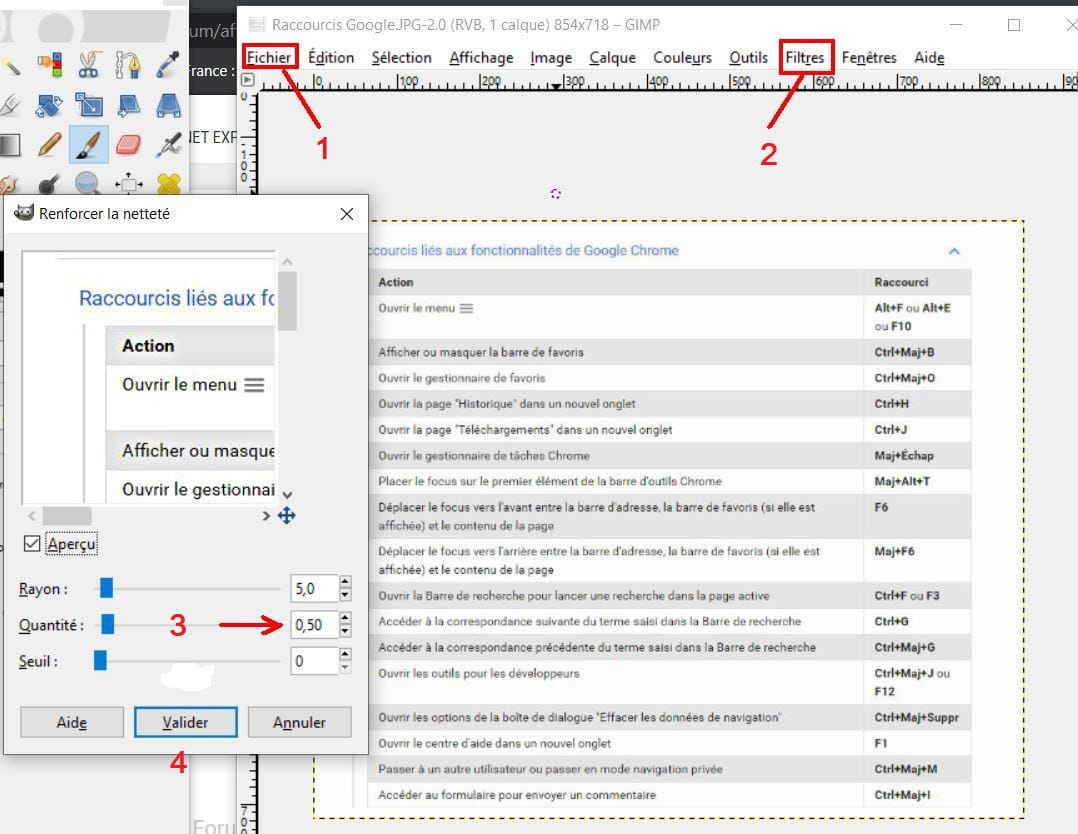
Then if you have the Gimp software installed on your PC, try to enhance the sharpness of this image with the filter. Set the "amount" to 0.10 and confirm. See the result, and if it's not sufficient, try again while keeping it at 0.10
But it's not sure that the final result will satisfy you, because the pixel problems will still be there.

See you later
--
"Patience leads to success, haste leads to nothing"