
Is it possible to add an SSD to an HP Pavilion P6?
Solved
Ralph_Lauren
Posted messages
33
Status
Member
-
Ralph_Lauren Posted messages 33 Status Member -
Ralph_Lauren Posted messages 33 Status Member -
Hi everyone,
Here it is: I would like to install an SSD (MX500 model from Crucial) in my tower, but being quite rustic and basic, I can't find a slot (knowing that I want to keep the original HDD). So, I'm wondering if it's feasible.
Here’s what the inside looks like:
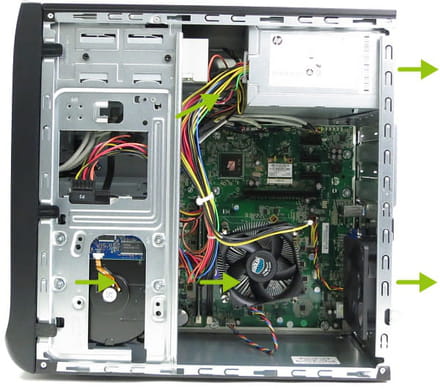
Do you think it's possible?
Thank you for your feedback.
Here it is: I would like to install an SSD (MX500 model from Crucial) in my tower, but being quite rustic and basic, I can't find a slot (knowing that I want to keep the original HDD). So, I'm wondering if it's feasible.
Here’s what the inside looks like:

Do you think it's possible?
Thank you for your feedback.
3 answers
-
Hello,
the mx500 in 2.5" model? Because you won't find the M.2 model.
Does the image you posted match the one from your computer?
It may be that there is no 2.5" slot in your case (and you need to have the screws to secure it). As for the connection, you connect it like the hard drive, with a SATA coming from the power supply (the largest SATA) and the other one you connect to the motherboard, exactly like the hard drive. You'll see there are several ports next to the one where the hard drive is connected (in the upper left of the motherboard). However, you'll need to buy a SATA cable; it's not supplied with the SSD.
As for securing the SSD, you can attach it with a wire or tape, or even leave it hanging; it shouldn’t come loose, the SSD is ultra-light.-
Yes, it's indeed the MX500 in 2.5.
This is an image I found on the forum, but it is identical in every way.
As for the SATA cable and screws, no problem, I retrieved the one(s) from my old PC.
For the connections, I have all the necessary connectors.
It's just that I don't know where to put it, and I don't really want to see it hanging in the PC.
-
-
Hello
a SSD being lightweight and vibration-free can simply be placed on the bottom plate
held down with adhesive tape -

