Atomic number and number of nucleons in word
Solved
Celinette21300
Posted messages
61
Registration date
Status
Member
Last intervention
-
Pierr10 Posted messages 13838 Registration date Status Moderator Last intervention -
Pierr10 Posted messages 13838 Registration date Status Moderator Last intervention -
Hello,
I would like to include the names of chemical elements (like copper for example: Cu) in a chemistry document typed in Word, with the number of nucleons in superscript and the atomic number of the element in subscript
I know how to do superscripts and subscripts in Word, but here both should be positioned BEFORE the name of the element and one should be VERTICAL relative to the other... I haven't found a solution to my problem either through Word's equation editor or in forums... That's why I'm reaching out to you in the hope that... :)
Thank you for any help you could provide :)
Configuration: Windows / Chrome 78.0.3904.108
I would like to include the names of chemical elements (like copper for example: Cu) in a chemistry document typed in Word, with the number of nucleons in superscript and the atomic number of the element in subscript
I know how to do superscripts and subscripts in Word, but here both should be positioned BEFORE the name of the element and one should be VERTICAL relative to the other... I haven't found a solution to my problem either through Word's equation editor or in forums... That's why I'm reaching out to you in the hope that... :)
Thank you for any help you could provide :)
Configuration: Windows / Chrome 78.0.3904.108
1 answer
-
Hello
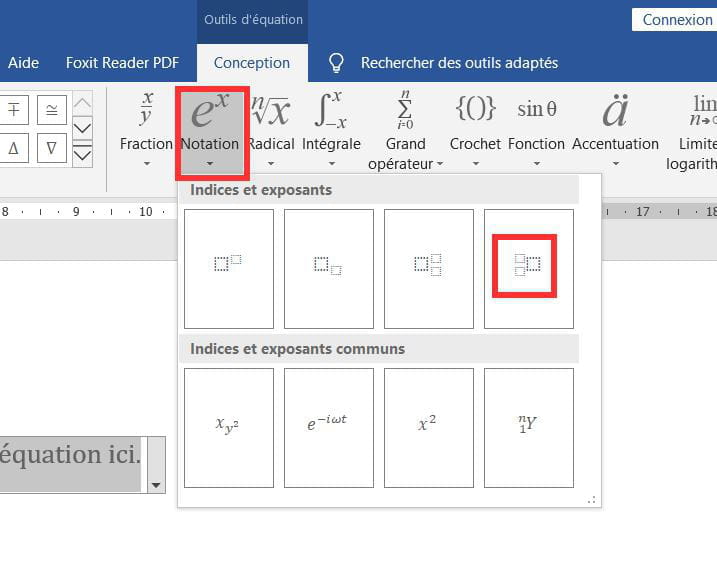
You need to go through the equation editor.
Insert > Equation
Then go to the Notations menu.
The result:
Personally, I prefer to use LibreOffice. It's a bit less straightforward, as this format is not offered directly. But you can easily adjust the font sizes and the result is better (for me).
To change font sizes in Word, you need to select the superscript or subscript, right-click, and choose "increase size ..." or "decrease size ..."