Copy/paste
merlin84370
Posted messages
4
Status
Member
-
gugu01 Posted messages 15669 Registration date Status Contributor Last intervention -
gugu01 Posted messages 15669 Registration date Status Contributor Last intervention -
Hello,
I am on Windows 10 and I would like to copy and paste my folders to another drive while keeping the latest version of a modified folder.
If I currently copy a folder that I just modified to another one with the same name, I will have both folders appear: the old one and the new one.
Thank you for your help and have a nice Sunday.
Christophe.
I am on Windows 10 and I would like to copy and paste my folders to another drive while keeping the latest version of a modified folder.
If I currently copy a folder that I just modified to another one with the same name, I will have both folders appear: the old one and the new one.
Thank you for your help and have a nice Sunday.
Christophe.
6 answers
-
Hello ....
I don't quite understand what you want to do, but I think the solution would be to rename the modified folder to differentiate it from the other one...
For example
Folder-1 ► Copy/Paste
Folder-2 ► Modified ► Also copy/paste to your external storage.... but all of this might take up space unless your external storage can hold all of that?
See you later
--
Best regards
Aging well means preferring the time that passes over the time that remains! -
Hello jmarion3.
Let me explain myself better.
Folder 1 copied on 01/10/2019 to a backup folder.
Folder 1 modified on 05/10/2019 and copied to the backup folder. In the older versions of Windows, a panel would notify me that the source folder had the same name as the destination folder. There was information about the folders (size, modification date) and we had the choice to validate the paste or not. Now, when the source folder has the same name as the destination folder, Windows still copies the file without asking to replace it. The problem is that I work on a huge number of folders and only make a backup at the end of the week, and I find myself with all my folders duplicated.
Thank you.
Christophe.
-
Hello ..
Thank you for the feedback...
We're coming back to what I recommended, namely renaming the file banque2002.xls to banque2002-1.xls, for example, after modifying it so that your backup considers it a new folder...
I suppose that over time the earlier files no longer need to exist, and we can simply replace them with the most recent ones... but maybe I haven't grasped everything?
See you soon
--
Best regards
Aging well is preferring the time that passes to the time that remains!-
-
Personally, I think that renaming the file by simply adding an index manually allows you to manage all of this in order to keep the history of your work and easily delete them over time...
Have a good afternoon as well
I mark the subject as resolved
Best regards- Hello jmarion,
Perhaps the "resolved" is premature
Upon reading, there may be a misunderstanding.
;-)
I would say it's the opposite
Because he says that before there was the choice message "replacement and others" and no longer under Windows 10.
Whereas originally it still exists under W10.
He also talks about duplicates and having to manually delete the old file afterward.
Etc ...
So
Either a setting has been changed and it directly creates a copy instead of giving the choice window.
Or it doesn't save these modifications to the folder and therefore remains the same, resulting in a direct copy.
See message 6 (so as not to get lost)
https://forums.commentcamarche.net/forum/affich-36245278-copier-coller#6
-
-
Hello to both of you!
Actually, it creates duplicates for you, and you don't want that?
It directly creates a second folder like xxxxx-copy?
This is in the case of a copy that has no modifications compared to the original.
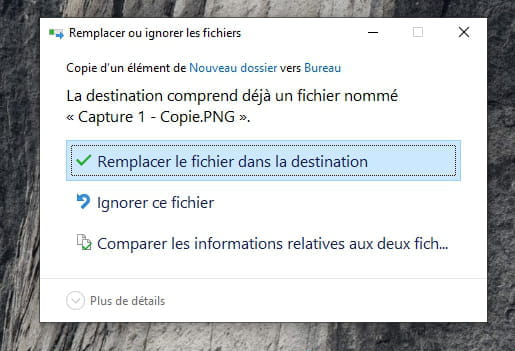
Normally, you get this message if you copy a folder with the same name in the same location that has undergone modifications:

W 10 copies same folder name, same location:
> without modifications of the source file, no message and directly creates a new folder xxxx-copy
> with modifications of the source file, message shown in the photo /
2 options similar to other Windows
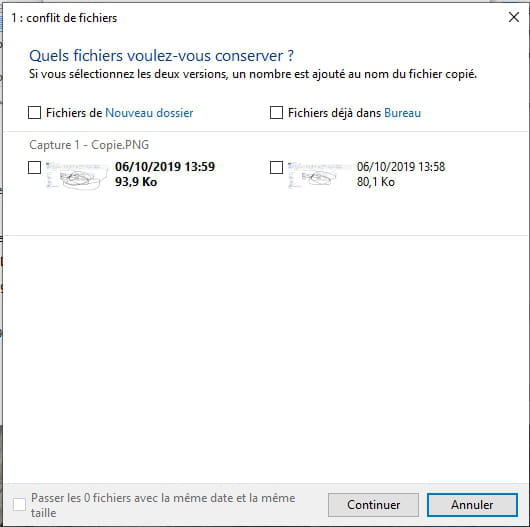
3rd option, almost the same
If you click on it, a window asks you to check one or the other or both. If both, the most recent is renamed with a (2)...
Like before, a simple request where you are given the choice/confirmation additionally.
Auto message
If you are here, it's because you don't know, so... ;-)
Mini Note to the volunteers who help you: Respond, Respect, Politeness,... -
Good evening.
Indeed, I just checked and every time the source file has not been modified.
During a modification, Windows asks me for a choice.
However, is there a trick to avoid having two unmodified files in the source file?
(without modifying the source file, no message and directly create a new folder xxxx-copy recipient)
Thank you and have a good evening.
Christophe.-
I have an image on my desktop > copied and pasted on the desktop > gives a direct copy xxx-copy
____
If I paste an image on my desktop coming from a folder, I paste it a second time > no duplicate but it asks for replacement.
If the paste comes from another location, it normally asks, so that's fine.
I don't know if it's the same under older Windows.
It might not be your habits that have changed.
Placed randomly in a space or in folders or ...
Do the same tests between a doc on your desktop and a folder.
-
-
Hi,
I have been using SuperCopier 2.2 beta for 10 years, it works perfectly.
http://www.admicro.fr/telechargements/utilitaires/gestion-de-fichiers/24-supercopier-2.html
And I always choose to overwrite if different.
It works from one disk to another; otherwise, on a single disk, it's not a copy but a move, Supercopier does not handle that.
PS: You need to install it as an administrator.