A error de lectura del disco ha ocurrido. Presione Ctrl + Alt + Supr para reiniciar.
Solved
skroll
Posted messages
112
Registration date
Status
Member
Last intervention
-
skroll Posted messages 112 Registration date Status Member Last intervention -
skroll Posted messages 112 Registration date Status Member Last intervention -
Hello,
My son's laptop (Acer Aspire 7750G-2334G50Mn with Windows 7) keeps rebooting with the message "A disk read error occurred. Press Ctrl + Alt + Del to restart."
I already replaced the hard drive at the end of January (so it should still be under warranty).
I removed it and installed it in an external enclosure that I connected to other PCs (Windows 10 and Windows 7)... It eventually gets recognized (a letter appears), but it's impossible to access it (unable to attempt a repair, or run a scan, or view the properties)
Do you think it is repairable and worth it, or should I turn to the seller for the warranty or consider buying a new one?
Thank you in advance.
My son's laptop (Acer Aspire 7750G-2334G50Mn with Windows 7) keeps rebooting with the message "A disk read error occurred. Press Ctrl + Alt + Del to restart."
I already replaced the hard drive at the end of January (so it should still be under warranty).
I removed it and installed it in an external enclosure that I connected to other PCs (Windows 10 and Windows 7)... It eventually gets recognized (a letter appears), but it's impossible to access it (unable to attempt a repair, or run a scan, or view the properties)
Do you think it is repairable and worth it, or should I turn to the seller for the warranty or consider buying a new one?
Thank you in advance.
2 answers
-
diskpart
list disk
list volume
To see if your hard drive connected to an external case is properly recognized on the troubleshooting and testing PC.
--
“Take your chance, hold onto your happiness, and go towards your risk. By looking at you, they will get used to it.” René Char -
Thank you for your response.
In fact, when I connect the external hard drive, it lights up/spins, but it causes "diskpart" to crash (I left it for 20 minutes... couldn't do anything until I unplugged it...)
So, what do you think, is it really done for?
Thanks in advance.-
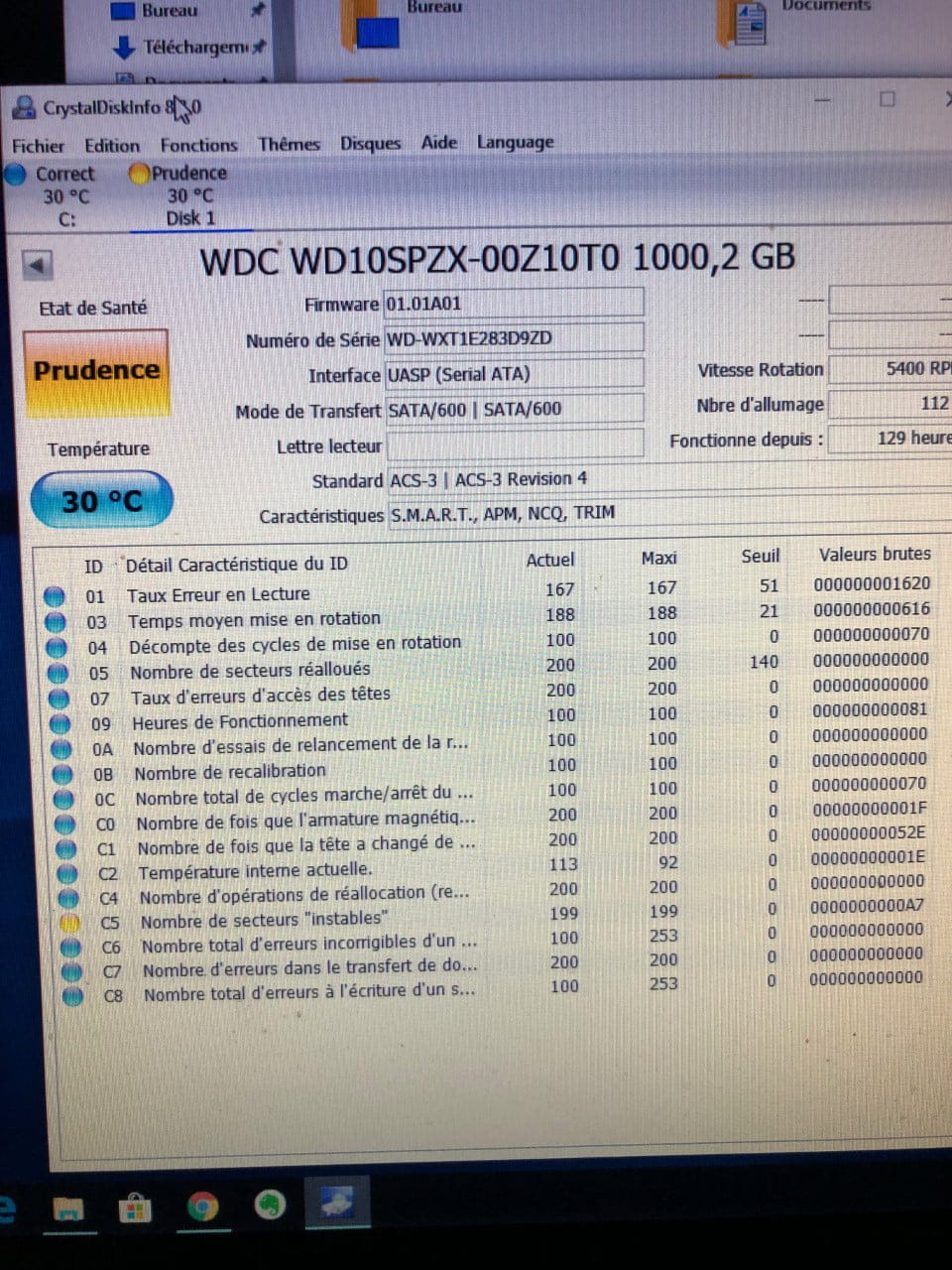
Test it with "crystal disk info" on the other PC, if it doesn't shut down!
-
He is being cautious, so he won't take long to release it, make backups of documents with the other PC, then turn to the seller to activate the warranty, print what you posted from CrystalDisk to have proof of the hard drive's condition!
-