3.5mm Jack Socket Issue with Hyper X Cloud Alpha Headset
Miloux
-
Maltaph -
Maltaph -
Hello,
My problem seems simple yet it complicates things for me.
I have an ASUS ROG STRIX GL753VE running Windows 10 Home.
I recently bought the Hyper X Cloud Alpha headset.
Each time I plug my headset into the only jack on this PC, the headphones work perfectly. However, the microphone is a different story.
First of all:
I contacted Hyper X, who had me go through a lot of troubleshooting (most of which I had already done) and none of it worked.
Examples:
1. Check that the microphone works by doing a test with the voice recorder (it works perfectly).
2. The headset receives sound without any issue, so I went into the control panel and checked microphone privacy settings (everything is enabled).
3. I also made sure the microphone was properly detected by going to the sound tab at the bottom right that I opened. I went into recording and there was a problem: the headset doesn't respond to speech but does when I tap (and I insist that if I just touch it, it doesn't work) on the microphone.
Second phase:
I called ASUS to find out if the jack port of the computer is indeed meant to recognize a headset AND its microphone (or just the headphone function).
They told me after quite a few tests that they would check the compatibility between the headset and the computer (which seems a bit far-fetched to me). Otherwise, I need to buy an AMP (which essentially, if I understood correctly, is an external sound card) to make it work via USB.
Before this headset, I had a Turtle Beach that didn’t pose this issue as I was using an adapter via USB. So I bought an adapter for this headset hoping it will work.
I just wanted to write here out of curiosity, with equipment at this price point how is it possible that no one can solve a basic problem like the functioning of a gaming headset microphone?
If any experts pass by here, know that I would be very grateful for you to share your knowledge on the subject with me.
Kind regards,
Miloux
My problem seems simple yet it complicates things for me.
I have an ASUS ROG STRIX GL753VE running Windows 10 Home.
I recently bought the Hyper X Cloud Alpha headset.
Each time I plug my headset into the only jack on this PC, the headphones work perfectly. However, the microphone is a different story.
First of all:
I contacted Hyper X, who had me go through a lot of troubleshooting (most of which I had already done) and none of it worked.
Examples:
1. Check that the microphone works by doing a test with the voice recorder (it works perfectly).
2. The headset receives sound without any issue, so I went into the control panel and checked microphone privacy settings (everything is enabled).
3. I also made sure the microphone was properly detected by going to the sound tab at the bottom right that I opened. I went into recording and there was a problem: the headset doesn't respond to speech but does when I tap (and I insist that if I just touch it, it doesn't work) on the microphone.
Second phase:
I called ASUS to find out if the jack port of the computer is indeed meant to recognize a headset AND its microphone (or just the headphone function).
They told me after quite a few tests that they would check the compatibility between the headset and the computer (which seems a bit far-fetched to me). Otherwise, I need to buy an AMP (which essentially, if I understood correctly, is an external sound card) to make it work via USB.
Before this headset, I had a Turtle Beach that didn’t pose this issue as I was using an adapter via USB. So I bought an adapter for this headset hoping it will work.
I just wanted to write here out of curiosity, with equipment at this price point how is it possible that no one can solve a basic problem like the functioning of a gaming headset microphone?
If any experts pass by here, know that I would be very grateful for you to share your knowledge on the subject with me.
Kind regards,
Miloux
2 answers
-
Hello.
>>> They replied after quite a few tests that they would check the compatibility between the headset and the computer (it sounds a bit far-fetched to me) <<<
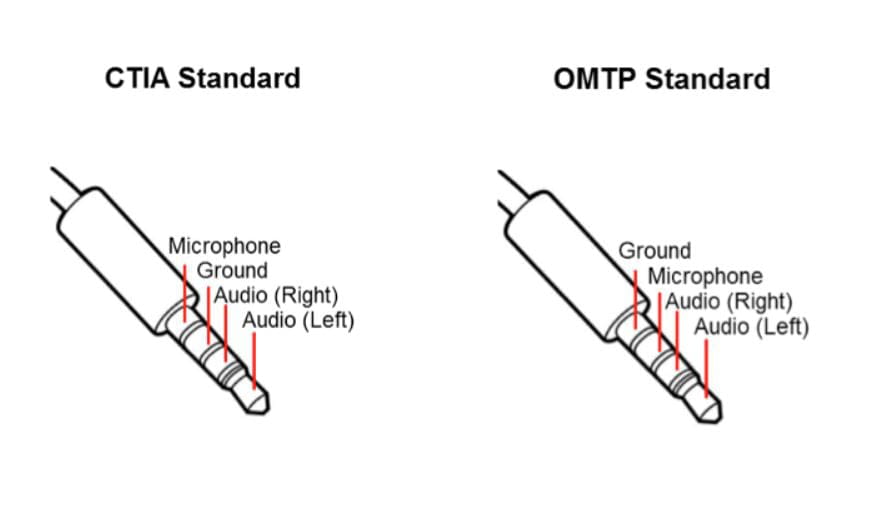
And yet . . . It may be that the jack of this headset is not the same as that of the PC. So either in CTIA or in OMTP.

This does not prevent the speakers of the headset from working, but since the microphone is reversed relative to the ground, it cannot function.
You need an adapter like this one >>>
https://www.amazon.fr/Asiproper-Adaptateur-Convertisseur-convertir-3-5mm/dp/B07L9ZCNCQ/ref=sr_1_6?adgrpid=56494574072&gclid=EAIaIQobChMI9ezXgN625AIVQbTtCh1txg2fEAAYAiAAEgI8pfD_BwE&hvadid=275329356227&hvdev=c&hvlocphy=1005901&hvnetw=g&hvpos=1t2&hvqmt=e&hvrand=12319873492848015783&hvtargid=kwd-314334055341&hydadcr=424_1791938&keywords=adaptateur+ctia+omtp&qid=1567585301&s=gateway&sr=8-6
But if that doesn't work, which would be surprising, there would of course be the sound card solution.
See you . . .
-
Hello,
Thank you for your response, I didn't think there was such a difference at all. Even when searching online, I didn't come across it. I must not have done the appropriate search...
I'll check if there's a notable difference between the two and see which one is already on my headset just to move forward.
See you later -
Here is ASUS's response:
The computer is equipped with a DC-Jack audio port for headphones and microphone, located on the left side of the computer as indicated in the user guide. (https://dlcdnets.asus.com/pub/ASUS/nb/GL753VD/040C_F11814_GL753VD_A.pdf) pages 23-24.
If the headphones are USB, the computer already has several USB type A ports of generation 2.0 and 3.0.
For compatibility, it is rather the manufacturer of the accessory that ensures its accessory is compatible with as many devices (brands and models) as possible, not the other way around.
So I don't really have a choice; I'll have to find the solution myself. I'm already waiting to see with the adapter I bought, and if not, I'll take the one you recommended. -
What type of adapter did you buy?
But if you ordered it, you're right to wait for the next step. When you've tested it, give us some news if you want. Thanks
PS = I had suggested to a member, 2/3 years ago, a CTIA/OMTP type adapter and it worked for him. That was too long ago to find the post. But every case can also be different.
See you later . . . -
Here is the one I ordered because I have a double green and pink jack plug also provided with the headset, so I thought it would work...
https://www.amazon.fr/gp/product/B01N905VOY?ref=ppx_pt2_dt_b_prod_image
I just hope it won't negatively affect the sound... I'm not really familiar with the concept of the "external sound card"
Yes, no problem, I'll keep you updated, thanks again. -
-