
Annoying small microphone icon on the Windows 10 taskbar
Solved
enzomario
Posted messages
19
Status
Membre
-
pistouri Posted messages 19008 Registration date Status Contributeur Last intervention -
pistouri Posted messages 19008 Registration date Status Contributeur Last intervention -
Hello, I updated my PC a few days ago and one of the new features is something I'd like to hide if possible, thank you in advance ^^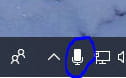
2 réponses

pistouri
Posted messages
19008
Registration date
Status
Contributeur
Last intervention
Ambassadeur
8 719
Hello,
With version 1903 of Windows 10
Right-click on the taskbar and then → Taskbar settings
Section → Notification area
Click on the line → Turn system icons on or off
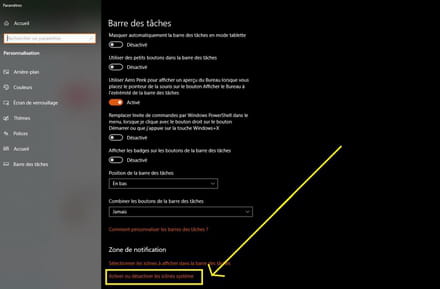
Disable the Microphone at the bottom of the page
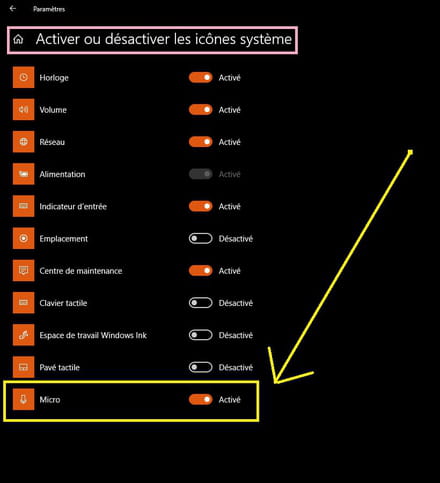
Restart the PC.
Edit:
On my PC, the icon is indeed enabled in the settings but does not appear in the notification area or on the taskbar.
It could be that a device like a headset or headphones was left plugged in during the update, or try unplugging and replugging the audio jack if there are speakers as considerations.

Ps: I greet jee pee by the way.
A+
With version 1903 of Windows 10
Right-click on the taskbar and then → Taskbar settings
Section → Notification area
Click on the line → Turn system icons on or off

Disable the Microphone at the bottom of the page

Restart the PC.
Edit:
On my PC, the icon is indeed enabled in the settings but does not appear in the notification area or on the taskbar.
It could be that a device like a headset or headphones was left plugged in during the update, or try unplugging and replugging the audio jack if there are speakers as considerations.

Ps: I greet jee pee by the way.
A+

If you encounter a problem with the microphone, there is a tutorial here for Windows 10.
We are happy for you.