Hard drive error message on Dell startup
pascal110463
Posted messages
13
Registration date
Status
Member
Last intervention
-
pascal110463 Posted messages 13 Registration date Status Member Last intervention -
pascal110463 Posted messages 13 Registration date Status Member Last intervention -
Hello,
I have a Dell XPS 8910 running Windows 10 64-bit that displays an error 2000-0151 in a PSA (Pre-Boot System Assessment) diagnostic when I boot up, indicating that my hard drive needs to be replaced.
I have updated the BIOS, and I am now on BIOS 1.1.9 dated 2019-06-25. When I use the Disk Checkup utility, it shows no errors. When I run Support Assist, Troubleshooting, it tells me that my hard drive is not experiencing any issues. The chkdsk also shows no problems. My computer works fine otherwise.
And yet I still have this error 2000-0151 at startup.
So I have two questions: Is my hard drive really in danger? If not, how can I remove this error message?
Thank you in advance,
pascal110463
I have a Dell XPS 8910 running Windows 10 64-bit that displays an error 2000-0151 in a PSA (Pre-Boot System Assessment) diagnostic when I boot up, indicating that my hard drive needs to be replaced.
I have updated the BIOS, and I am now on BIOS 1.1.9 dated 2019-06-25. When I use the Disk Checkup utility, it shows no errors. When I run Support Assist, Troubleshooting, it tells me that my hard drive is not experiencing any issues. The chkdsk also shows no problems. My computer works fine otherwise.
And yet I still have this error 2000-0151 at startup.
So I have two questions: Is my hard drive really in danger? If not, how can I remove this error message?
Thank you in advance,
pascal110463
8 answers
-
Hello,
Can you give me the model and brand of your hard drive? -
Hello,
Here is what I get when I request the configuration of my PC:
Hard drives:
SK hynix SC215 M.2 2242 32GB
ST1750LM 000 HN-M171R USB Device
Multiple Card Reader USB Device
ST2000DM001-1ER164
pascal110463-
you have three hard drives,
2 seagate and one sk hynix
if the error is on a seagate, use their software to test the hard drives: https://www.seagate.com/fr/fr/support/downloads/seatools/ -
Hello Pascal,
The tests to be performed from SeaTools are the Short Generic and the Long Generic.
Best regards,
Seagate Technology | Official Forums Team
IronWolf drives for NAS Applications - SkyHawk drives for Surveillance - BarraCuda drives for PC and gaming
-
-
Thank you both,
I noticed that the Dell error message was about the SK hynix. I ran SeaTools for Windows, which offered to test this drive. Both tests (Short Generic and Long Generic) went well.
I'm attaching the error message in case it gives you an idea:

I don't know if this will work?
Pascal -
That's the problem, I go to the file explorer, I position myself on C, right-click, properties, hardware tab, and there I see several lines, so SK hynix and the 2 Seagate.
What should I conclude: that a chkdsk C: should be enough?
Or is there something better to do? -
Hello,
In the meantime, I had launched the SK Hynix tool on the drives. Here’s what I got:

I conclude that it is indeed the SK Hynix SC215 M.2 2242 32GB drive that is causing the problem.
In the properties of this drive, I see the following message: 'The device SCSI\Disk&Ven_SK&Prod_hynix\4&15b5b40&0&000000 was not migrated due to a partial or ambiguous match.' As of July 15, I believe my problem dates back to around that date.
So, what do you advise me to do?
Can I run a chkdsk only on this drive? In practice, how?
pascal110463 -
What I don't understand is the connection between C: and this SK hynix drive? Is C: split between this SK hynix and the Seagate drive or am I completely off the mark?
Moreover, how can you tell that it's dead? I don't want to argue, but chkdsk C: doesn't find any errors!?-
You're completely off track.
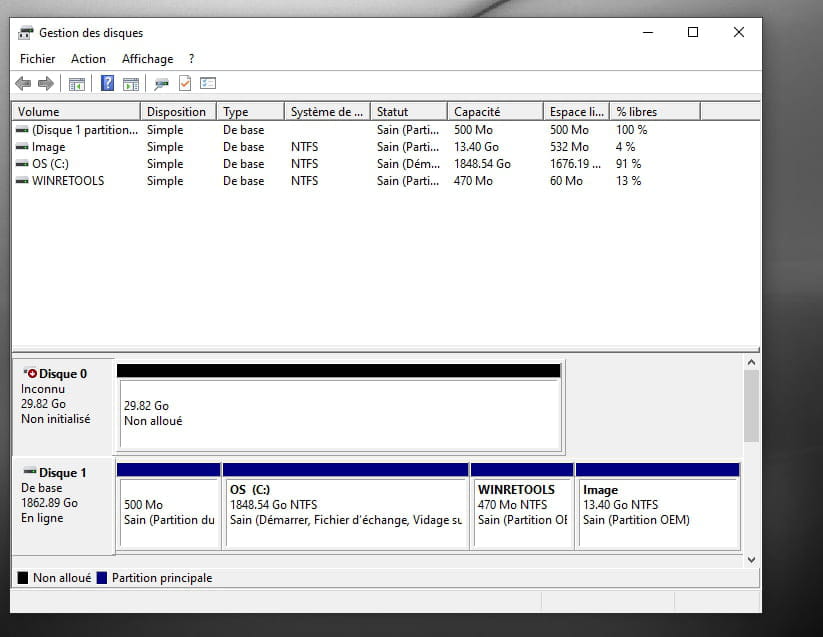
The C:\ is on the hard drive (number 1) which has 1863.02 GB of space. Everything is fine there.
The problematic disk (SK Hynix of 29.82) currently has no partition (so no C:, no D:, nothing), it is just recognized as hardware that has an issue. Right now, you can't even perform a check disk on it.
Hence my suggestion to try creating a partition on it and assign it a letter (D: E:) and then perform a check disk.
But I'm telling you, it's dead anyway.
(So just to be clear, your C: is on another working hard drive. So it's normal that check disk finds nothing.
The problematic disk has no partition (so no letter), which is why you can't even perform a check disk.)
-
-
OK thanks a lot for the explanation. It's clearer now.
I will see what I can do. -
I have read quite a bit since your last post, especially this article:
https://www.easeus.fr/reparer-peripherique-de-stockage/ssd-ne-saffiche-pas-dans-windows-10.html
I'm certain I have never seen any drive letters except C: (and D: and E: which are drives), so I wonder if the SSD has ever worked? (even though I've had this PC for 8 years).
Here is what disk management looks like:

Given these elements, do you recommend that I initialize disk 0 (case no 2 in the article), etc., or should I do nothing knowing that everything has been working for 8 years?
Thank you in advance,
Pascal