Message: audio rendering engine error please restart your computer
Solved
Didine3105
Posted messages
1
Status
Member
-
pistouri Posted messages 19011 Registration date Status Contributor Last intervention -
pistouri Posted messages 19011 Registration date Status Contributor Last intervention -
Hello everyone,
I've been facing this problem for a few weeks now: when I try to watch a video on YouTube, the video starts for 4-5 seconds without sound, then refreshes before finally displaying the error message: "audio rendering error please restart your computer." At first, I would restart my computer every time, but over time it has become troublesome... sometimes, after refreshing the page multiple times, the video plays once out of three attempts... but I'm starting to get fed up.
I've already done quite a bit of research on this site but nothing works, the problem persists...
Additionally, for the past few days, I've also been experiencing the issue on Twitch... as if it was becoming impossible for me to play any online videos.
I have a small Asus (tablet-type computer), Windows 10, Google Chrome, my computer is not connected to any external audio system (like speakers), and I'm not using headphones...
Thank you in advance for your help.
I've been facing this problem for a few weeks now: when I try to watch a video on YouTube, the video starts for 4-5 seconds without sound, then refreshes before finally displaying the error message: "audio rendering error please restart your computer." At first, I would restart my computer every time, but over time it has become troublesome... sometimes, after refreshing the page multiple times, the video plays once out of three attempts... but I'm starting to get fed up.
I've already done quite a bit of research on this site but nothing works, the problem persists...
Additionally, for the past few days, I've also been experiencing the issue on Twitch... as if it was becoming impossible for me to play any online videos.
I have a small Asus (tablet-type computer), Windows 10, Google Chrome, my computer is not connected to any external audio system (like speakers), and I'm not using headphones...
Thank you in advance for your help.
1 answer
-
pistouri Posted messages 19011 Registration date Status Contributor Last intervention Ambassadeur 8 723
Hello,
1- Check if your audio and graphics drivers are up to date on the Asus manufacturer website in your case.
Or perform a detection using My drivers
Select the certified drivers box.
Confirm everything.
2- Use reset browser.
3- Disable hardware acceleration in Google Chrome.
Go to the three dots located in the top right corner then Settings
Scroll down to the bottom of the page to advanced settings
Scroll down to the System section (at the very bottom of the page)
Uncheck → Use hardware acceleration (if applicable)
4- Is Windows up to date?
Check Windows Update.
5- Adobe Flash Player.
Check if Flash Player is up to date HERE
6- Test with another browser.
Firefox for example.
Install the version according to your system.
32 or 64 bits over here
7- Reset your little Asus (tablet-type computer), Windows 10.
A+
--
pistouri-
- Hello,
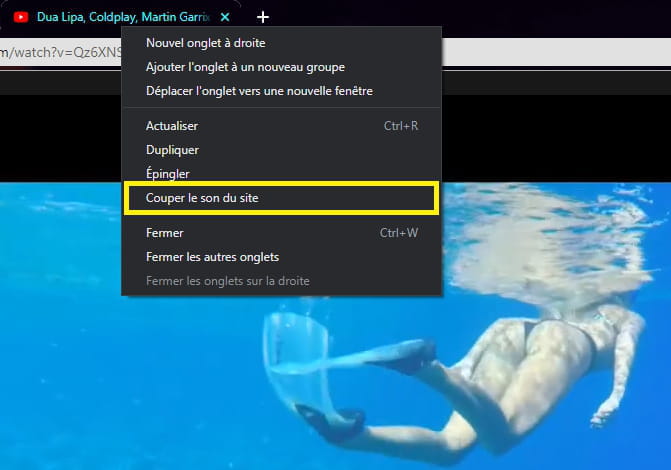
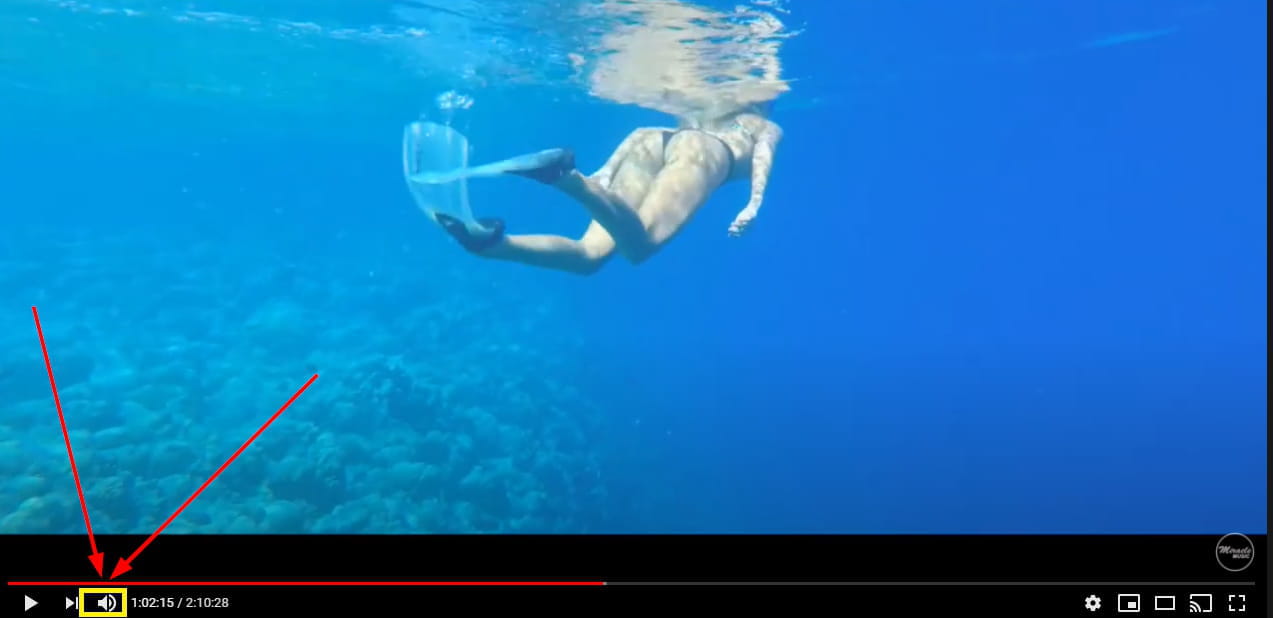
- Check if ''Mute'' is not disabled
In the Chrome tab:
In the video:
- Restart Google Chrome or reboot the PC
- In the Chrome address bar do a copy/paste -►chrome://settings/content/sound
Check the box ►Allow sites to play sound (recommended).- Restart the Windows Audio service
- Try in incognito mode
If it works, it’s an outdated extension.
See you!
-