
An error occurred while opening this document. File not found.
soldat74
Posted messages
241
Registration date
Status
Member
Last intervention
-
jeannets Posted messages 28454 Registration date Status Contributor Last intervention -
jeannets Posted messages 28454 Registration date Status Contributor Last intervention -
Hello, I saved one or more documents in PDF format, but I'm receiving this error message 
my files are located

I moved them to my documents on drive D:

and now, coincidentally, it works

I tried to find a solution in this topic, but nothing https://forums.commentcamarche.net/forum/affich-2301187-impossible-de-lire-les-fichiers-pdf?full=1
I don't understand, can you help me?
Thank you =)
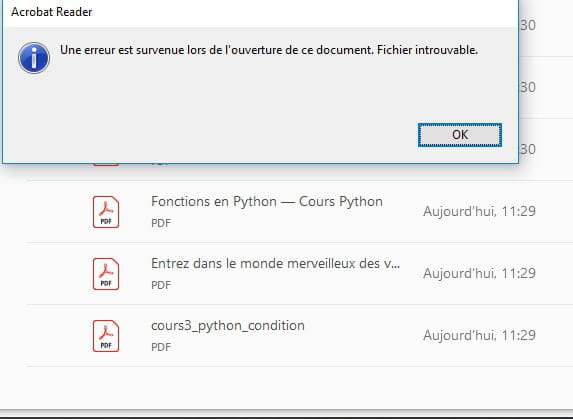
my files are located
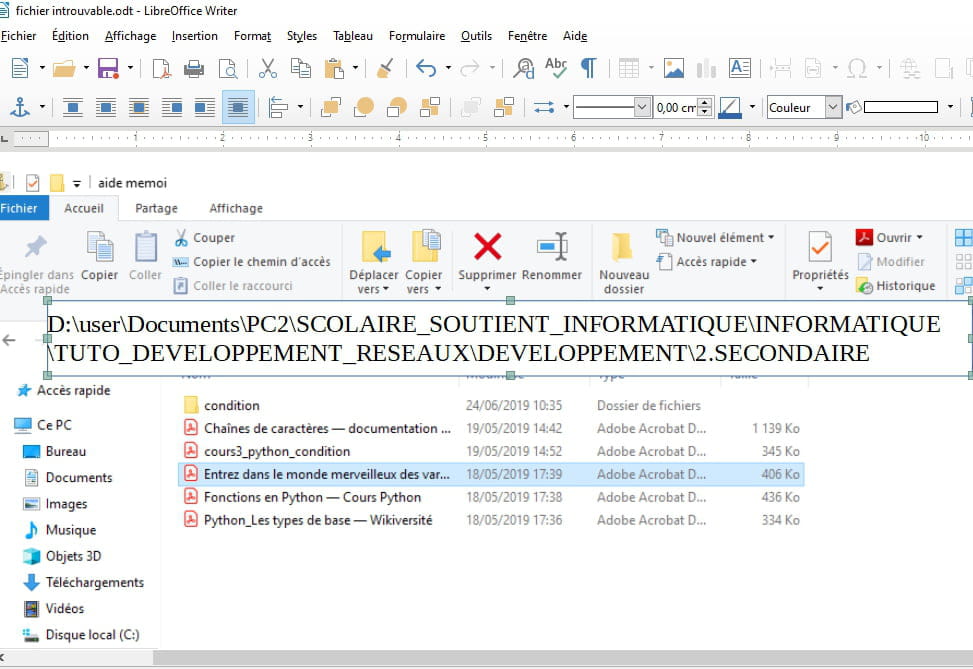
I moved them to my documents on drive D:

and now, coincidentally, it works

I tried to find a solution in this topic, but nothing https://forums.commentcamarche.net/forum/affich-2301187-impossible-de-lire-les-fichiers-pdf?full=1
I don't understand, can you help me?
Thank you =)
1 answer
-
jeannets Posted messages 28454 Registration date Status Contributor Last intervention Ambassador 6 618
Hello,
The problem is not that you cannot read the PDFs...
It's mainly that it cannot find the file; because you changed its location.
-- If you go to Explorer to find your file in the right folder, as you show here, double-click on it and it will open..-
I also receive a message regarding the page dimensions being cut off, why do I have this and how can I resolve it?
The problem seems to occur when I save a page with Opera, then place it in "Downloads" and move the PDF file to another folder.
So how do I save it and place it in the right folder because I'm having trouble with that.
Thank you for clarifying this point for me.

-
The issue of dimensions out of bounds rests with your sender, who is not using standard formats... To be able to visualize it, you must display only a percentage lower than 100%... It all depends on whether you want to see it on the screen or print it..
At the top right of the hand, you have a percentage displayed, if you click on the little triangle, you can change the percentage value to fit it into your standardized page
In the "Adobe" program, you have a menu bar at the top... And in "File," you have two options...
-- "Save" which saves in the same file as the original
-- "Save As," the difference is that it allows you to choose the folder where you want to save it...
Even in Opera and all its counterparts, you can define in the settings which folder you have chosen to save downloaded files. Here is a tutorial on Opera https://www.malekal.com/opera-navigateur-web-rapide-sur/
I cannot know which folder you are moving your file from and to... what is the point..?
Either you read your file before saving it, or you read it afterwards... But in any case, it is in a folder somewhere that you know... (I assume)
The Adobe software also offers to open the file ===>File ===>Open... you go to the folder you know, select the file you want to open ... click on "Open" at the bottom right and your PDF will open. -
-
-
If that's the case, don't mix things up.
Don't confuse the folder name with the file name...
I believe the maximum is 255 characters (but not all characters) accented characters and punctuation should be avoided in names... the2.secondaire
may not be good..?? replace the PERIOD with a Hyphen from key 6 However, Win10 has normally put an end to all that. Here is some reading on the subject https://www.developpez.com/actu/99242/Windows-10-Microsoft-met-silencieusement-fin-a-la-limitation-a-260-caracteres-pour-les-chemins-d-acces-dans-la-Build-14352-en-preversion/
-- There is a solution for long paths "LongPaths" if it's not available on your system.
What is also curious is that you are inD:\user
... Normally the USER is in Windows and is reserved for the name of the PC user... All those names should be avoided elsewhere... You could place your documents in D:\ of course but name it D:\soldat for example and then continue with your other subfolders, to follow.
-- You should also keep these folder names in lowercase... ex:SoutientScol
is enough by merging the words in abbreviation, Your names are way too long...
--Dimensions hors limites
means that you have a printer set up in your Windows and its maximum print format cannot contain your document as it has been defined.
You need to redo its layout respecting the standard (A4 I suppose) with a margin of at least 5 mm on each side, minus the headers and footers, if you have included any..
In short... it's quite an art...! but it can be quickly understood and it's the logic behind page layout.
-

