Reader 0 unallocated space 0.0 MB??
Good evening,
I'm trying to help a friend; I'm usually okay with computers... but this time I'm stuck. Here’s the problem: her computer starts up but a message saying "AHCI Option ROM BIOS Revision etc port 1_" appears. She wants to format it; I launched a bootable DVD for Windows 10 installation, but when I reached the drive, it says "Drive 0 unallocated space" 0.0 MB and it's impossible to delete or format, everything is greyed out except for new, but when I select it, I receive a message saying impossible 0 MB. I also can't access the BIOS on startup by pressing F2 or Delete, the same initial message keeps showing up. Her computer is an ACER Aspire X3200.
I'm afraid her hard drive might be physically damaged. There was an online procedure to check this, but the computer won't open a DOS window by pressing Shift+F10 when I'm on the disk selection display.
Thanks in advance for your replies.
I'm trying to help a friend; I'm usually okay with computers... but this time I'm stuck. Here’s the problem: her computer starts up but a message saying "AHCI Option ROM BIOS Revision etc port 1_" appears. She wants to format it; I launched a bootable DVD for Windows 10 installation, but when I reached the drive, it says "Drive 0 unallocated space" 0.0 MB and it's impossible to delete or format, everything is greyed out except for new, but when I select it, I receive a message saying impossible 0 MB. I also can't access the BIOS on startup by pressing F2 or Delete, the same initial message keeps showing up. Her computer is an ACER Aspire X3200.
I'm afraid her hard drive might be physically damaged. There was an online procedure to check this, but the computer won't open a DOS window by pressing Shift+F10 when I'm on the disk selection display.
Thanks in advance for your replies.
6 answers
-
Hello.
If the space is considered Unallocated, it simply means it is not formatted.
You will need to do this under the DISKPART command, do you have the USB stick or the Windows installation DVD?-
-
-
-
Moderator@emi6666Maj+F10
but that won't help you much.
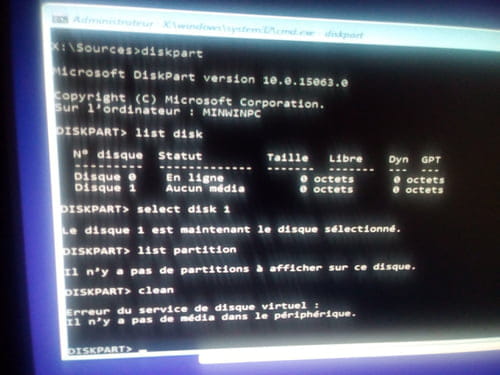
Then type diskpartlist disk
sel disk 1
list partition
and provide a screenshot
but that will also be zero.
Test the disk with the Malekal Live CD as I indicated or set it as a slave on another disk. -
-