Unable to start the computer - No operating system found
Solved
ByMorgane
Posted messages
43
Status
Member
-
ByMorgane Posted messages 43 Status Member -
ByMorgane Posted messages 43 Status Member -
Hello,
So to explain the problem clearly, I will go through things in order:
My grandfather caught a virus on his Compaq laptop running Windows 8. I wasn't with him at the time, so I had him run scans with antivirus software, apparently it removed some stuff.
Then I went to his place, and to be sure, I wanted to initiate a recovery from a date prior to his problem.
The recovery took a really long time, so I left telling him to let the computer run.
I don't know if he let the recovery finish before turning it off. Apparently, after a while, the computer restarted and landed on the place where he needs to enter his session password to log in.
He entered his password and apparently it was loading indefinitely, so he turned it off "brutally."
After that, he could no longer use it normally. A few seconds after startup (barely enough time to enter the session password), a blue screen appeared with the message "Your computer has encountered a problem and needs to restart :(" The computer restarted. He couldn't turn it off normally either because this blue screen appeared while the computer was shutting down, so it restarted.
So I thought about doing a complete system restore. Before that, I wanted to recover his files, so at startup, I pressed Escape, chose "System recovery," "Advanced options," then I selected restore system image, which opened a file explorer for me to select an image on the computer, but that wasn't what I wanted to do, so I just used it to access the files and save them to a USB drive (which I managed to do).
Then still in the advanced options, I initiated the "factory reset" proposed. So the restoration started but crashed shortly after for no real reason. And when the computer turned back on, I had no access to anything at all, as if Windows had been completely deleted.

The only thing I can access is this, by pressing Escape at startup:

I should note that when I choose F11, I return to my initial error message, it leads nowhere.
From there, I tried several things:
1. Running a disk diagnostic
So I did a quick diagnosis, it passed without error. I also did a slow diagnosis; same result.

2. I tried to boot the computer from a USB drive with a version of Windows
Well, I tried with several different USB drives, on all the USB ports of the computer, and the same initial message always appears. I also tried booting from a Windows 10 version, from a system recovery tool (I tried several programs to make my USB drive bootable, including Rufus, Windows 7 USB DVD Download Tool, etc.), but when I went to F9 (Boot Device Options), there was no listing.
3. I also tried resetting the BIOS settings to default.
4. I tried booting from a Windows XP CD that I had. The startup takes longer, but in the end, the same error always appears.
So, that's it, I don't know what to do anymore.
Do you have any ideas?
Configuration: Windows / Firefox 66.0
So to explain the problem clearly, I will go through things in order:
My grandfather caught a virus on his Compaq laptop running Windows 8. I wasn't with him at the time, so I had him run scans with antivirus software, apparently it removed some stuff.
Then I went to his place, and to be sure, I wanted to initiate a recovery from a date prior to his problem.
The recovery took a really long time, so I left telling him to let the computer run.
I don't know if he let the recovery finish before turning it off. Apparently, after a while, the computer restarted and landed on the place where he needs to enter his session password to log in.
He entered his password and apparently it was loading indefinitely, so he turned it off "brutally."
After that, he could no longer use it normally. A few seconds after startup (barely enough time to enter the session password), a blue screen appeared with the message "Your computer has encountered a problem and needs to restart :(" The computer restarted. He couldn't turn it off normally either because this blue screen appeared while the computer was shutting down, so it restarted.
So I thought about doing a complete system restore. Before that, I wanted to recover his files, so at startup, I pressed Escape, chose "System recovery," "Advanced options," then I selected restore system image, which opened a file explorer for me to select an image on the computer, but that wasn't what I wanted to do, so I just used it to access the files and save them to a USB drive (which I managed to do).
Then still in the advanced options, I initiated the "factory reset" proposed. So the restoration started but crashed shortly after for no real reason. And when the computer turned back on, I had no access to anything at all, as if Windows had been completely deleted.

The only thing I can access is this, by pressing Escape at startup:

I should note that when I choose F11, I return to my initial error message, it leads nowhere.
From there, I tried several things:
1. Running a disk diagnostic
So I did a quick diagnosis, it passed without error. I also did a slow diagnosis; same result.

2. I tried to boot the computer from a USB drive with a version of Windows
Well, I tried with several different USB drives, on all the USB ports of the computer, and the same initial message always appears. I also tried booting from a Windows 10 version, from a system recovery tool (I tried several programs to make my USB drive bootable, including Rufus, Windows 7 USB DVD Download Tool, etc.), but when I went to F9 (Boot Device Options), there was no listing.
3. I also tried resetting the BIOS settings to default.
4. I tried booting from a Windows XP CD that I had. The startup takes longer, but in the end, the same error always appears.
So, that's it, I don't know what to do anymore.
Do you have any ideas?
Configuration: Windows / Firefox 66.0
Related links:
- How to access the boot menu or BIOS on MSI?
- modifications non autorisées sur le firmware, le système d'exploitation ou l'UEFI
- Error: "An operating system wasn't found..." at startup
- Périphérique de démarrage introuvable
- Système d'exploitation manquant
- Classic Shell doit se configurer pour le nouveau système.
8 answers
-
Try F10 to enter the BIOS and see if there's a way to enable USB boot and disable security boot to ensure the USB key boots. If you are reinstalling Windows 8, you need to choose the UEFI installation mode with Rufus and set the BIOS to UEFI mode.
-
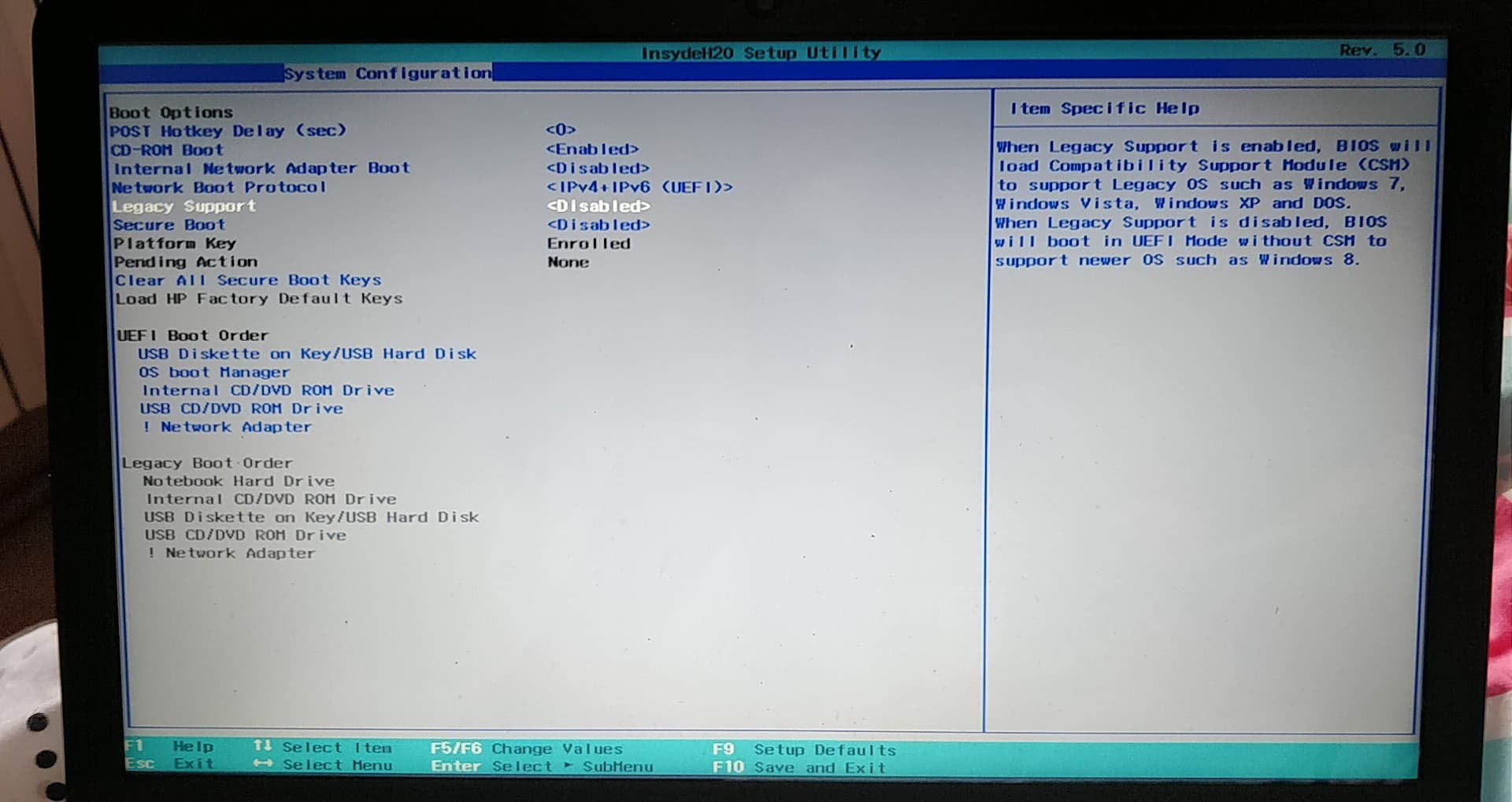
This is what I am trying to do, but I get a message upon restart after saving and exiting in the BIOS settings;
“Operating System Boot Mode Change
A change to the operating system Source Boot mode is pending. Please enter the pass code displayed below to complete the change. If you did not initiate this request, press the ESC key to continue without accepting the pending change.
Operating System Boot Mode change (201)
6197 + ENTER - to complete the change
ESC - Continue without change
”
Of course, I entered the code and pressed enter, but nothing happens at all. If I press Escape, it cancels the modifications and restarts the computer.
I read that this needs to be done with a USB keyboard, but same result.
EDIT: I hadn't activated the numeric keypad on the USB keyboard. I can now save the changes.
And apparently, it is reading the Windows CD I had inside.
EDIT 2: I activated Legacy Support and disabled Secure Boot.
I plugged in a USB stick with Debian on it, and it seems to boot from it.
-