Avast Secure Browser at PC Startup
Solved
pajo1616
Posted messages
121
Status
Member
-
pistouri Posted messages 19010 Registration date Status Contributor Last intervention -
pistouri Posted messages 19010 Registration date Status Contributor Last intervention -
Hello,
I often use Avast Secure Browser to connect to the Internet.
It works well.
However, this software starts up automatically when I turn on the computer.
And for some time now, not only does it launch at startup, but it also connects and displays the last visited page.
How can I stop this: the launch and display?
Thank you for your responses...
Configuration: Windows / Chrome 69.0.3497.100
I often use Avast Secure Browser to connect to the Internet.
It works well.
However, this software starts up automatically when I turn on the computer.
And for some time now, not only does it launch at startup, but it also connects and displays the last visited page.
How can I stop this: the launch and display?
Thank you for your responses...
Configuration: Windows / Chrome 69.0.3497.100
9 answers
-
pistouri Posted messages 19010 Registration date Status Contributor Last intervention Ambassador 8 732
Hello,
What is your version of Windows? (Windows 10, Seven...other)
If you have Windows 10, I have a solution to propose.
Avast Secure Browser may be launching at startup
Check this by opening the Task Manager (Ctrl+Alt+Del) in the Startup tab
Disable it if you see it
For the browser:
The procedure (it’s the same settings/Options as Google Chrome)
Open Avast Secure Browser
Go to the three dots at the top right
Go to → Settings
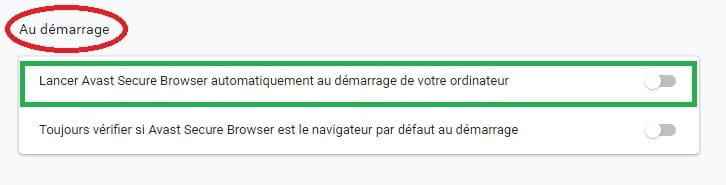
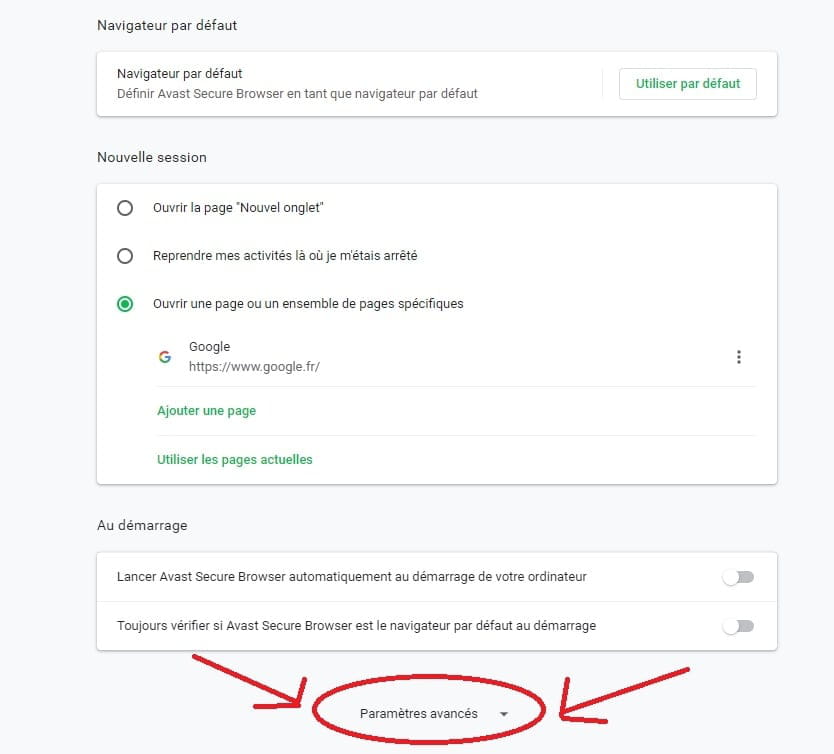
Section → On startup
Uncheck the box → Launch Avast Secure Browser automatically on startup

In the section → New session
Select → Open a specific page or set of pages
Choose a URL of your choice
For example Google → https://www.google.fr/

Add a page

Optional: Temporarily disable app execution in the background
Still on the Settings page, scroll to the bottom and click on → Advanced settings
Section → System (at the bottom of the page)
Disable → Continue running background apps after closing Avast Secure Browser

A+
-
-
The images will help you with the sections of the Avast Secure Browser
Open the Avast Secure Browser
1- Go to the Customize menu located at the top right (3 small dots)
Then click on Settings

For advanced settings, scroll to the bottom of the page

Task Manager
Note that you can also open the Task Manager by right-clicking on the Windows 7 taskbar and selecting the option → Start Task Manager.

-