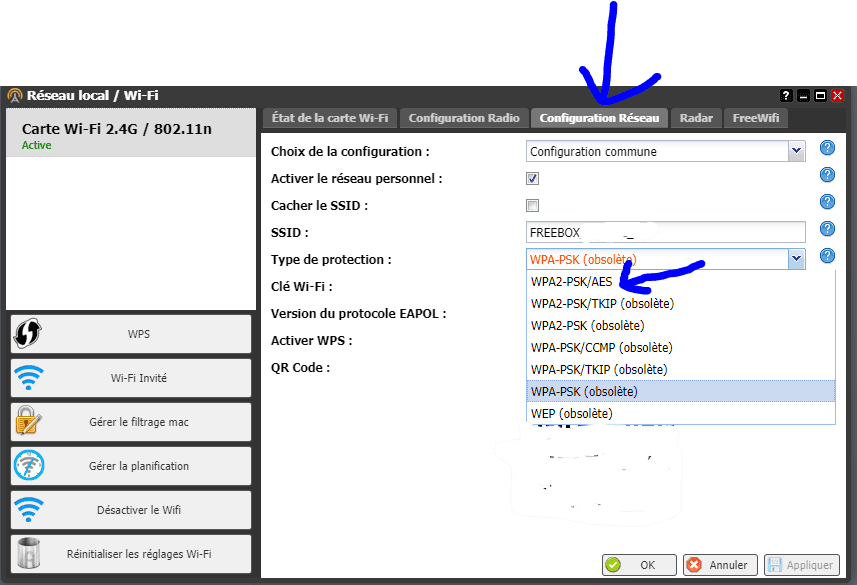
WPS cannot be activated on Free Box
Solved
JustMarcus
-
gigas62 -
gigas62 -
Hello,
I'm with Free and I have a Free box.
Recently, my Wi-Fi has been of poor quality, and my phone informed me about WPS. I learned that switching to WPA2 is much better, but when I go to my box, then to Wi-Fi, and then to WPS, it shows as disabled and even clicking on it does not activate it.
I would have liked to give you the version number to see if an update is necessary, but the small screen displaying the menus is somewhat "beat up" and the numbers for the time overlap the words so it was difficult to see much.
Thank you very much!
I'm with Free and I have a Free box.
Recently, my Wi-Fi has been of poor quality, and my phone informed me about WPS. I learned that switching to WPA2 is much better, but when I go to my box, then to Wi-Fi, and then to WPS, it shows as disabled and even clicking on it does not activate it.
I would have liked to give you the version number to see if an update is necessary, but the small screen displaying the menus is somewhat "beat up" and the numbers for the time overlap the words so it was difficult to see much.
Thank you very much!