
M.2 SSD unable to boot from UEFI BIOS
Solved
MyNameIsTwiggy
Posted messages
4
Status
Member
-
Zorbio -
Zorbio -
Hello everyone, and thank you in advance for the attention you give to this message.
Yesterday, I decided to take the plunge and buy an SSD with the following reference: Western Digital (WD) Black PCIe NVMe M.2 2280 - 512 Go. My PC was already equipped with two 1TB HDDs (which we will call HDD 1 and HDD 2). At first, everything seemed to work smoothly. I used a bootable Windows USB drive to install Windows 10 on my SSD, which booted perfectly fine. I then started transferring all my important folders from my HDD 1 (where my first installation of Windows was) to my SSD. Once that was done, from the Windows booted on my SSD, I formatted my HDD 1, which was no longer useful to me. The drama happened when I restarted the computer: it was impossible to boot Windows from my SSD.
In the UEFI BIOS of my motherboard (reference: Asus Prime B350-Plus), I realized that my SSD connected via M.2 to my motherboard was simply not recognized. In the list of storage devices, I find "M.2: N/A" while I can see my two HDDs. In the boot order, the reference of my SSD (WDC WDS512G1X0C-00ENX0) is present, but it is impossible to boot Windows from here. I get worried about my important files newly transferred to the SSD, so I reuse my Windows USB drive to reinstall W10 on HDD 1 (I had to go through Diskpart in the command prompt to clean it and make it active, apparently the formatting I had done with my software did not allow for a simple reinstallation of Windows). I boot W10 on HDD1 and transfer all my important files from my SSD to HDD 2 through the explorer (phew!).
Then, I formatted my SSD in MBR mode (I thought maybe my boot problem was related to that) and used my Windows USB drive again to make a new installation of W10 on the SSD. But again, it is impossible to boot directly on this new installation. However, when I boot on HDD1, Windows asks me if I prefer to launch W10 located on HDD 1 or the one on the SSD. Here is where I am now: it is impossible to boot directly on the SSD; I have to go through a HDD boot which then offers me to boot on my SSD.
Ideally, I would like to avoid remaining in this situation and be able to safely remove W10 from my HDD.
Why doesn’t my UEFI BIOS want to boot from my SSD? Why does my UEFI BIOS detect the SSD in the boot order but not in "M.2 device"?
While from a launched Windows or the bootable USB drive, the SSD always appears perfectly.
Thank you for reading and for all the advice you can give me! I am not a great expert neither in UEFI BIOS nor in the art of disks and partitions.
Guillaume
EDIT: The BIOS of my motherboard is up to date.
Another question, are there any parameters that a disk or a partition must absolutely have to be bootable, which my SSD might not currently have?
It looks like this with the disk management utility (I am booted on my SSD):

The "disk 2" (=SSD) does not have the status "system" while my HDD 1 ("disk 0") does. Is there a connection?
Yesterday, I decided to take the plunge and buy an SSD with the following reference: Western Digital (WD) Black PCIe NVMe M.2 2280 - 512 Go. My PC was already equipped with two 1TB HDDs (which we will call HDD 1 and HDD 2). At first, everything seemed to work smoothly. I used a bootable Windows USB drive to install Windows 10 on my SSD, which booted perfectly fine. I then started transferring all my important folders from my HDD 1 (where my first installation of Windows was) to my SSD. Once that was done, from the Windows booted on my SSD, I formatted my HDD 1, which was no longer useful to me. The drama happened when I restarted the computer: it was impossible to boot Windows from my SSD.
In the UEFI BIOS of my motherboard (reference: Asus Prime B350-Plus), I realized that my SSD connected via M.2 to my motherboard was simply not recognized. In the list of storage devices, I find "M.2: N/A" while I can see my two HDDs. In the boot order, the reference of my SSD (WDC WDS512G1X0C-00ENX0) is present, but it is impossible to boot Windows from here. I get worried about my important files newly transferred to the SSD, so I reuse my Windows USB drive to reinstall W10 on HDD 1 (I had to go through Diskpart in the command prompt to clean it and make it active, apparently the formatting I had done with my software did not allow for a simple reinstallation of Windows). I boot W10 on HDD1 and transfer all my important files from my SSD to HDD 2 through the explorer (phew!).
Then, I formatted my SSD in MBR mode (I thought maybe my boot problem was related to that) and used my Windows USB drive again to make a new installation of W10 on the SSD. But again, it is impossible to boot directly on this new installation. However, when I boot on HDD1, Windows asks me if I prefer to launch W10 located on HDD 1 or the one on the SSD. Here is where I am now: it is impossible to boot directly on the SSD; I have to go through a HDD boot which then offers me to boot on my SSD.
Ideally, I would like to avoid remaining in this situation and be able to safely remove W10 from my HDD.
Why doesn’t my UEFI BIOS want to boot from my SSD? Why does my UEFI BIOS detect the SSD in the boot order but not in "M.2 device"?
While from a launched Windows or the bootable USB drive, the SSD always appears perfectly.
Thank you for reading and for all the advice you can give me! I am not a great expert neither in UEFI BIOS nor in the art of disks and partitions.
Guillaume
EDIT: The BIOS of my motherboard is up to date.
Another question, are there any parameters that a disk or a partition must absolutely have to be bootable, which my SSD might not currently have?
It looks like this with the disk management utility (I am booted on my SSD):
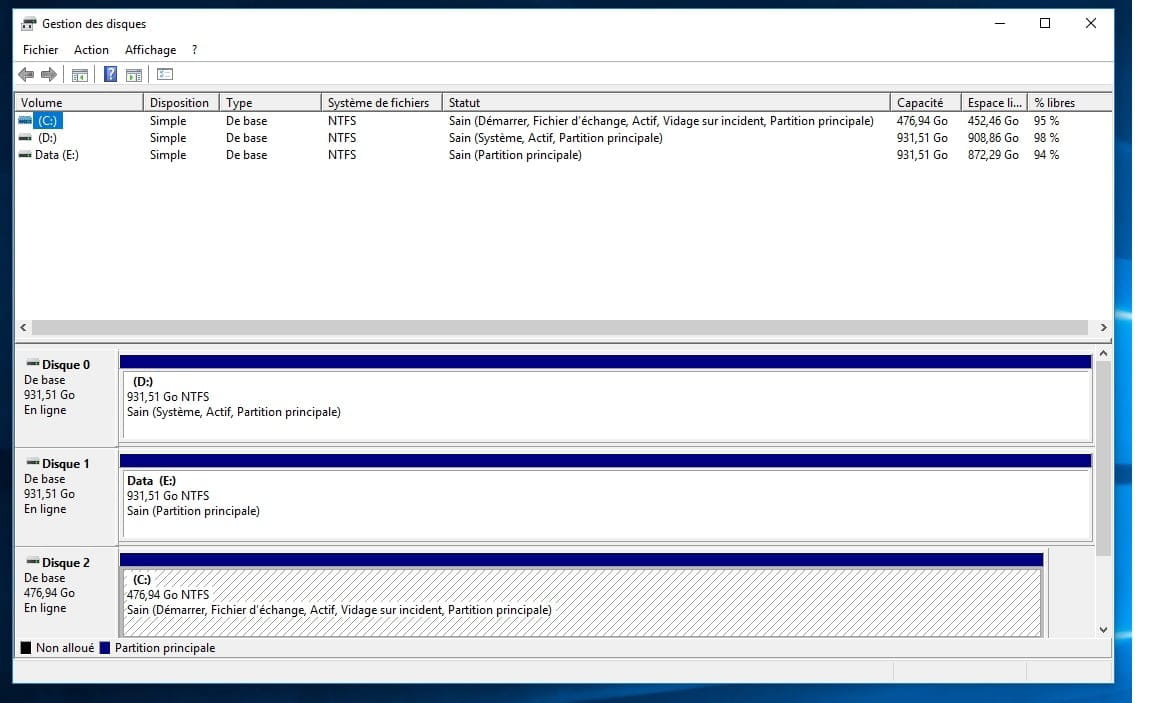
The "disk 2" (=SSD) does not have the status "system" while my HDD 1 ("disk 0") does. Is there a connection?
2 answers
-
Problem solved. I'm revealing the nature of the issue, in case anyone has the same.
It all stemmed from the fact that I was formatting my SSD partition myself before installing Windows on it, using the tools I had. I fixed the problem by deleting all partitions in the Windows installation utility, at the moment you choose the disk to install on. By clicking on "New partition," the utility automatically organizes the disk to make it bootable. My M.2 device is still not visible in the BIOS, but I have a "Windows Boot Manager" that has been added to my boot list, allowing me to boot directly from the SSD, which is what I wanted.
