[Asus] Stuck in BIOS Utility - EZ Mode
VirOjeK
Posted messages
9
Registration date
Status
Member
Last intervention
-
pistouri Posted messages 19010 Registration date Status Contributor Last intervention -
pistouri Posted messages 19010 Registration date Status Contributor Last intervention -
Hello everyone :)
The day before yesterday, I restarted my computer to install the new Windows update. So far, nothing unusual (except that the restart takes an incredibly long time, much longer than usual). When my PC finally turns back on, I see this:
http://www.noelshack.com/2019-33-4-1565868741-68441937-1378723558944126-1040321678447476736-n.jpg
I then try to exit this mode in various ways (turning the computer off and on, clicking on "Save and Exit," etc...) but nothing works, and as soon as my computer shuts down and I turn it back on, the same interface opens up. I've obviously searched online to find out how to get out of this, but nothing seems to work. All my classes are on this computer (which just turned 2 years old last week), so it is very important to me, and I really can't afford to buy a new one right now.
Here's what happens when I click on "Default(F9)" at the bottom of the page:
http://www.noelshack.com/2019-33-4-1565868953-68786970-352343579022622-71484306098225152-n.jpg
Whether I press "Ok" or "Cancel," nothing different happens and I return to the main interface.
Here's what happens when I click on "Save and Exit(F10)" at the bottom of the page:
http://www.noelshack.com/2019-33-4-1565869027-67948948-635027236988203-5617662067474432000-n.jpg
When I press "OK," my computer shuts down. But when I turn it back on, the same interface returns.
Here's what happens when I click on "Boot Menu(F8)" at the bottom of the page:
http://www.noelshack.com/2019-33-4-1565869125-67941597-402287613733450-7592693604489887744-n.jpg
When I double-click on the displayed option, the screen goes black for 3 seconds and then the BIOS Utility interface returns.
Here's what happens when I click on "Advanced Mode(F7)" at the bottom of the page:
http://www.noelshack.com/2019-33-4-1565869203-68749359-2113845178917305-4410073493274624000-n.jpg
Still in "Advanced Mode," here's what displays if I click on "Advanced":
http://www.noelshack.com/2019-33-4-1565869258-68969298-2364707817076420-1870029155815391232-n.jpg
Still in "Advanced Mode," here's what displays if I click on "Boot":
http://www.noelshack.com/2019-33-4-1565869285-69072740-3052133531482943-1944577826590031872-n.jpg
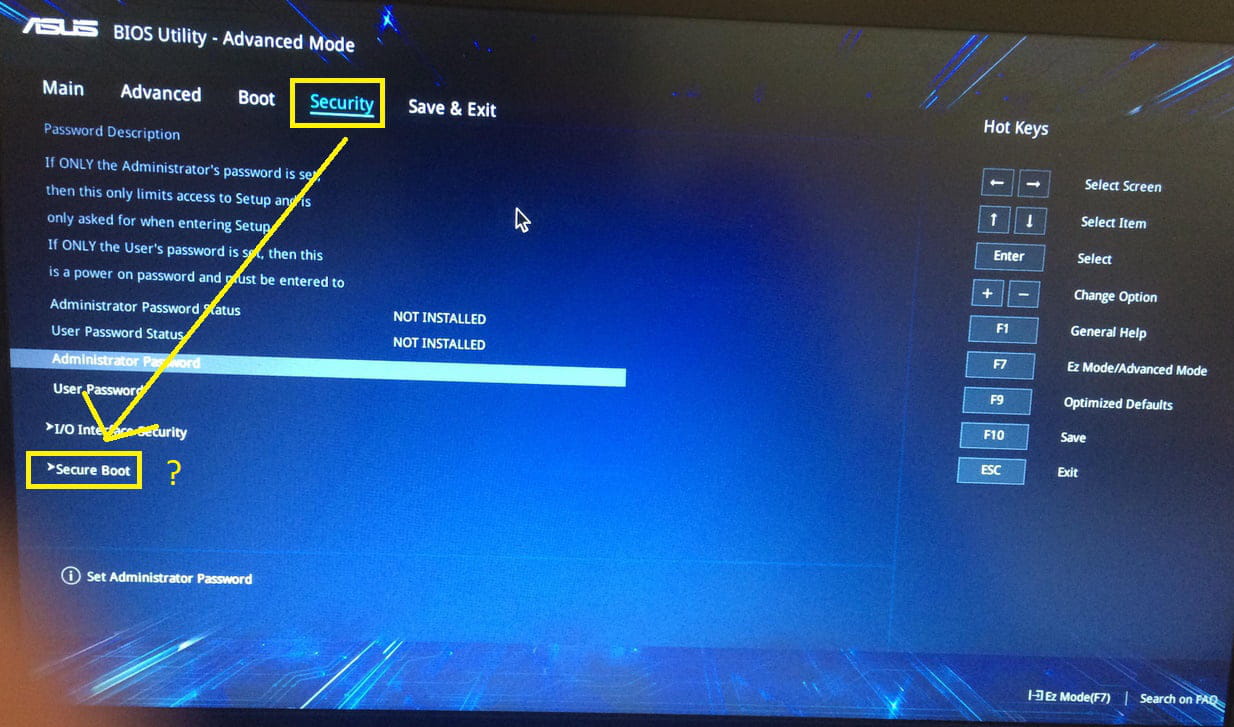
Still in "Advanced Mode," here's what displays if I click on "Security":
http://www.noelshack.com/2019-33-4-1565869317-69180627-1042260215977992-4291243451980185600-n.jpg
Still in "Advanced Mode," here's what displays if I click on "Save and Exit":
http://www.noelshack.com/2019-33-4-1565869347-68404110-452178785511331-3398094583186325504-n.jpg
If anyone has an idea on how I can finally get out of this mode that my computer has been stuck in for 2 days, I would appreciate it!
Thank you in advance to everyone who takes the time to read this long message! :)
The day before yesterday, I restarted my computer to install the new Windows update. So far, nothing unusual (except that the restart takes an incredibly long time, much longer than usual). When my PC finally turns back on, I see this:
http://www.noelshack.com/2019-33-4-1565868741-68441937-1378723558944126-1040321678447476736-n.jpg
I then try to exit this mode in various ways (turning the computer off and on, clicking on "Save and Exit," etc...) but nothing works, and as soon as my computer shuts down and I turn it back on, the same interface opens up. I've obviously searched online to find out how to get out of this, but nothing seems to work. All my classes are on this computer (which just turned 2 years old last week), so it is very important to me, and I really can't afford to buy a new one right now.
Here's what happens when I click on "Default(F9)" at the bottom of the page:
http://www.noelshack.com/2019-33-4-1565868953-68786970-352343579022622-71484306098225152-n.jpg
Whether I press "Ok" or "Cancel," nothing different happens and I return to the main interface.
Here's what happens when I click on "Save and Exit(F10)" at the bottom of the page:
http://www.noelshack.com/2019-33-4-1565869027-67948948-635027236988203-5617662067474432000-n.jpg
When I press "OK," my computer shuts down. But when I turn it back on, the same interface returns.
Here's what happens when I click on "Boot Menu(F8)" at the bottom of the page:
http://www.noelshack.com/2019-33-4-1565869125-67941597-402287613733450-7592693604489887744-n.jpg
When I double-click on the displayed option, the screen goes black for 3 seconds and then the BIOS Utility interface returns.
Here's what happens when I click on "Advanced Mode(F7)" at the bottom of the page:
http://www.noelshack.com/2019-33-4-1565869203-68749359-2113845178917305-4410073493274624000-n.jpg
Still in "Advanced Mode," here's what displays if I click on "Advanced":
http://www.noelshack.com/2019-33-4-1565869258-68969298-2364707817076420-1870029155815391232-n.jpg
Still in "Advanced Mode," here's what displays if I click on "Boot":
http://www.noelshack.com/2019-33-4-1565869285-69072740-3052133531482943-1944577826590031872-n.jpg
Still in "Advanced Mode," here's what displays if I click on "Security":
http://www.noelshack.com/2019-33-4-1565869317-69180627-1042260215977992-4291243451980185600-n.jpg
Still in "Advanced Mode," here's what displays if I click on "Save and Exit":
http://www.noelshack.com/2019-33-4-1565869347-68404110-452178785511331-3398094583186325504-n.jpg
If anyone has an idea on how I can finally get out of this mode that my computer has been stuck in for 2 days, I would appreciate it!
Thank you in advance to everyone who takes the time to read this long message! :)
2 answers
-
pistouri Posted messages 19010 Registration date Status Contributor Last intervention Ambassador 8 732
Hello,
Try this here
Otherwise, I've prepared this:
Try to disable Secure Boot in the Security tab
If you see → CSM
Set it to → Enabled (or launch csm = Enable)
If you see → FAST BOOT
Set it to → Disabled
Select the "Save & Exit" tab and press "yes"
Hold the "power" button until the laptop is completely off.
Turn it back on and continuously press "F9" for about ten seconds or until you see the
''Recovery Menu''.
Select "Advanced startup"
Then select "Troubleshoot".
Choose "System Restore" and select a date prior to when the problem started.
If that doesn't work, try this if you have a laptop:
1. Turn off the PC
2. Remove the battery
3. Now, reconnect the battery and turn on your computer.
See you
--
pistouri