Your PC can't use another display.
Solved/Closed
jurgenwallis
Posted messages
43
Status
Member
-
mahofoce1 Posted messages 2 Status Member -
mahofoce1 Posted messages 2 Status Member -
Hello everyone, I hope you are doing well.
I wanted to know if you had a solution to my problem, let me explain:
I recently updated my laptop
Since this update, I can no longer connect my laptop to my PC via an HDMI cable. The following message appears: Your PC can't use another screen. Try reinstalling the driver or using another graphics card.
I have already tried to update the drivers but according to Windows Update and the device manager, everything is up to date. I even tried to manually update the drivers but nothing works. When I try to update them manually, it shows an error.

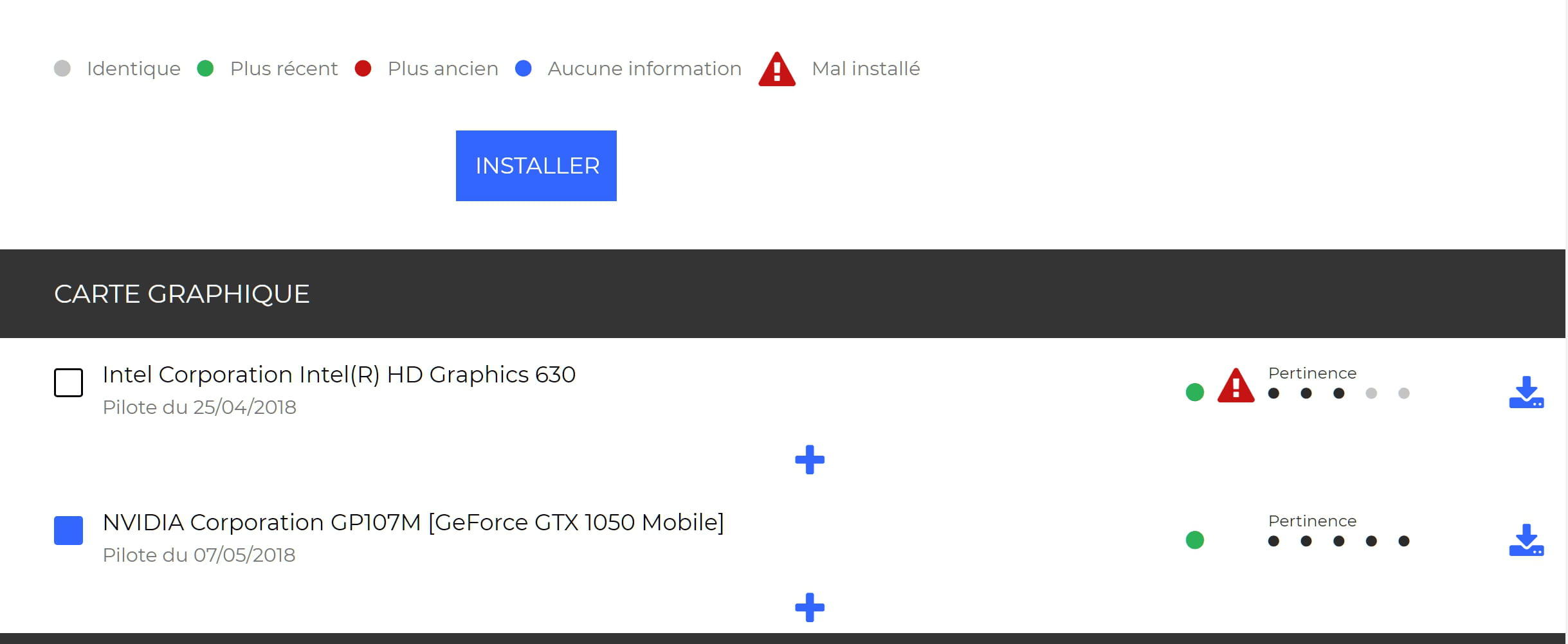
You can see that there is a little yellow warning on the Intel(R) HD Graphics 630 graphics card. I suspect the laptop has set the second NVIDIA card as the default card. And I can't seem to revert the original graphics card to the default usage.
So that's my issue. I would like to know if you have a solution because I can no longer project my computer onto my TV and it's really bothering me since I can no longer present my projects on a projector.
I wanted to know if you had a solution to my problem, let me explain:
I recently updated my laptop

Since this update, I can no longer connect my laptop to my PC via an HDMI cable. The following message appears:
 Your PC can't use another screen. Try reinstalling the driver or using another graphics card.
 I have already tried to update the drivers but according to Windows Update and the device manager, everything is up to date. I even tried to manually update the drivers but nothing works. When I try to update them manually, it shows an error.

You can see that there is a little yellow warning on the Intel(R) HD Graphics 630 graphics card. I suspect the laptop has set the second NVIDIA card as the default card. And I can't seem to revert the original graphics card to the default usage.
So that's my issue. I would like to know if you have a solution because I can no longer project my computer onto my TV and it's really bothering me since I can no longer present my projects on a projector.
9 answers
-
Good evening
I have exactly the same problem with my PC, HP 15-bs234wm
I am glad to know that jurgenwallis found a solution. But I am not sure what driver I need to download. Thank you for your help. -
I finally found the solution!
Thank you to gugu01 and tanteelise for your patience and advice!
Actually, I had to completely remove the Intel device and then reinstall the new version. It wasn't enough to just uninstall or disable it, but to completely remove it, install the new version, and then restart :)
Thanks again to these 2 forum members. You are gold! -
Hello,
You should disable the Nvidia card so that the first one goes back to default, maybe that would work! Happy Pentecost! -
Yes, it is always better to uninstall before installing.
Also try:
> the Intel detection and update software:
https://www.intel.fr/content/www/fr/fr/support/detect.html
> the Asus update software that you should have on your PC
> driverscloud: https://www.commentcamarche.net/faq/48455-mettre-a-jour-ses-pilotes-gratuitement-avec-driverscloud
Note what each person finds as a driver, test it, and report the results.-
Similarly, right-click on the 630 and choose to disable it.
Your PC should then operate on the 1050 (make sure it is enabled before disabling the other one)
Restart and see if everything is okay to project on another screen.
(this doesn't resolve the issue with the driver for the 630 though) -
-
https://forums.commentcamarche.net/forum/affich-35372647-votre-pc-ne-peut-pas-utiliser-un-autre-ecran#38
Do this to see. This is done by simply right-clicking on your card from the manager
There I was talking about disabling...
For an uninstallation, the same, device manager, right-click on the card > uninstall this device and check in the window that opens to uninstall with its drivers.
Restart and see what happens. -
-
-
-
Hello,
what is the exact model of this Asus PC?
best regards
--
A little help goes a long way.
No responses from 5 PM to 7 PM, thank you for your understanding :) -
download and install this driver:
http://dlcdnet.asus.com/pub/ASUS/nb/DriversForWin10/VGA/VGA_Intel_Kabylake_Win10_64_VER232016487701.zip
I will give you the nvidia one in a next message.
--
A little help goes a long way. Absence of replies from 5 PM to 7 PM, thank you for your understanding :)-
-
Hello everyone,
tanteelise, there is this driver for the HD 630, it’s very recent so there might be some issues encountered and fixed:
https://downloadcenter.intel.com/en/download/27680/Graphics-driver-for-Intel-graphics-for-Windows-10?product=98909
And for the GTX 1050 graphics card, I doubt that it's "real", it can't fit in a laptop if I'm not mistaken about the model or card.
I would recommend uninstalling it with its drivers before installing the 630 driver. -
-
-
gugu01
in the composition of this PC model, there is indeed this NVIDIA card.
I just checked the properties.
jurgenwallis :
here is the NVIDIA driver
https://www.nvidia.fr/content/DriverDownload-March2009/confirmation.php?url=%2FWindows%2F397.64%2F397.64-notebook-win10-64bit-international-whql.exe&lang=fr&type=geforcem
-
-

I admit that I don't know what to do here...
I have updated the NVIDIA graphics card, but the Intel one is not responding at all. -
https://downloadcenter.intel.com/download/27412/Graphics-Intel-Graphics-Driver-for-Windows-15-60-?product=9891
(I was on this page and it didn't show the drivers in French, oh dear https://www.asus.com/fr/Laptops/For-Students/VivoBook/VivoBook-Pro-15-N580/ ) -
gugu01 :
what do you think about this:
uninstall the Intel driver present in the device manager, restart the PC, and install the driver you suggested via
setup.exe?
--
A little help goes a long way.
No responses from 5 PM to 7 PM, thank you for your understanding :)