Google search in triple if selected text?
Solved
ShadowMor
Posted messages
235
Status
Member
-
pistouri Posted messages 19008 Registration date Status Contributor Last intervention -
pistouri Posted messages 19008 Registration date Status Contributor Last intervention -
Hello/Good evening,
When I select text in Chrome and click on the "Search '...' with Google" button, it performs the search on Google three times. The same thing happens when I type something in my URL bar; it shows what I typed three times on Google.
Well, I express myself poorly, but here are some screenshots:
- I select CCM and click on "Search 'CCM' with Google": https://i.imgur.com/615A5Va.png
- Or when I type CCM in the URL bar: https://i.imgur.com/VFCBPWC.png
= this is what it looks like on Google: https://i.imgur.com/OCHijSG.png
I must admit it's annoying over time, especially if what you're searching for is long and you have to delete two-thirds every time.
I switched to 'incognito' mode to see if it's due to extensions, but it still does the same thing, so the extensions are not the issue.
I tried to do the same on Firefox, and the search for selected terms works perfectly.
If anyone could shed some light on this.
Thanks!
When I select text in Chrome and click on the "Search '...' with Google" button, it performs the search on Google three times. The same thing happens when I type something in my URL bar; it shows what I typed three times on Google.
Well, I express myself poorly, but here are some screenshots:
- I select CCM and click on "Search 'CCM' with Google": https://i.imgur.com/615A5Va.png
- Or when I type CCM in the URL bar: https://i.imgur.com/VFCBPWC.png
= this is what it looks like on Google: https://i.imgur.com/OCHijSG.png
I must admit it's annoying over time, especially if what you're searching for is long and you have to delete two-thirds every time.
I switched to 'incognito' mode to see if it's due to extensions, but it still does the same thing, so the extensions are not the issue.
I tried to do the same on Firefox, and the search for selected terms works perfectly.
If anyone could shed some light on this.
Thanks!
3 answers
-
pistouri Posted messages 19008 Registration date Status Contributor Last intervention Ambassadeur 8 723
Hello,
Check if Google Chrome is not infected:
Open Google Chrome, delete everything in the URL bar, and copy/paste
chrome://settings/cleanup
Click on → Search
If nothing is found:
- Backup your bookmarks like this
-Run Resetbrowser
-Run Adwcleaner
Scan and delete everything that is found
Post the report with cjoint
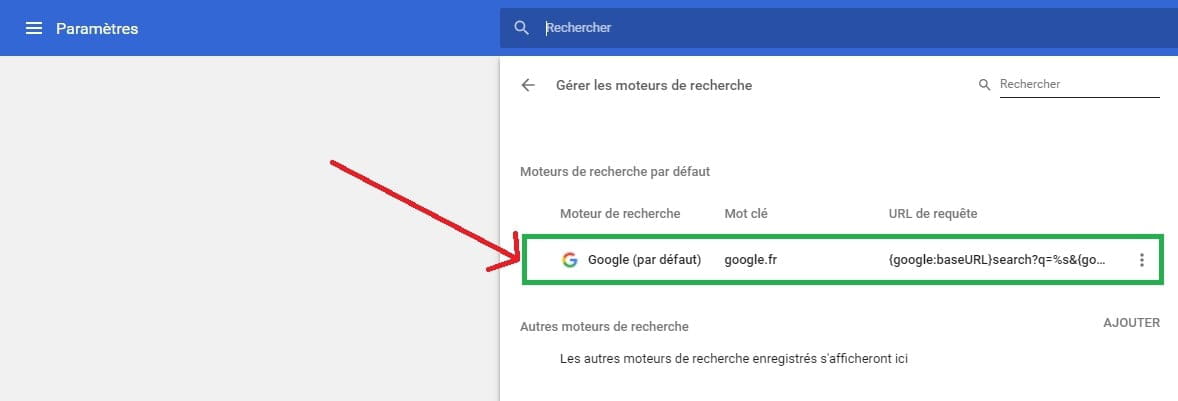
Before trying to type, make sure Google is the only default search engine
Right-click on the URL bar → Edit search engines
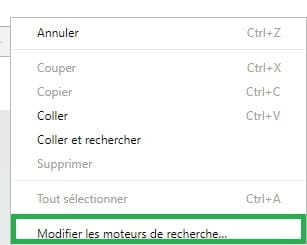
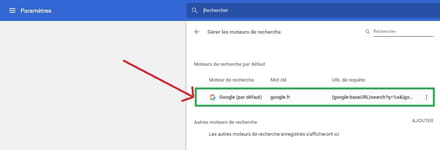
Remove any other search engines you see
You just need to click on the small horizontal dots then → Remove from list
Image with Google, the only default search engine
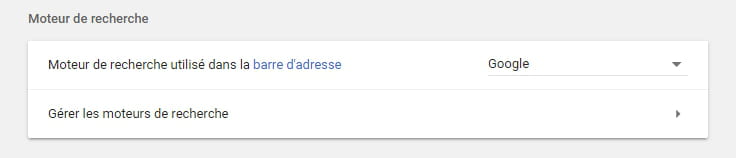
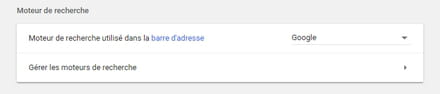
Check in Chrome Settings
Delete everything in the URL bar and copy/paste
chrome://settings/
Section → Search engine
If it fails, reset Google Chrome
Delete everything in the URL bar of Google Chrome and copy/paste
chrome://settings/reset
Then press Enter
Click on → Reset settings
Retry
Otherwise, if there's no improvement, uninstall Google Chrome with Revo
At the scan step, check → full scan
Once the PC is restarted, show hidden folders and files like this
- Delete the following folders:
C: \ Users \ username \ AppData \ Local \ Google
C: \ Users \ username \ AppData \ Roaming \ Google
C: \ Program Files (x86) \ Google
Hide the folders and files again
Download and install the browser Google Chrome
Try again
If it's OK, import your bookmarks and reinstall your extensions
We can already see 3 in your right-click (Nimbus screenshot, Save current version, and Ublock]
For Ublock once installed, update it like this
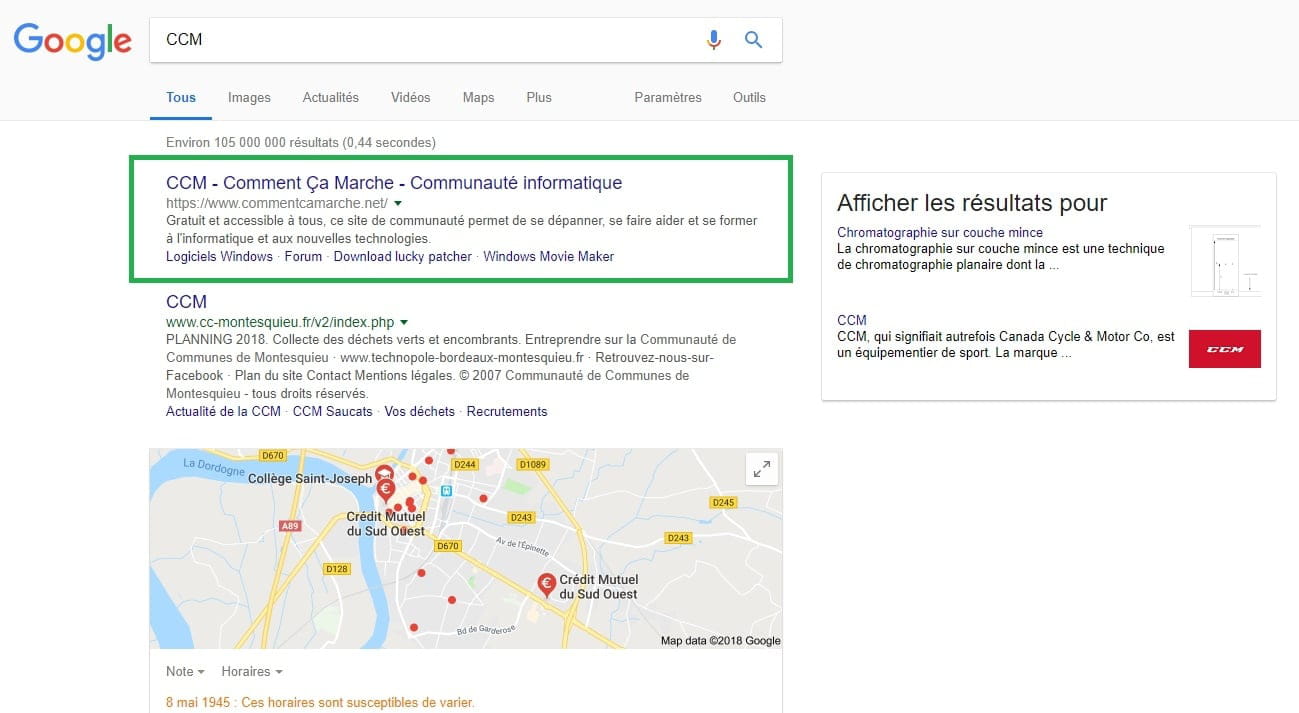
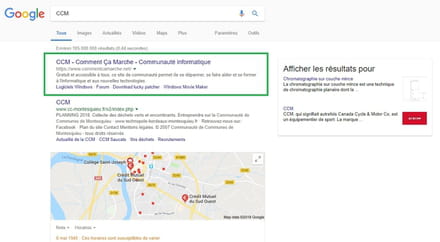
What seems strange to me in this screenshot is that Google doesn't seem to be your default search engine, as for example CCM doesn't appear first in Google when you search
Moreover, on the right side, you have nothing; even with Ublock you should see → show results , which is not the case
With a clean Google Chrome (+ clean extensions) you should see like this image
Question:
What version of Windows do you have?
What is your antivirus?
Do you have any other protection software like Malwarebytes running?
A+ for the comments in your next message, hoping the Reset Browser software will be enough
-
Hello, I'm really sorry, you went to so much trouble to respond to me and I completely forgot that I had posted this topic (during that time I didn't have a connection for a while and I don't often use CCM...).
Your solution indeed worked! I stopped at the step: "Section → Search Engine"
This "google": https://i.imgur.com/u0UJbSR.png was set as the default search engine so I deleted it and kept this one: https://i.imgur.com/0ApPc8r.png!
Thanks a thousand times!
Have a great day and HAPPY NEW YEAR! -
Better late than never, happy for you and thank you for the feedback that could help other contributors.
"A good year repairs the damage of two bad ones."
Quote from Voltaire; The Philosophical Dictionary (1764)
Have a nice evening.
-
-
pistouri Posted messages 19008 Registration date Status Contributor Last intervention Ambassadeur 8 723
Information:
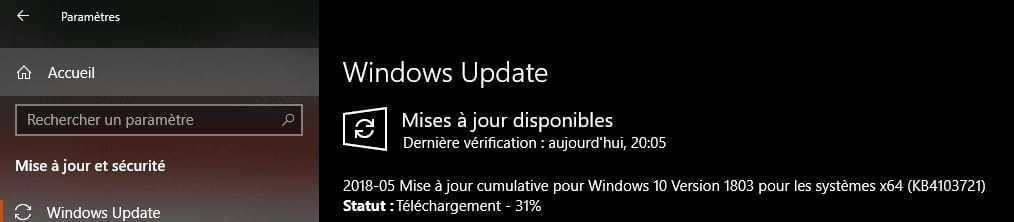
In case you are on the latest current version of Windows 10 (Windows 10 version 1803), there is a bug with Chrome (browser crashes or other issues).
A fix is planned in an upcoming cumulative update, Microsoft announced it.
Source here
Updates are released on the 2nd Tuesdays of the month (so keep an eye on your Windows Update, today is Tuesday, check for updates).
There is indeed one (KB4103721, for Windows 10 only), but it does not concern Google Chrome; probably Microsoft is working on it because they haven't found a solution yet, so check Windows Update from time to time.

Is Google Chrome up to date in your case → Version 66.0.3359.139 (Official build)
Go to the three dots at the top right in Chrome
Help → About Google Chrome
A+
-