
Sound issue
Solved
Mt.
-
kaneagle Posted messages 86298 Registration date Status Moderator Last intervention -
kaneagle Posted messages 86298 Registration date Status Moderator Last intervention -
Hi.
After reinstalling the system on my nasco PC (Windows 10 for Windows 10), I no longer have audio devices. There is this message: audio device not installed. Need help please. Thank you.
After reinstalling the system on my nasco PC (Windows 10 for Windows 10), I no longer have audio devices. There is this message: audio device not installed. Need help please. Thank you.
27 answers
- 1
- 2
Next
-
-
Hello,
Download and install -->> AIDA64 extreme <<--
For the report, check the example in the tutorial.
Post the report in your next message.
--
Human beings are at their best when things are at their worst. -
(CTRL+A) Select up to DMI
(CTRL+C) Copy
(CTRL+V) Paste in your next message.
--
Human beings are at their best when things are at their worst.-
Version AIDA64 v5.97.4600/en
Test Module 4.3.783-x64
Website https://www.aida64.com/
Report Type Report Generator [ TRIAL VERSION ]
Computer DESKTOP-7RPH7LF
Generator THRONE
Operating System Microsoft Windows 10 Home 10.0.14393.0 (Win10 RS1)
Date 2018-05-06
Time 18:02
Summary
Computer:
System Type Intel(R) Serial I/O DMA Controller
Operating System Microsoft Windows 10 Home
System Service Pack [ TRIAL VERSION ]
Internet Explorer 11.0.14393.0 (IE 11.0.33)
Edge 38.14393.0.0
DirectX DirectX 12.0
System Name DESKTOP-7RPH7LF
User Name THRONE
Connection Domain [ TRIAL VERSION ]
Date / Time 2018-05-06 / 18:02
Motherboard:
Processor Type QuadCore Intel Atom x5-Z8350, 1680 MHz (21 x 80)
Motherboard Name AMI Corporation Intel Education Tablet
Motherboard Chipset Intel Cherry Trail
System Memory [ TRIAL VERSION ]
BIOS Type AMI (12/21/2016)
Communication Port Communication Port (COM1)
Monitor:
Video Card Intel(R) HD Graphics (1 GB)
Video Card Intel(R) HD Graphics (1 GB)
Video Card Intel(R) HD Graphics (1 GB)
Monitor Intel AVStream Camera
Monitor LG Philips LP140WH8-TPA1 [14" LCD]
Storage:
Storage Controller Secure Digital (SD) Class Storage Controller
Storage Controller Microsoft Storage Spaces Controller
Hard Drive SanDisk DF4064 (58 GB)
Hard Drive TOSHIBA External USB 3.0 USB Device (465 GB, USB)
Hard Drive Status SMART OK
Partitions:
C: (NTFS) [ TRIAL VERSION ]
F: (NTFS) 465.8 GB (41.1 GB free)
Total Size [ TRIAL VERSION ]
Input:
Keyboard PIH Keyboard Device
Keyboard PIH Keyboard Device
Mouse HID Mouse
Network:
Primary IP Address [ TRIAL VERSION ]
Primary MAC Address A2-2C-36-9D-13-E7
Network Card Microsoft Wi-Fi Direct Virtual Adapter
Network Card Realtek RTL8723BS Wireless LAN 802.11n SDIO Network Adapter
Devices:
Printer Fax
Printer Foxit Reader PDF Printer
Printer Microsoft Print to PDF
Printer Microsoft XPS Document Writer
Printer Send To OneNote 16
USB3 Controller Intel Cherry Trail SoC - USB 3.0 xHCI Controller [D-1]
USB Device USB Mass Storage Device
USB Device USB Input Device
USB Device USB Input Device
USB Device USB Composite Device
USB Device USB Composite Device
USB Device USB 2.0 PC Cam
Battery Microsoft AC Adapter
Battery Intel(R) Battery Management Device
DMI:
BIOS Distributor American Megatrends Inc.
BIOS Version MHCHT10A.86A.1030.2016.1221.1658
System Manufacturer Default string
System Name NT14C
System Version Default string
System Serial Number [ TRIAL VERSION ]
System UUID [ TRIAL VERSION ]
Motherboard Manufacturer AMI Corporation
Motherboard Name Intel Education Tablet
Motherboard Version Default string
Motherboard Serial Number [ TRIAL VERSION ]
Chassis Manufacturer Default string
Chassis Version Default string
Chassis Serial Number [ TRIAL VERSION ]
Chassis Identifier [ TRIAL VERSION ]
Chassis Type Desktop Case
-
-
-
-
-
Press Windows + R
Type --> devmgmt.msc and OK.
If there is an alert regarding audio: (Also check in system devices)
Provide the hardware ID of the device
Look at this --> Find a device's hardware ID
Post the ID in your next message.
What do you have under sound, video and game controllers?
Is Windows 10 32 or 64 bits?
-
-
-
Give the device identification numbers of the unknown device and the Intel SST Audio device
Look at this --> Find a device identification number
Post the numbers in your next message.
--
The human being is at its best when things are at their worst -
-
-
Download and install --> 7Zip 64 bit
Download this driver --> Audio
and place it in your documents.
Right-click on --> tbook10s_...cab
Select --> 7Zip
Choose --> extract to ""tbook10s_...\""
Go to Device Manager.
Right-click on the unknown device
Update driver
Browse my computer ......
Choose from a list of drivers...
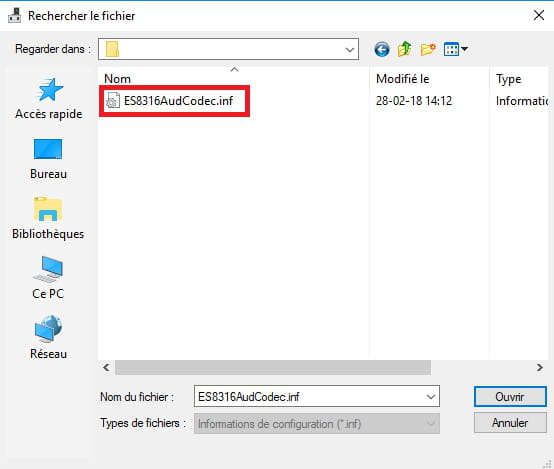
Have disk
Browse
Go to your documents
Go into the unzipped driver folder --> tbook10s_...
Select the file --> ES8316AudCodec.inf and OK.
Restart.
-
-
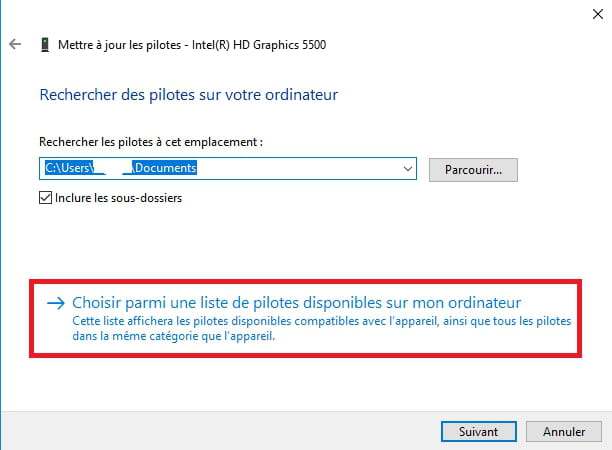
Did you follow the procedure correctly?
Right-click on the unknown device
Update the driver
Search for a driver on my computer or Browse my computer ......
Choose from a list of available drivers...
Do not select a device, click on --> Provided disk
Example images:


--
Humankind is at its best when things are at their worst. -
-
Go to Windows Update and make all the updates.
Start
Settings (Cogwheel)
Updates & Security
Windows Update
Check for updates.
--
The human being is at its best when things are at their worst. -
Control Panel
Sounds
In the Playback tab, what do you have as the default device?
Example image:
--
Human beings are at their best when things are at their worst. -
-
Press Windows + R
Type --> services.msc and OK
Check if the Windows audio service is running and set to automatic in the startup type.
Also check if the sound is not muted.
Provide the hardware ID number of the unknown device.
--
The human being is at its best when things are at their worst.







- 1
- 2
Next