Install Windows 7 on UEFI and GPT disk
Solved
PowershellMan
Posted messages
36
Status
Member
-
Malekal_morte- Posted messages 178136 Registration date Status Moderator, Security Contributor Last intervention -
Malekal_morte- Posted messages 178136 Registration date Status Moderator, Security Contributor Last intervention -
Hello,
I currently have a laptop with Windows 10 installed (OEM type product key). My BIOS is UEFI and my hard drive is in GPT mode. To install Windows 7 (32-bit version) I need to convert my hard drive to MBR, and for that I need to format my hard drive, including the Recovery partition.
My question is as follows: can I format the Recovery partition and then reinstall Windows 10 (and then Windows 7) without losing my product key?
Feel free to let me know if I haven't been very clear.
Thank you in advance.
I currently have a laptop with Windows 10 installed (OEM type product key). My BIOS is UEFI and my hard drive is in GPT mode. To install Windows 7 (32-bit version) I need to convert my hard drive to MBR, and for that I need to format my hard drive, including the Recovery partition.
My question is as follows: can I format the Recovery partition and then reinstall Windows 10 (and then Windows 7) without losing my product key?
Feel free to let me know if I haven't been very clear.
Thank you in advance.
9 answers
-
Good evening
was your PC running Windows 7??
if it's a recent one with Windows 10 you won't be able to install Windows 7 because Windows 7 won't have the drivers.
Windows 7 managed AHCI disks (64 bit).
--
we're not all geniuses but we're working on it
Google is your friend, don't forget it! -
Hello,
To install Windows 7 (32-bit version) I need to convert my hard drive to MBR
That's not necessary at all.
The latest Microsoft ISOs support EFI and GPT mode.


But anyway, you're trying to install Windows 7 on a computer that originally runs Windows 10.
You don't have a license...
Then read: https://www.commentcamarche.net/faq/47812-revenir-de-windows-10-a-windows-7
Please press a key to continue the cleaning... -
Hi, if I have a Retail license for Windows 7.
Regarding the partitions, does that mean I can install Windows 7 without converting anything?
--
Posted from https://itunes.apple.com/fr/app/ccm-live-discussion-forum/id871822609?mt=8-
Yes.
Deactivate the license on the other computer: https://www.malekal.com/licences-et-activation-de-windows/#Desactiver_la_licence_sur_lrsquoancien_ordinateur
1) Download the Windows ISO from the Adguard site, which allows you to download the official Microsoft ISOs: Download Windows installation ISOs
2) Create a Windows installation USB drive that will serve as the installation media for Windows 7: How to create a Windows installation USB drive
3) Boot from it by modifying the boot sequence and indicating the USB drive or DVD: How to boot the computer from a USB drive
The Windows 7 installation program will then start...
Follow the instructions in this tutorial: How to install Windows 7.
-
-
Okay, I just deactivated the license on the old computer.
But for your "no" edit, does that mean I have to convert if I want to install in 32-bit?
--
Posted from https://itunes.apple.com/fr/app/ccm-live-discussion-forum/id871822609?mt=8 -
Sure, thank you very much for your dedication :)
PS: your site is very well done
--
Posted from https://itunes.apple.com/fr/app/ccm-live-discussion-forum/id871822609?mt=8-
Thank you :)
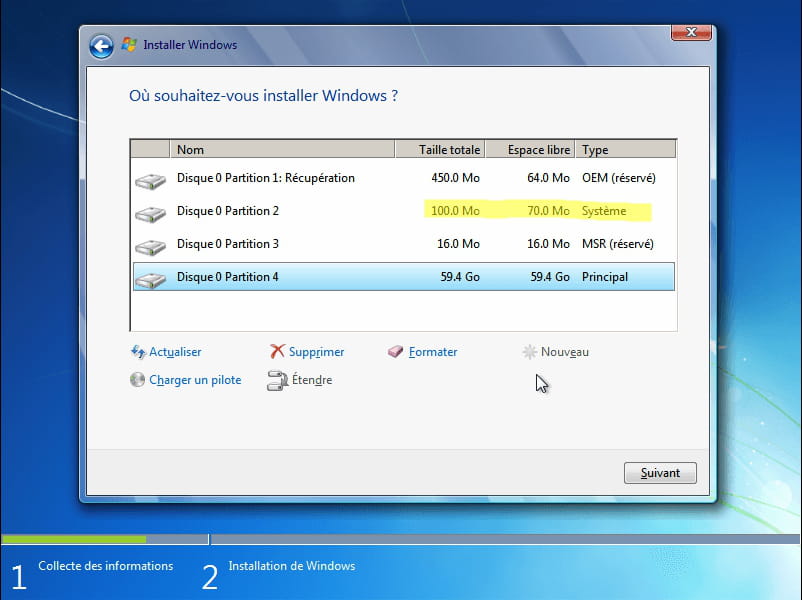
I have placed the screenshots above: https://forums.commentcamarche.net/forum/affich-35062992-installer-windows-7-en-uefi-et-disque-gpt#2
-
-
-
I will test this later and let you know if it works.
Thanks everyone!
--
Posted from https://itunes.apple.com/fr/app/ccm-live-discussion-forum/id871822609?mt=8 -
I just tried to install Windows, but it's impossible: I have to use a disk in MBR :(
-- -
The ISO date of 2010 must be why, unfortunately.
---
Yes, so make another one as explained above: https://forums.commentcamarche.net/forum/affich-35062992-installer-windows-7-en-uefi-et-disque-gpt#3
-