DTI to RJ45 Ethernet
Solved
ice033
Posted messages
13
Status
Member
-
brupala Posted messages 111138 Registration date Status Member Last intervention -
brupala Posted messages 111138 Registration date Status Member Last intervention -
Hello,
Like many people, I moved into an apartment with RJ45 sockets in every room.
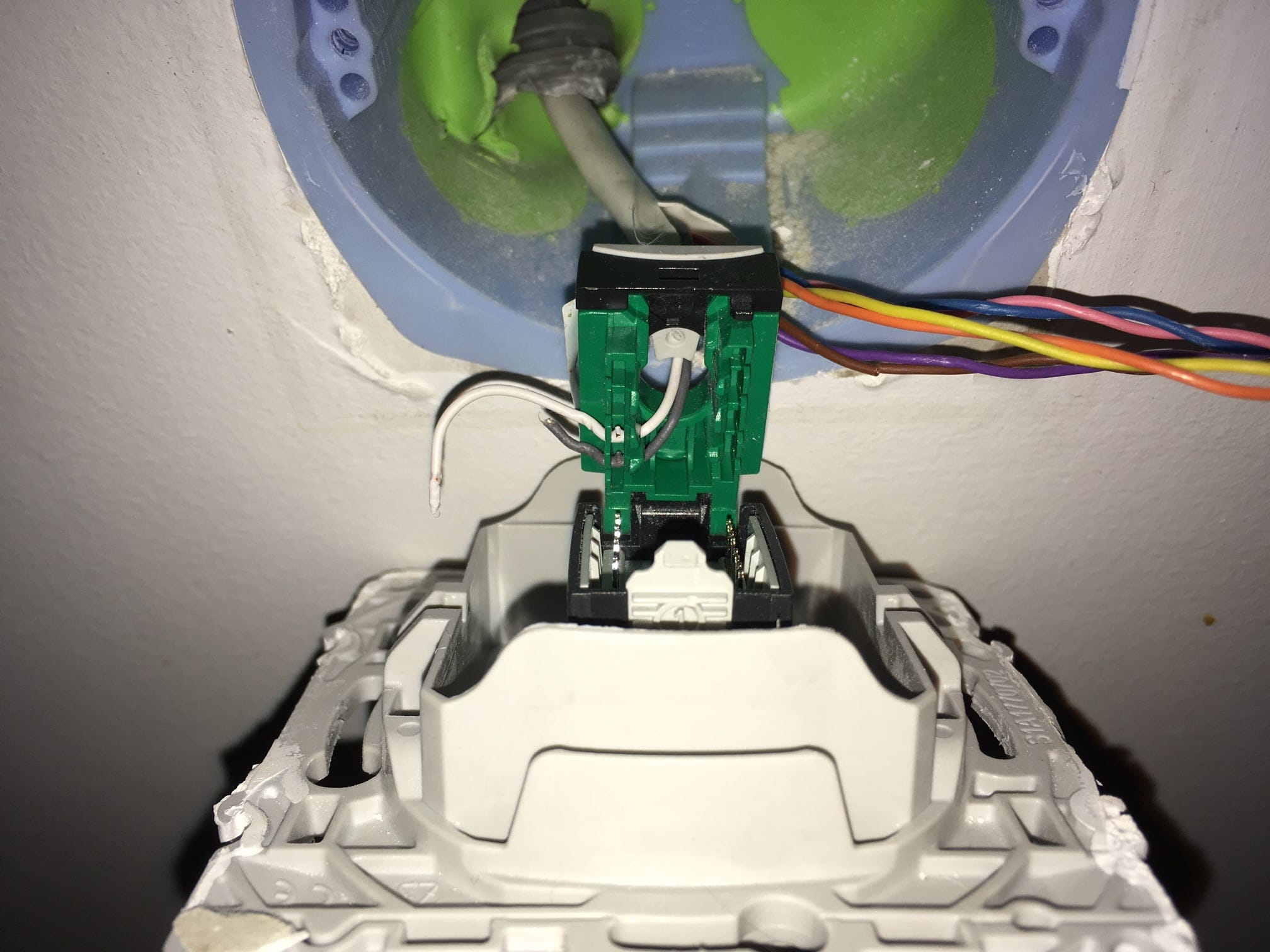
I opened one socket and only the gray and white wires are connected.
With my current setup (see the image of the DTI box), can I set up an Ethernet network in the apartment?
Considering I haven't seen an RJ45 DTI box in the electrical panel...
Thank you for your help.


Configuration: Windows / Chrome 61.0.3163.100
Like many people, I moved into an apartment with RJ45 sockets in every room.
I opened one socket and only the gray and white wires are connected.
With my current setup (see the image of the DTI box), can I set up an Ethernet network in the apartment?
Considering I haven't seen an RJ45 DTI box in the electrical panel...
Thank you for your help.

Configuration: Windows / Chrome 61.0.3163.100
3 answers
-
Hi there,
this wiring is only for the phone :-(
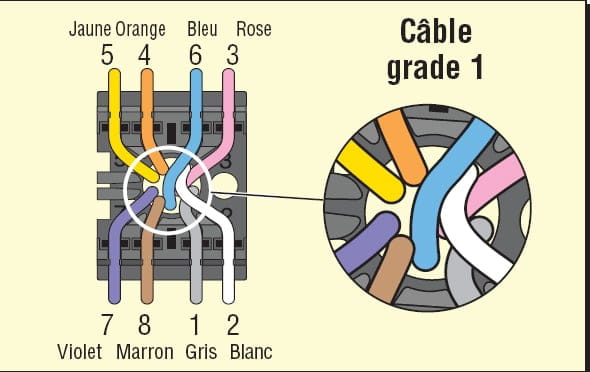
to use it for Ethernet, you need to create a patch panel next to the DTI by adding 4 RJ45 sockets on the 4 cables going to the wall sockets and connecting the 4 pairs in the wall and patch RJ45s like this:
by disconnecting the cables from the DTI and keeping only one going to the ADSL of the box.
by the way, where does the 5th cable at the bottom left of the DTI go?
it is different from the others ....
--
and ... There you go, here it is! -
Hello and thank you for the response.
The 5th cable (red/blue) goes to a box where I have 4 RJ 45 sockets marked (Phone/modem) but they are not wired. I'll send the photo when I get home as I’m not sure about the socket type (RJ45 or RJ11)
To make sure I understand the explanation correctly:
I unplug the 4 gray/white pairs from the "outputs" of the DTI (on the top right and bottom), I connect them to RJ45 sockets according to the diagram. I do the same with the wall sockets according to the diagram.
Then I connect the Freebox to the DTI socket and the 4 newly wired RJ45 sockets to the box?-
I disconnect the 4 gray/white pairs from the "outputs" of the DTI (top right and bottom), then I connect them to RJ45 sockets following the diagram. I do the same with the wall sockets according to the diagram.
Exactly, yes.
Then I connect the Freebox to the DTI socket and the 4 newly wired RJ45 sockets to the box?
Almost yes,
it's better to connect the box's ADSL to the modem socket of the main filter which we haven't seen but which you seem to be describing there:
the 5th cable (red/blue) goes to a box where I have 4 RJ45 sockets marked (Phone/modem)
-
-
So I checked carefully, it is indeed the ADSL filter as shown in the picture.
So I have a question that intrigues me.
In the apartment, I need 8 wires to transmit VDI information, but in the DTI, the FT signal only arrives through 2 wires (white and blue)?
So it's the box that is responsible for "transforming" the signal that comes through the two poor white and blue wires that go to the DTI input and pass through the filter?
By the way, if I am unsubscribed, do I need the filter?