Casio SE S100
Solved
Hello,
I purchased a Casio SE S100 cash register, but I can't program it to display VAT on each receipt! Also, VAT and net amount are not showing on the Z report! Can you help me?
Best regards,
Thank you in advance!
Configuration: iPhone / Safari 602.1
I purchased a Casio SE S100 cash register, but I can't program it to display VAT on each receipt! Also, VAT and net amount are not showing on the Z report! Can you help me?
Best regards,
Thank you in advance!
Configuration: iPhone / Safari 602.1
12 answers
-
baladur13 ModeratorHello,
Apart from directing you to various manuals
https://support.casio.com/fr/manual/manualfile.php?cid=006004012
and more specifically the programming manual
https://support.casio.com/storage/fr/manual/pdf/FR/006/SE-S100_QPM_FR.pdf
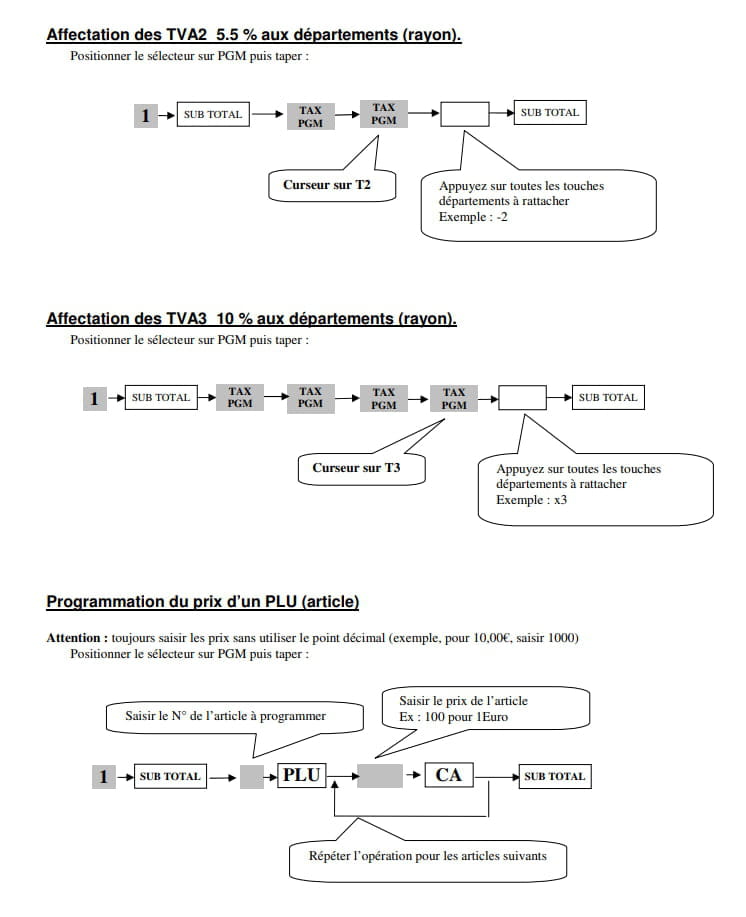
For VAT, see pages 6 and 7

To reset, it's here:


-
Djino57Hello, I just acquired this cash register in question and I'm completely lost. I am in fast food and I have no idea how to set this thing up... can someone help me? Thank you.
-
FrancisHello,
Buy a 16GB SD card to program the cash register from a PC.
Your PC must be equipped with an SD card reader.
Install the program available at the following address http://casio-caisses-enregistreuses.fr/wp-content/uploads/2017/09/SOFT-SES100.zip
Follow the instructions in the ECRSS100.pdf file contained in the zipped folder above. -
cmqm64@FrancisI installed the software, configured everything in the software, which is easy enough, but it refuses to save on the card
do you have any idea?
-
-
ClaudineSuper! It's so much simpler when an experienced user explains things than when a computer scientist does it with binary logic :-), my register finally works according to the law and my wishes: not easy to make the two coincide. Thank you all for everything you understood and put at the service of others. Claudine
-
Olive89Hello,
I just acquired this cash register, and for VAT, I recommend using the Casio Windows software, which allows you to program the register directly on the computer. It's much simpler. Here is the link to Casio's official software => http://casio-caisses-enregistreuses.fr/wp-content/uploads/2017/09/SOFT-SES100.zip
For my part, the only issue I'm having is with the logo. I managed to integrate it once, but now the software isn't loading my logo in the correct bmp format. Any ideas?-
-
-
BulleUnless I'm mistaken, I believe that Paint only saves at 72 dpi.
I think it would be better to use "GIMP."
I did it in Photoshop, and I had no problems: Logo + phone + website.
I inserted it using the programming software found on the Casio website: regarding this, I am very surprised that every reference to this very useful software is systematically removed from the blog. -
Bulle@BulleIf you only have Paint, try creating a file that is 13.5 cm x 5.90 cm instead of 3.25 cm x 1.42 cm
(this is the equivalent at 72 dpi) -
-
-
anelor86Hello everyone,
Thank you in advance to those who share their experiences on the forums, it helps prevent long moments of solitude for others in front of their new cash register!
My problem is as follows: when printing the Z ticket, the "gross sales" is the same as the "net sales" while the "tax excluded" sections 1, 2, 3, and 4 are correctly filled in with the right amounts corresponding to each VAT rate.
Could someone explain to me how to get a coherent net sales figure?
Thank you very much
Anne Laure-
BulleI made the same observation, but I think we are wrongly interpreting the words in their primary definition. Given that at the bottom of the ticket, I have my net turnover, then the VAT, it shouldn't be an anomaly.
For those who offer discounts, I believe that the gross figure indicated will be different from the net one.
-
-
YvesGood evening,
I also found it difficult to program the Casio SES100.
Regarding VAT, it is important to set the display of net and VAT on the receipt correctly because I noticed that the net and VAT amounts were incorrect when using the discount key (% / CLK #) on the total amount.
As an example
sale € 10.00
sale € 10.00
Subtotal € 20.00
20 %
% - - 4.00
Net amount 1 € 16.67
VAT 1 € 3.33
Total € 16.00
Cash € 16.00
The same receipt would have been correct if we had deducted the 20 % per line item; we would have had net and VAT amounts of 13.33 and 2.67.
Maintenance explained to me that you cannot apply a discount after a subtotal, which seems strange to me, so be very careful, and if anyone has a solution, it would be welcome.-
BulleThe machine calculates well: I learned over 20 years ago, when I was an employee, I gave discounts on the register, the accountant reprimanded me because VAT had to be paid on the amount excluding the discount.
If you want to give a discount, it needs to be done before you ring up the sale!
And yes, that's the law! That's why we are required to have a cash register!
That way, we pay VAT on an amount that we do not actually receive.
The second solution is not to give a discount.
Ask your accountant. -
-
Bulle@YvesYes, you can, but you will then have to pay VAT on the price before the discount, as indicated on the receipt.
-
-
Titi@PatPage 52 of the manual.
Key on PGM
Then
2 and the Sub Total button
then
1 and the CH button for the first line
Confirm by pressing the = CA/ button
2 and the CH button for the 2nd line
Confirm by pressing the = CA/ button
3 and the CH button for the 3rd line
Confirm by pressing the = CA/ button
4 and the CH button for the 4th line
Confirm by pressing the = CA/ button
5 and the CH button for the 5th line
Confirm by pressing the = CA/ button
To exit the programming press the SUB TOTAL button
To type the text, you must use the numeric keypad, the 8 key allows you to enter the letters ABC, for example to get the letter C, you must press 8 three times.
On page 48 of the manual, we have the complete correspondence for each key.
-
-
daxou14Hello, how can I make restaurant vouchers appear as a payment method????
Thank you-
BulleI needed a button for transfers: I took the credit card button that I don't need.
On my register, I renamed the buttons: ch to CB, CHK to CH, and CR to Vir; I printed little squares and removed the buttons to place them.
I didn't understand the difference between a bank card and a credit card.
How do people who accept contactless payments do it?
It probably goes through a bank card.
I didn't go into detail if it could be changed on the receipt.
We'll see... -
-
Bulle@daxou14I don't see why I would be offside: I'm just assigning a function to a key that is useless to me, a function that I need and doesn't exist.
I'm even going to try to change the title on the ticket, but that's not going to be easy, because the explanations are not clear at all. -
Olive89I believe there are no dedicated keys for meal vouchers; you probably need to use a more computerized cash register. Bulle's response seems like a possible solution: you assign the key ("CR" for credit card) for meal voucher payments. In case of an audit, they can match your meal vouchers with the "CR" recording.
-
-
-
oscarHello, has anyone figured out how to change it to round up?
-
-
BulleHelp, I'm stuck!
Could someone explain to me how to not display the 4 VAT rates on the receipt?
I only have one rate and I don't see the point of seeing VAT 2 = 0, VAT 3 = 0, etc. every day.
On page 62 of the manual, this is well explained, but I don't understand it at all:
In the left column, it says D5, D4, D3, D2, and D1: what do they correspond to?
In the example: D5=2, D3=7, D2=3???
Thanks to those whose brain has worked well and who will gladly enlighten me. -
Oscar@BulleGood evening
I deleted the labels during the programming. -
-
Bulle@OscarUnless I'm mistaken, if you do Z, you get the daily total.
For the monthly total, you need to type 10Z.
For the annual total, 20Z.
-
-
Tazounette60Thank you Bulle, I'll try that! I hope it works :)
-- -
jlm22Bonjour, can we read the SD card with its recordings on a PC?
-
-
Lenowcomputer Ask your question Report topic
Hello,
I have a Casio SE S100 cash register. Everything works very well, however when I want to close my day I put my key on X and then press CA AMT. A report is printed, then I switch my key to Z to reset it, but the next day when I perform the same procedure, I find the total of the previous day's transactions added to the previous ticket + the same for the cash advances that are also added... I am reaching out to request the correct procedure to reset my cash register so that I don’t find the previous day's transactions on my ticket the next day.
HELP CASIO ASSISTANCE IS OUT OF SERVICE -
jlm22@Olive89Thank you for your response (Casio SE-S100 register)
and would you be able to generate a monthly Z report (our old register provided a GTZ summary)
we do the X during the day to do a check, no problem there
and a Z in the evening for the revenue broken down by department and VAT
but we would also like to have the accumulated figures for all days on a single slip at the end of the month!
we are talking about the EJZ report, how do we do that???
by doing 10 and Z, we get the total revenue accumulated for the days! -
Olive89@jlm22Hello,
Unfortunately, I haven't seen any settings regarding the total for each day printed at the end of the month, as only the total for the entire month is displayed. -
oscar@jlm22Good evening, use the help key to print. Then type 04+help to edit... or 05+help to know EJZ.
-
-
BulleHello,
I struggled so much that I want to share my experience with you: You need to program the VAT rates, for that:- type 3 then sub/Total then 125 then sub/Total, then the rate, finally type Ca/Am then Sub/Tot.
- For the other rates, do the same thing by replacing 25 with 225 for another rate, 325 for the third rate, and 425 for the fourth rate.
- Once that's done, you need to assign to each department the VAT rate that corresponds to it. For me, I assigned the same VAT code to all items, because I only have one rate.
Example:- Type 1 then Sub/Tot, place the cursor on VAT 1, press the key for the desired department (1 to 24), then press Sub/Tot.
And there, miracle! we have the price including VAT, then the price excluding VAT, and the amount of VAT.
I hope this helps some of you.-
denisThank you very much for the response. I have another question if you happen to have the answer. I bought a Casio SE-S100 and I would like to integrate items into the department that are not predefined and for which I don't want to set a price (because there may be several), so no PLU, just subcategories of the department. And if possible, once done, how can I integrate them when processing a payment (a key that allows calling the subcategory in the department). Thank you in advance for your response. Best regards.
-
Bulle@denisHello,
Attached are two links:
https://support.casio.com/storage/fr/manual/pdf/FR/006/SE-S100_QPM_FR.pdf
http://casio-caisses-enregistreuses.fr/wp-content/uploads/2017/09/SOFT-SES100.zip
The first one concerns the explanations given yesterday regarding the VAT rate, and the second is software that I consider essential for managing the names and prices of items and departments.
You just need to click on the icon and specify the path of the memory card that you have removed from the register and placed in the card reader of the computer.
It's much easier and faster than setting it directly on the register.
Then, when you put the card back in the cash register, remember to restore the data on the register:
7, then sub/total, then 4104, then sub/total, then CA/AMT.
Don’t hesitate to download the manuals; there are several, and they are not identical.
I downloaded one that is 91 pages long, but I need to find the link.
As for the PLU, I don’t find it necessary.
I just type my price and my department code.
2000 possible items to register is far too constraining for my taste.
I just found the link to a more detailed manual:
https://support.casio.com/storage/fr/manual/pdf/FR/006/SES100_EU2_FR.pdf -
denisThank you for your response. But actually, I don't think what I want is possible. I just want to create subcategories in the aisles without giving a price, so no PLU (because in the subcategory I want to create there are several possible prices). For example, the light aisle, subcategory lamps (and among the lamps, there are multiple prices). I saw that by creating a PLU with a price, we can attach it to an aisle and recall it during a purchase, but I haven't found a way to create a simple subcategory to avoid creating 24 aisles. If you happen to have a trick, I’m open to suggestions. Thanks in advance and thanks again for your help.
-
denis@Bulle<translation>One last question, I created ranges beyond 12. I would like to know how we can select them when making a purchase. Thank you again for your help.</translation>
-
Bulle@denisTo select departments 13 to 24, you need to type your price, press the #/DEPT-SHIFT key, and then press the keys 1 to 12 (the keys have the primary function number on them, followed by the DEPT-SHIFT function in the bottom right corner).
I think that to request sub-departments (for me, they're more like departments), you need to go through PLU (You can enter up to 200 prices).
See pages 51 to 55 of the 90-page manual.
-
jungleThe VAT does not appear on the receipt, what should I do?
What can I do to obtain the Z end of Thank you for your response.