
Application permission issues
Solved
Hello,
Having reset my phone, the apps keep asking me to approve permissions like access to the camera for example.
Except when I want to authorize them, I get a message saying that I need to disable an overlay... And it redirects me to a menu where no matter how much I check or uncheck all the apps, it changes absolutely nothing, especially since sometimes the app asking for these permissions isn't even listed...
Here's the message:
Sometimes I manage to bypass this message by repeatedly navigating through the app's permission info and allowing certain actions, but sometimes the message persists and it's honestly tiring because I can no longer post photos or even take them with certain apps...
If anyone has a remedy for this problem, thank you in advance!!
Having reset my phone, the apps keep asking me to approve permissions like access to the camera for example.
Except when I want to authorize them, I get a message saying that I need to disable an overlay... And it redirects me to a menu where no matter how much I check or uncheck all the apps, it changes absolutely nothing, especially since sometimes the app asking for these permissions isn't even listed...
Here's the message:
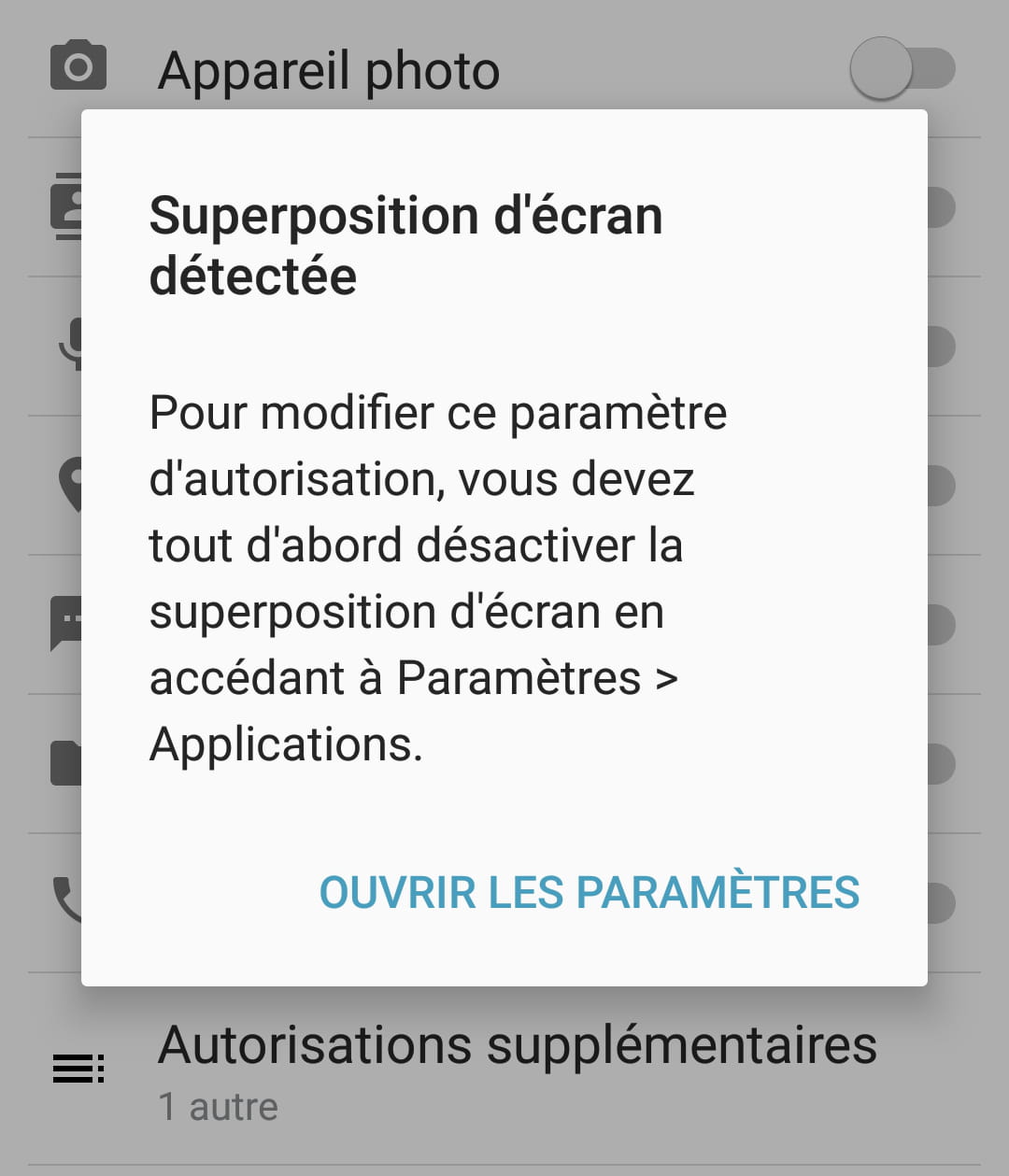
Sometimes I manage to bypass this message by repeatedly navigating through the app's permission info and allowing certain actions, but sometimes the message persists and it's honestly tiring because I can no longer post photos or even take them with certain apps...
If anyone has a remedy for this problem, thank you in advance!!
3 answers
-
ModeratorHello,
the apps keep asking me to approve permissions such as access to the camera for example
Yes, that's the new security feature of Android. Permission requests are no longer made at installation but at usage. However, when the app asks you for permission, you can check the "don't ask again" box.
As for the screen overlay, I've already seen a post about this problem in the forum. I can't find it right now, but if I remember correctly, it's due to an app like TweakUI or something similar. If I find a link, I'll post it here.
--
@+
Buno, Modo CS-CCM
The urgent is done, the impossible is underway. For miracles, provide for a delay... -
For those with the issue, I found the solution: For my part, this message would appear when I was talking to people on Messenger via the bubble... Just close the bubble and the message will no longer appear...
-
ModeratorI found this on the internet:
https://www.samsung.com/n_africa/support/mobile-devices/screen-overlay-detected-how-do-i-adjust-the-mouse-on-an-android-marshmallow/
--
@+
Buno, Modo CS-CCM
The urgent is done, the impossible is underway. For miracles, provide for a delay...
L'urgent est fait, l'impossible est en cours. Pour les miracles, prévoir un délai...

