PC INFECTÉ, DEMANDE DE DÉSINFECTION
Solved
Hello
I hope you’ve been well all this time.
One of my PCs that you helped repair a few years ago is making me think I might have several viruses on it. Would you be kind enough to help me?
FRST: https://pjjoint.malekal.com/files.php?read=FRST_20260919_ca6ed918f36dcf6d
ADDITION: https://pjjoint.malekal.com/files.php?read=20260919_ee261ece1f74bc1c
Best regards,
Rudy
2 answers
-
Moderator
Hello .
You used something to activate a Microsoft product, here are the processes:
IFEO\osppsvc.exe: [GlobalFlag] IFEO\osppsvc.exe: [VerifierDlls] SppExtComObjHook.dll IFEO\SppExtComObj.exe: [GlobalFlag] IFEO\SppExtComObj.exe: [VerifierDlls] SppExtComObjHook.dllI can remove them but the Microsoft product will no longer be activated, tell me what you want to do.
Windows 10 is not up to date.
Firefox is infected.
You have a PowerShell infection.
Meanwhile here is a first script :
Procedure to follow in the indicated order :
1- Open FRST as administrator, for this right-click FRST and choose run as administrator
2 - Copy the entire script that is in the box that follows:Start:: CreateRestorePoint: CloseProcesses: HKLM\...\RunOnce: [Delete Cached Update Binary] => C:\Windows\system32\cmd.exe /q /c del /q "C:\Program Files\Microsoft OneDrive\Update\OneDriveSetup.exe" (Not found) HKU\S-1-5-21-172983263-84869316-3819629878-1001\...\Run: [WindowsPowerShell_v1.0 CL_NCL] => conhost.exe --headless powershell.exe -NoP -ExecutionPolicy Bypass -WindowStyle Hidden -Command "" (Not found) HKLM\SOFTWARE\Policies\Microsoft\Windows\WindowsUpdate: Restriction Startup: C:\Users\Users\AppData\Roaming\Microsoft\Windows\Start Menu\Programs\Startup\OS_net35.lnk [2026-04-09] ShortcutTarget: OS_net35.lnk -> C:\ProgramData\WSLSvc\Reflector_Digital21.exe (Tenorshare Co., Ltd. -> Tenorshare) GroupPolicy: Restriction ? Policies: C:\ProgramData\NTUSER.pol: Restriction Task: {6CDA5728-38F0-41E0-92E9-F10EBA2AF425} - System32\Tasks\GoogleSystem\GoogleUpdater\GoogleUpdaterTaskSystem47.0.7703.CL_NCL{47263A17-2D66-43B9-9692-30514D0C1AEC} => C:\Windows\system32\conhost.exe [843264 2020-11-19] (Microsoft Windows -> Microsoft Corporation) -> --headless C:\Windows\System32\WindowsPowerShell\v1.0\powershell.exe -NoP -ExecutionPolicy Bypass -WindowStyle Hidden -EncodedCommand JAB0AD0ARwBlAHQALQBTAGMAaABlAGQAdQBsAGUAZABUAGEAcwBrACAALQBUAGEAcwBrAE4AYQBtAGUAIAAiAEcAbwBnAGsAZQBVAFgAYQBkAGEAdABlAHIAVABhAHMAawBTAHkAcwB0AGUAbQA0ADcALgAwAC4ANwA3AD (the data element has 814 more characters). FF Homepage: Mozilla\Firefox\Profiles\96tptjqy.default -> hxxps://mysearchengine.co/homepage?hp=1&bitmask=9996&pId=BT171001&iDate=2021-05-19 01:31:13&bName= FF NewTab: Mozilla\Firefox\Profiles\96tptjqy.default -> hxxps://mysearchengine.co/homepage?hp=1&bitmask=9996&pId=BT171001&iDate=2021-05-19 01:31:13&bName= CHR Notifications: Default -> hxxps://app.ringover.com cmd: netsh advfirewall reset EmptyTemp: End::3- Once the script is copied, click Fix, FRST will automatically pick up the script from the clipboard.
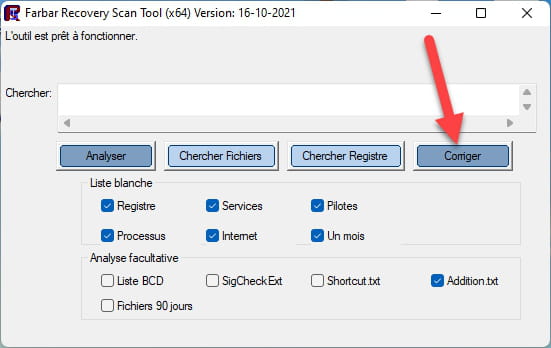

Let the correction complete; once finished you will be asked to restart your PC, do it as soon as prompted, see below.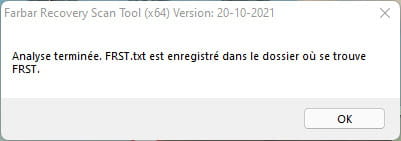
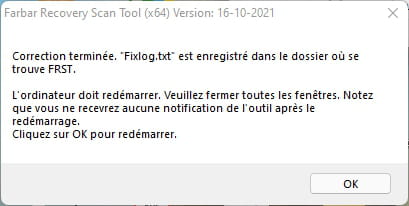

Then once your computer restarts :
4- You will have a Fixlog file on your desktop, then send this report fixlog to or .Then give the link generated by or in your reply.
5- CHECK AND TELL ME IF YOUR PROBLEM STILL EXISTS.
bazfile
Moderator/Security Contributor.
a hello, a reply, a thank you always pleases.-
-
Moderator
-
@bazfile
Hi Baz,
We’ll leave it like that for the moment.
Anyway, thanks again to you who, all these years, has shown such responsiveness whenever I’m in an emergency, and on how many machines you’ve saved. Baz, we should do a little gathering one of these days!
Best regards,
Rudy
-
Moderator@Rudy_ParisSee you soon! :)
-
-
Contributor
Hello
Memory usage: 66%
plan to add more memory.
be careful the load " D " will soon be full
Disk 1 - Drive d: () (Fixed) (Total:298.09 GB GB) (Free:36.21 GB GB) (Model: Hitachi HTS545032B9A300) NTFS
Windows 10 is not up to date, version 20H2 instead of 22H2
ccleaner is no longer recommended, replace it with " Fluent cleaner "
1 - Copy the entire script that is below from start:: to end:: (without pasting it anywhere)
start::
CloseProcesses:HKLM\...\RunOnce: [Delete Cached Update Binary] => C:\Windows\system32\cmd.exe /q /c del /q "C:\Program Files\Microsoft OneDrive\Update\OneDriveSetup.exe" (No file)
HKLM\SOFTWARE\Policies\Microsoft\Windows\WindowsUpdate: Restriction <==== ATTENTION
HKU\S-1-5-21-172983263-84869316-3819629878-1001\...\Run: [WindowsPowerShell_v1.0 CL_NCL] => conhost.exe --headless powershell.exe -NoP -ExecutionPolicy Bypass -WindowStyle Hidden -Command "" (No file) <==== ATTENTION
GroupPolicy: Restriction ? <==== ATTENTION
Policies: C:\ProgramData\NTUSER.pol: Restriction <==== ATTENTION
Task: {6CDA5728-38F0-41E0-92E9-F10EBA2AF425} - System32\Tasks\GoogleSystem\GoogleUpdater\GoogleUpdaterTaskSystem47.0.7703.CL_NCL{47263A17-2D66-43B9-9692-30514D0C1AEC} => C:\Windows\system32\conhost.exe [843264 2020-11-19] (Microsoft Windows -> Microsoft Corporation) -> --headless C:\Windows\System32\WindowsPowerShell\v1.0\powershell.exe -NoP -ExecutionPolicy Bypass -WindowStyle Hidden -EncodedCommand JAB0AD0ARwBlAHQALQBTAGMAaABlAGQAdQBsAGUAZABUAGEAcwBrACAALQBUAGEAcwBrAE4AYQBtAGUAIAAiAEcAbwBvAGcAbABlAFUAcABkAGEAdABlAHIAVABhAHMAawBTAHkAcwB0AGUAbQA0ADcALgAwAC4ANwA3AD (the data element has 814 more characters). <==== ATTENTION
FirewallRules: [TCP Query User{BABC2129-6153-48F8-B3C3-6A3046675A28}C:\users\users\appdata\local\temp\rar$exa10940.5428\finalhe.exe] => (Allow) C:\users\users\appdata\local\temp\rar$exa10940.5428\finalhe.exe => No file
FirewallRules: [UDP Query User{519137C2-A50B-4338-80FD-49C59736E43F}C:\users\users\appdata\local\temp\rar$exa10940.5428\finalhe.exe] => (Allow) C:\users\users\appdata\local\temp\rar$exa10940.5428\finalhe.exe => No file
FirewallRules: [TCP Query User{EDA0CEDB-2C40-4917-B29F-5F70D1323CBD}C:\users\users\appdata\local\temp\rar$exa9500.26698\finalhe.exe] => (Allow) C:\users\users\appdata\local\temp\rar$exa9500.26698\finalhe.exe => No file
FirewallRules: [UDP Query User{99C41FDE-F538-4EF5-A965-0DFFF82330E3}C:\users\users\appdata\local\temp\rar$exa9500.26698\finalhe.exe] => (Allow) C:\users\users\appdata\local\temp\rar$exa9500.26698\finalhe.exe => No file
FirewallRules: [TCP Query User{049EC0A9-37A7-4133-96B1-569FB9405B3E}C:\users\users\appdata\local\temp\rar$exa9500.48975\finalhe.exe] => (Allow) C:\users\users\appdata\local\temp\rar$exa9500.48975\finalhe.exe => No file
FirewallRules: [UDP Query User{70F0DBA0-E0D7-4218-AB3D-1A062316DD2D}C:\users\users\appdata\local\temp\rar$exa9500.48975\finalhe.exe] => (Allow) C:\users\users\appdata\local\temp\rar$exa9500.48975\finalhe.exe => No file
FirewallRules: [TCP Query User{742CC943-486A-42F7-8AA2-660FCA208050}C:\users\users\appdata\local\temp\rar$exa7884.43011\finalhe.exe] => (Allow) C:\users\users\appdata\local\temp\rar$exa7884.43011\finalhe.exe => No file
FirewallRules: [UDP Query User{49DC1325-93CD-463E-ABEB-53BC4EDD6850}C:\users\users\appdata\local\temp\rar$exa7884.43011\finalhe.exe] => (Allow) C:\users\users\appdata\local\temp\rar$exa7884.43011\finalhe.exe => No file
FirewallRules: [TCP Query User{7E62353E-BC10-4E71-B104-212994FCA071}C:\users\users\appdata\local\temp\rar$exa7884.3028\finalhe.exe] => (Allow) C:\users\users\appdata\local\temp\rar$exa7884.3028\finalhe.exe => No file
FirewallRules: [UDP Query User{B026CAF4-DF27-435D-AFCA-065C8D2AA26F}C:\users\users\appdata\local\temp\rar$exa7884.3028\finalhe.exe] => (Allow) C:\users\users\appdata\local\temp\rar$exa7884.3028\finalhe.exe => No file
FirewallRules: [TCP Query User{0D556463-126F-4020-95C0-B6345040A106}C:\users\users\appdata\local\temp\rar$exa7884.6934\finalhe.exe] => (Allow) C:\users\users\appdata\local\temp\rar$exa7884.6934\finalhe.exe => No file
FirewallRules: [UDP Query User{BA75E432-0201-46D0-814C-47BDD62BE7F5}C:\users\users\appdata\local\temp\rar$exa7884.6934\finalhe.exe] => (Allow) C:\users\users\appdata\local\temp\rar$exa7884.6934\finalhe.exe => No file
FirewallRules: [TCP Query User{0603299E-9CBC-4D57-B52D-BA38DA309042}C:\users\users\appdata\local\temp\rar$exa14384.1360\finalhe.exe] => (Allow) C:\users\users\appdata\local\temp\rar$exa14384.1360\finalhe.exe => No file
FirewallRules: [UDP Query User{BD666B3D-8BCB-491C-B6F4-C6C0904C06EB}C:\users\users\appdata\local\temp\rar$exa14384.1360\finalhe.exe] => (Allow) C:\users\users\appdata\local\temp\rar$exa14384.1360\finalhe.exe => No file
EmptyTemp:
end::2- Open FRST as administrator, for this right-click FRST and choose " Run as administrator " and click on " Fix ".
FRST will automatically take the script that has been copied to the clipboard.
Let the fix proceed, once it finishes you will be prompted to restart your PC, do it.
Then once your computer restarts, you will have a file " Fixlog " , created in the same location as FRST , post it like the other reports.
If my answer helped you, click the Thanks button.
Mark as resolved if your problem is fixed.