Creating a simple volume?
Solved
romaincotillard
Posted messages
125
Status
Member
-
romaincotillard Posted messages 125 Status Member -
romaincotillard Posted messages 125 Status Member -
Hello everyone,
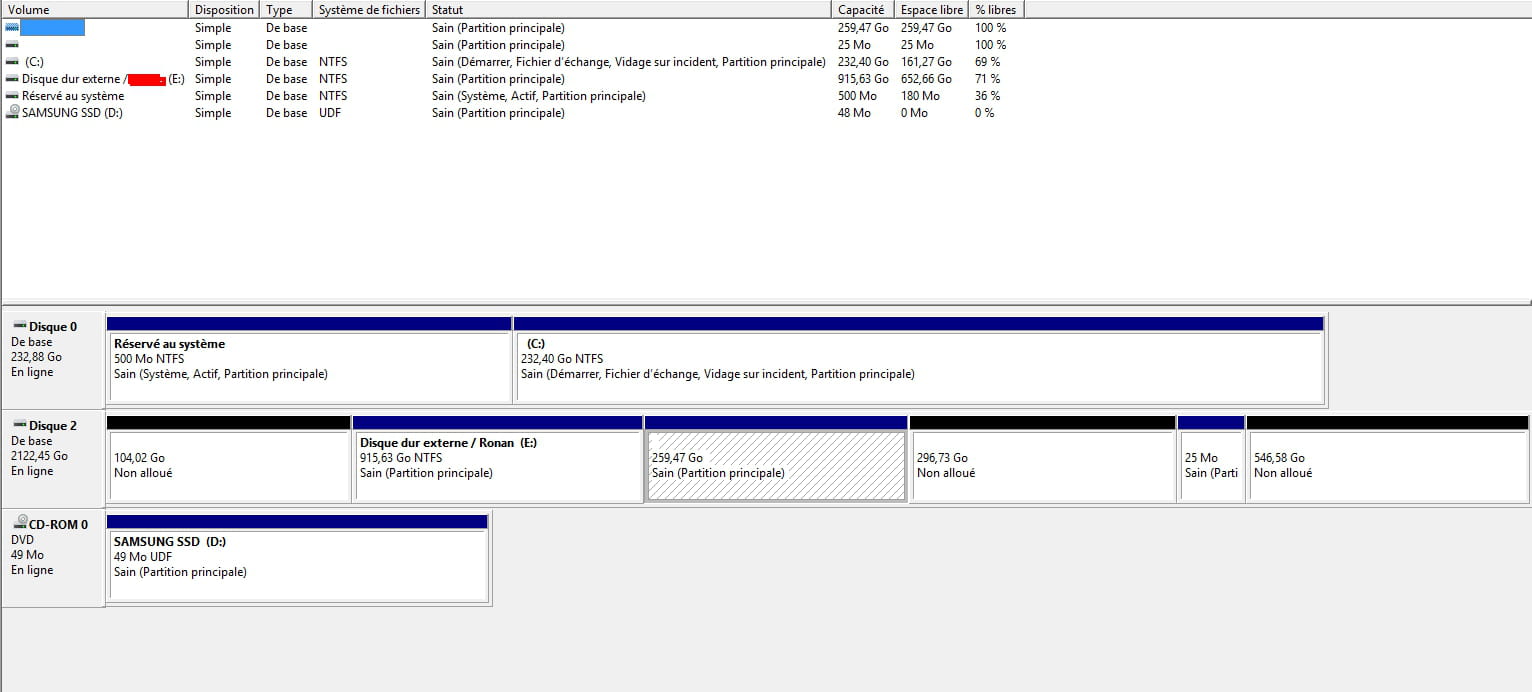
I've just received my computer, which has an SSD and an HDD. And the store where I bought it gave me these steps for initializing my HDD (the SSD is already initialized as I installed Windows on it, it's the primary drive):
"Control Panel > System and Security > Administrative Tools > Computer Management > Storage > New Simple Volume > Next."
However, when I get to "Storage," I can't find the "New Simple Volume" button.
Could you please help me? I found nothing on the forums.
Thank you in advance.
I've just received my computer, which has an SSD and an HDD. And the store where I bought it gave me these steps for initializing my HDD (the SSD is already initialized as I installed Windows on it, it's the primary drive):
"Control Panel > System and Security > Administrative Tools > Computer Management > Storage > New Simple Volume > Next."
However, when I get to "Storage," I can't find the "New Simple Volume" button.
Could you please help me? I found nothing on the forums.
Thank you in advance.
12 answers
-
Good evening...
Try this: start, right click on the computer, manage, disk management, right click on your HDD and "new simple volume" or "new partition"... if you don't see that, you'll probably need to format it first...
Best regards,
See you later
--
"He who wants to climb a mountain starts from the bottom!"
Signed: "Gillette" a.k.a. "nobody"! ;) (°!°)