CMD by right-clicking the mouse from the desktop.
Solved
Carmelitos
Posted messages
5
Status
Member
-
Carmelitos Posted messages 5 Status Member -
Carmelitos Posted messages 5 Status Member -
Hello everyone,
I use the right-click of the mouse to launch certain programs from the desktop; but I can't seem to do it to launch the command prompt (as Administrator)
Could you please help me?
Thank you in advance.
I use the right-click of the mouse to launch certain programs from the desktop; but I can't seem to do it to launch the command prompt (as Administrator)
Could you please help me?
Thank you in advance.
7 answers
-
I specify that I can launch it, but I want to do it as an Administrator.
-
Hello Billmaxime and thank you very much for your response. It works really well as you said. Indeed, I'm making it more complicated for myself and could even mess things up by snooping around in the database.
I had found this tip about right-clicking on the desktop in the link below
https://www.pcastuces.com/pratique/windows/contextuel_bureau/page1.htm
But I'm a tough nut to crack :-) ! What I wanted directly was a right-click of the mouse on the desktop and I had this appearing: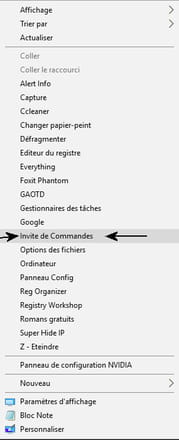
And now by right-clicking and choosing "Command Prompt" while pressing the Shift key at the same time, won’t I also run the command as Administrator? -
Hi Carmelitos,
I don't think you can do any "serious damage" to the registry, as you are adding keys and not modifying existing ones.
For "safety," make a backup of the registry with Erunt, and also create a restore point before making any changes.
And now by right-clicking and choosing "Command Prompt" while simultaneously pressing the Shift key, won't I also run the command as an Administrator?
I haven't tested it, but to run CMD as an administrator, you need to add CMD.EXE from C:\Windows\System32 to your context menu.
If you test using "SHIFT" to run CMD, let me know how it goes.
Thanks
@+
--
the radiation level is higher at the job center than at Chernobyl -
Regarding the BDR, I always make a backup when I need to modify keys and subkeys more deeply.
In the context menu, the "Command Prompt" (framed by the two arrows in my screenshot) was obtained by placing in the value of the subkey "Command" (below the key "Command Prompt"); c:\windows\system32\cmd.exe.
Now your question leaves me perplexed: whether I press SHIFT or not, I can't tell the difference between the two results as they seem identical.
I must admit that I am already a Grand Administrator. -
Hello
Just a quick interruption:
A right-click on the "Start" logo offers the command prompt, in admin mode and normal mode.
You're complicating things...
--
There are 3 kinds of people: those who know how to count and those who don't. -
re
so the CMD prompt runs as administrator (C:\Windows\System32)
@+
--
the radiation level is higher at the unemployment office than in Chernobyl -
Hi
I just tested on my PC with W10:
go to C:\Windows\System32
in the search box (top right), type CMD
right-click on CMD >> send to >> desktop create a shortcut
from the desktop, by right-clicking, you can run the CMD prompt as administrator
@+
--
the radiation level is higher at the unemployment office than at Chernobyl