
Windows installation stuck: no drive/driver found.
LuxTenebris
Posted messages
4
Registration date
Status
Member
Last intervention
-
LuxTenebris Posted messages 4 Registration date Status Member Last intervention -
LuxTenebris Posted messages 4 Registration date Status Member Last intervention -
Hello, first of all, I should mention that this is my first time using a forum, so please excuse me if this post is in the wrong place, etc. Also, I'm not very knowledgeable about computers, so don't hesitate to elaborate. Thank you in advance for your reading and help.
First of all, you should know that I salvaged an Acer laptop from a junkyard. It has no operating system, and I'm not sure if it had one before. The labels on my laptop: Intel Inside Core i3, Nvidia GeForce 820m, and Nvidia Optimus
On the back: [image]

And what it displays at startup: [image]

The version of my BIOS is: v2.06. See the 4 BIOS images
[image]


So, with the help of my Acer Premium Home Windows 7 (updated to Windows 10) desktop, I created a bootable USB drive (or so I believe) for Windows 10 installation (not in ISO format since it's not on CD) using MediaCreationTool.
By messing around with the BIOS (priority order), I managed to boot from it, I ignored the product key input, started the installation but:
"We couldn't find any drives. To get a storage driver, click on Load Driver." I clicked on Load Driver.
"To install the device driver for your drive, insert the installation media containing the driver files, then click OK." Then:
"No signed device driver was found. Verify that the installation media contains the correct drivers, then click OK."
So I tried something else, I downloaded Windows 7 this time from a site, in ISO format, burned it onto a CD using ImgBurn. I started it, it didn't ask me for an installation key, but in the end, I received the same messages, no drives, no signed device drivers found.
And I searched for Windows 8 (or 8.1) but couldn't find it.
Thank you for reading this novel xD If you need more info, feel free to ask. Can you please help me? I'm starting to despair, I think lol.
First of all, you should know that I salvaged an Acer laptop from a junkyard. It has no operating system, and I'm not sure if it had one before. The labels on my laptop: Intel Inside Core i3, Nvidia GeForce 820m, and Nvidia Optimus
On the back: [image]

And what it displays at startup: [image]

The version of my BIOS is: v2.06. See the 4 BIOS images
[image]

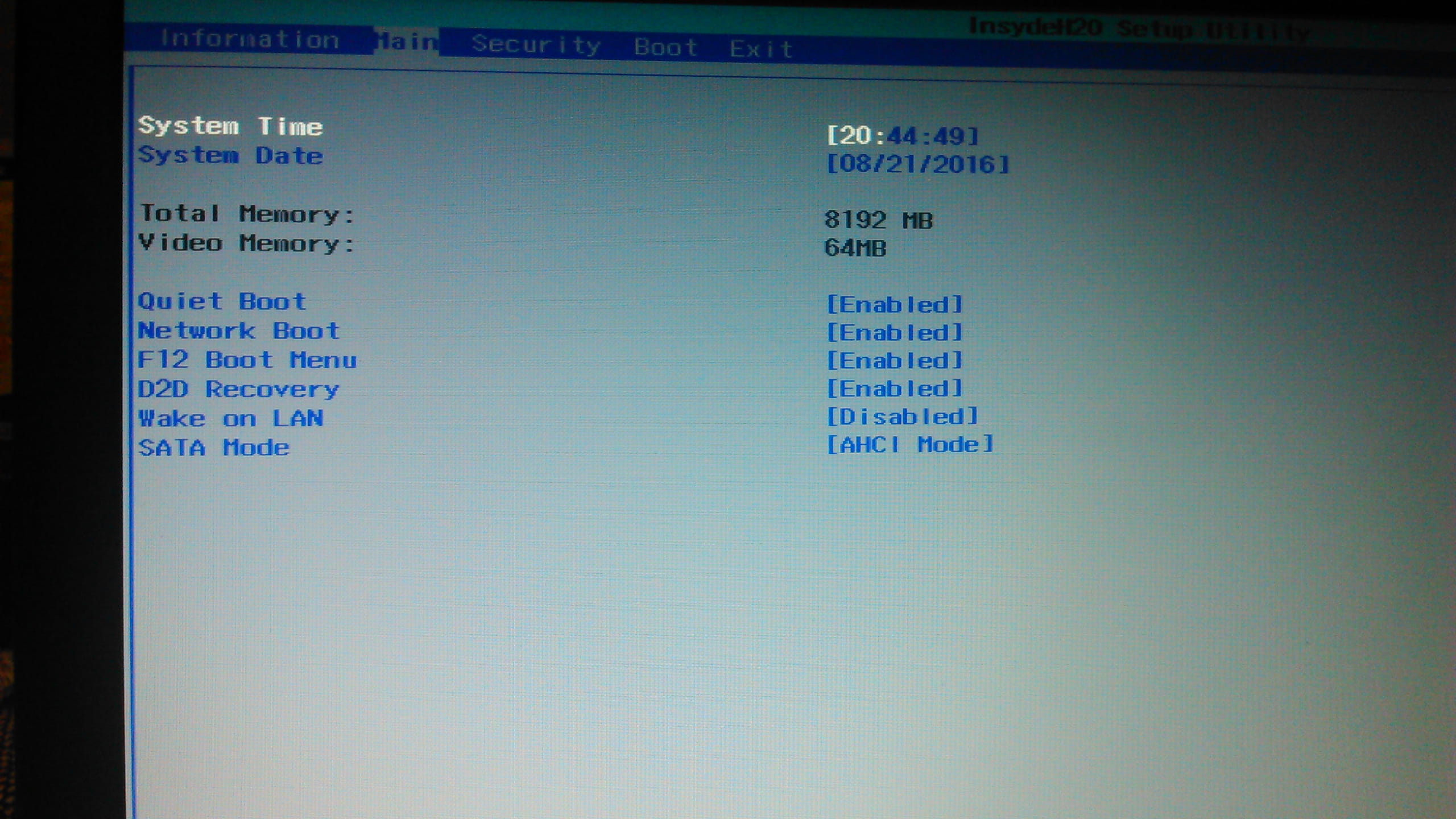
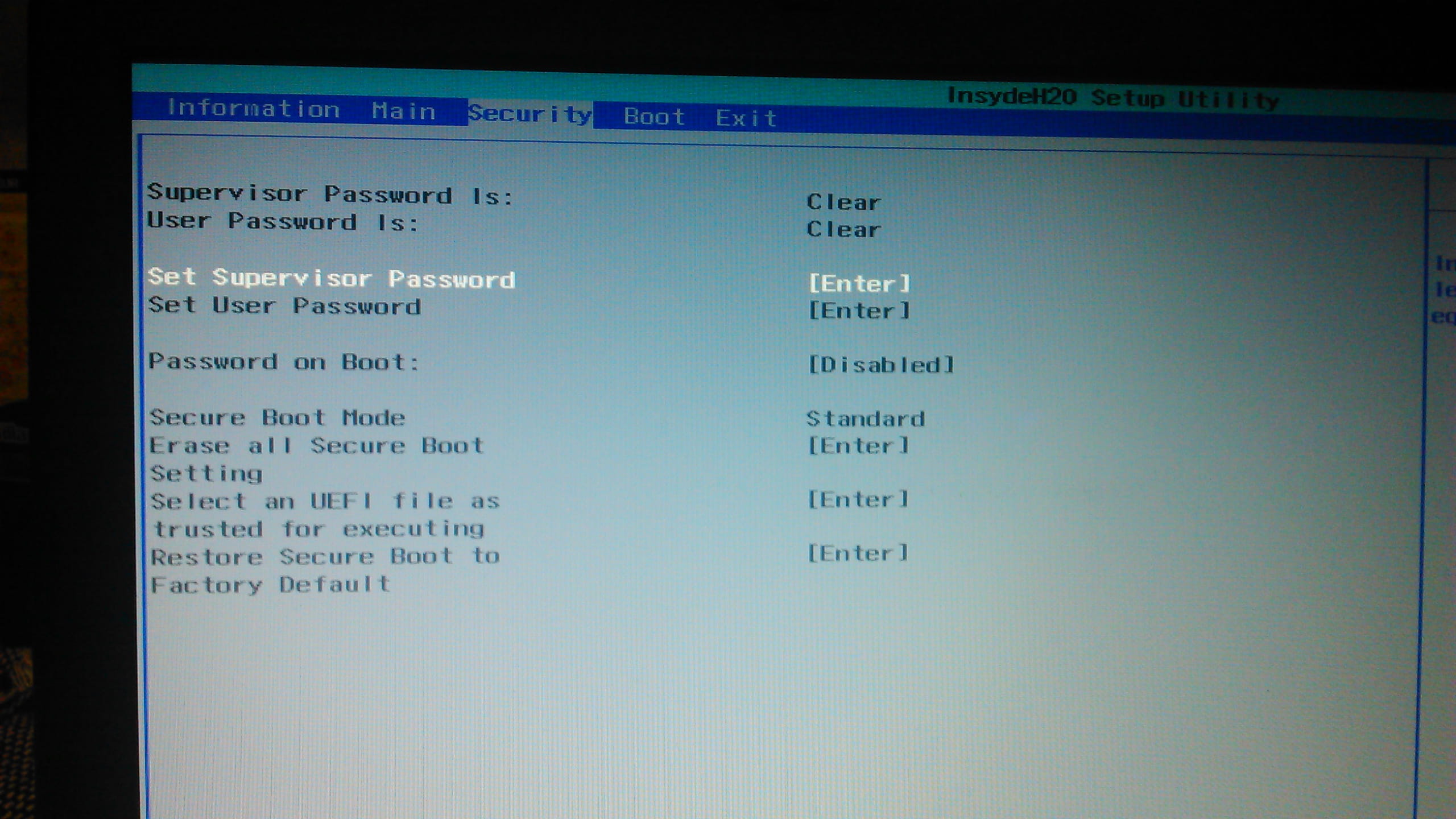

So, with the help of my Acer Premium Home Windows 7 (updated to Windows 10) desktop, I created a bootable USB drive (or so I believe) for Windows 10 installation (not in ISO format since it's not on CD) using MediaCreationTool.
By messing around with the BIOS (priority order), I managed to boot from it, I ignored the product key input, started the installation but:
"We couldn't find any drives. To get a storage driver, click on Load Driver." I clicked on Load Driver.
"To install the device driver for your drive, insert the installation media containing the driver files, then click OK." Then:
"No signed device driver was found. Verify that the installation media contains the correct drivers, then click OK."
So I tried something else, I downloaded Windows 7 this time from a site, in ISO format, burned it onto a CD using ImgBurn. I started it, it didn't ask me for an installation key, but in the end, I received the same messages, no drives, no signed device drivers found.
And I searched for Windows 8 (or 8.1) but couldn't find it.
Thank you for reading this novel xD If you need more info, feel free to ask. Can you please help me? I'm starting to despair, I think lol.
1 answer
-
Hello,
Some drivers are necessary for the installation of Windows:
Depending on your PC model (Asus Z5WE1):
You can download them here
Download the drivers in the "Hard Disk Controller Drivers" category and the first one in the "System & Chipset Drivers" category.
Place them at the root of the USB drive where your Windows is...
Then repeat the same process during the installation of Windows > Search for drivers
PS: I advise against installing Windows 10 on this machine, knowing that you are not sure if the license is compatible; the previous owner may not have done the update...
Good luck! ^^
--
Two things are infinite: the Universe and the trial version of WinRAR. But, as for the Universe, I have not yet acquired absolute certainty about it.-
Re, thank you for your response ^^
I downloaded what you told me. I decompressed the two folders using winRar and didn’t touch the .exe. It prompts me to install Intel(r) 7 series chipset SATA AHCI controller (c:\iaAHCI.inf), I click next, it loads, and then finally comes back saying there are no drives. As if my action has changed nothing.
What should I do?
Also, regarding the fact that it's better not to install Windows 10, I understand, but I can’t find Windows 8 to put on a USB stick. -
Try with this AHCi driver: here
You will see when you have unzipped it, you will find a drivers folder with the driver for either Windows 32 bit or 64 bit, so depending on what you are installing, choose the right folder to put on the USB stick.
From there, restart the installation and when you have the choice of hard drives, click to add the driver and navigate to your USB stick.
At first glance, I think this could work, but there is still a chance that it won't work either,
I don't really know how your computer is configured.- I had decided to install in 64 bit. I downloaded the folder, unzipped it, took the x64 one from the drivers folder and placed it in the root of my CD drive. Back at the installation, I go to the USB drive and click on the folder containing it: f6fflpy-x64. It offers me "intel(r) series chipset family SATA AHCI Controller (C:\f6fflpy-x64\iaAHCI.inf)" I click next but the same thing happens, as if it didn't install anything.
What do you suggest I do now?
-
