Built-in battery in the PC
kevin
-
kekedu95 Posted messages 1 Status Member -
kekedu95 Posted messages 1 Status Member -
Hello,
I have exactly the same problem (black screen on startup). The issue is that I cannot remove the battery since the battery is built into the laptop.
So, how can I start my PC without touching the battery?
Thanks in advance.
Configuration: Windows 7 / Firefox 35.0
I have exactly the same problem (black screen on startup). The issue is that I cannot remove the battery since the battery is built into the laptop.
So, how can I start my PC without touching the battery?
Thanks in advance.
Configuration: Windows 7 / Firefox 35.0
3 answers
-
Hello,
"I have exactly the same problem (black screen at startup)"
What do you mean by "the same problem"?
What hardware do you have?-
Hello,
Thank you for your quick response. Recently I installed Windows 10. Since yesterday, when I want to turn on my PC, a black screen appears and I can't do anything. At first, there is the brand (Toshiba) that appears, then the Windows logo, and afterwards nothing.
It is a Toshiba Satellite P50-B113.
Thank you very much. -
-
-
Without being able to remove the battery, it is impossible (at least without voiding the warranty) to perform the procedure of removing it, then holding down the power button for about ten seconds... In most cases this procedure works...
By calling Toshiba's technical support, I think they can guide you on the manipulation to perform, and they can certainly inform you about any possible data backup
Awaiting responses from other CCM users .... -
-
-
Hello
If the PC starts correctly in Safe Mode, there is probably a problem with the graphics card driver.
Try reinstalling it or updating it.
--
There are 3 kinds of people: those who can count and those who can’t. -
Hello,
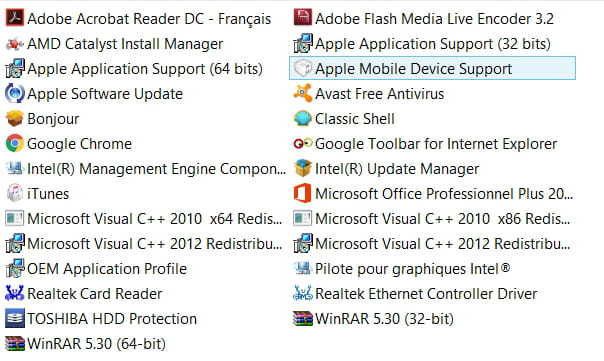
I tried to uninstall the graphics card driver. But I’m not very knowledgeable and I didn’t want to mess up, so I didn’t find this driver in Programs and Features. That’s why I took a screenshot of my program. If you could tell me which driver I should delete, that would be great.
Thanks in advance.