Open fpbf files on Mac
Com.Massoud
Posted messages
5
Status
Member
-
vesale66 Posted messages 4 Registration date Status Member Last intervention -
vesale66 Posted messages 4 Registration date Status Member Last intervention -
Hello,
I received DVDs with the .fpbf extension
Once inserted into my iMac (10.6.8), they show 'no items'... even though there is video on them?
I have seen previous forums on this topic, but I still don't understand anything... could someone provide a simple explanation on how to open these files so I can recover my videos?
Thank you in advance.
I received DVDs with the .fpbf extension
Once inserted into my iMac (10.6.8), they show 'no items'... even though there is video on them?
I have seen previous forums on this topic, but I still don't understand anything... could someone provide a simple explanation on how to open these files so I can recover my videos?
Thank you in advance.
11 answers
-
Hello
This extension, .fpbf corresponds to a burn folder created on a Mac.
How does it work? :
On the Mac Finder, you can create a "Burn Folder."
In this folder, you place what you want to burn. But the trick is, to avoid moving the actual files, they are links, aliases, that are actually placed in the folder, but not the actual files.
Then, when you decide to actually burn the folder, Disk Utility will use the aliases contained in this folder to find the files that are really to be burned.
If someone has given you such a folder, you can do absolutely nothing with it because it contains only links pointing to files that are not on your Mac but on the Mac that was used to create this burn folder.
Best regards
--
Have a Good Day :-) - Francis
Always specify your exact system configuration and read the entire provided response. -
Hello and thank you Francis for your message. However, reading your response, I understand even less about the 'mess' I'm in with these DVDs.
Let me explain: I gave 6 VHS-C cassettes to a company specialized in format transfer, to have them digitize my old tapes and transfer them to DVD. These DVDs arrived with the fpbf extension, empty, indicating 'no content' and zero kb in size. I tried to open them with VLC, Quick Time, but nothing works. Of course, I contacted the company, which told me that the problem is with my iMac, that it should work on PC and to check the forums for a solution... before getting seriously angry with them, I'm trying to find the solution with the help of all of you. -
Hello
.fpbf files are specific to Mac when it comes to burning DVDs. So there is no chance of opening them with Windows.
In the distant past, these files contained the actual files. Until Mac OS X 10.3, I believe, or maybe even 10.4, but afterwards, in the more recent versions of Mac OS, these burn folders only contained aliases.
A common mistake that unsuspecting users might make is putting the files to be burned into this folder on their Mac, then, (thinking they have the files present in the "Burn Folder"), deleting the original files located elsewhere on the Mac. As a result, the aliases in the burn folder no longer point to existing files, and the burning process results in an empty CD or DVD.
Test this DVD on a friend's PC, and you will find that it will read nothing at all.
This company just needs to demonstrate that it works on a Mac or PC :)
I remind you that Mac OS can open and read all CD or DVD formats (ISO, UDF, NTFS, etc...)
And if the video existed on this DVD, you should see it with its size in MB.
Personally, I transfer my SVHS tapes myself using Roxio's Easy VHS. But having a professional company do it should produce a better result. (theoretically...)
Best regards -
Hello,
No, I didn't specify that the DVDs should be playable on a Mac.
They didn't ask me anything either; the shipping slip doesn't specify the device I'll be using to play the DVDs.
I don't have a standalone player; I want to edit with QuickTime 7 and iMovie on the iMac to combine all my film clips into one. -
No need to specify that the DVD should be playable on Mac, PC, or TV.
A DVD provided by a service provider, after converting VHS tapes, must be playable on PC, Mac, and TV. That's the least one can expect. There was definitely a mishap on the part of this service provider. -
re...
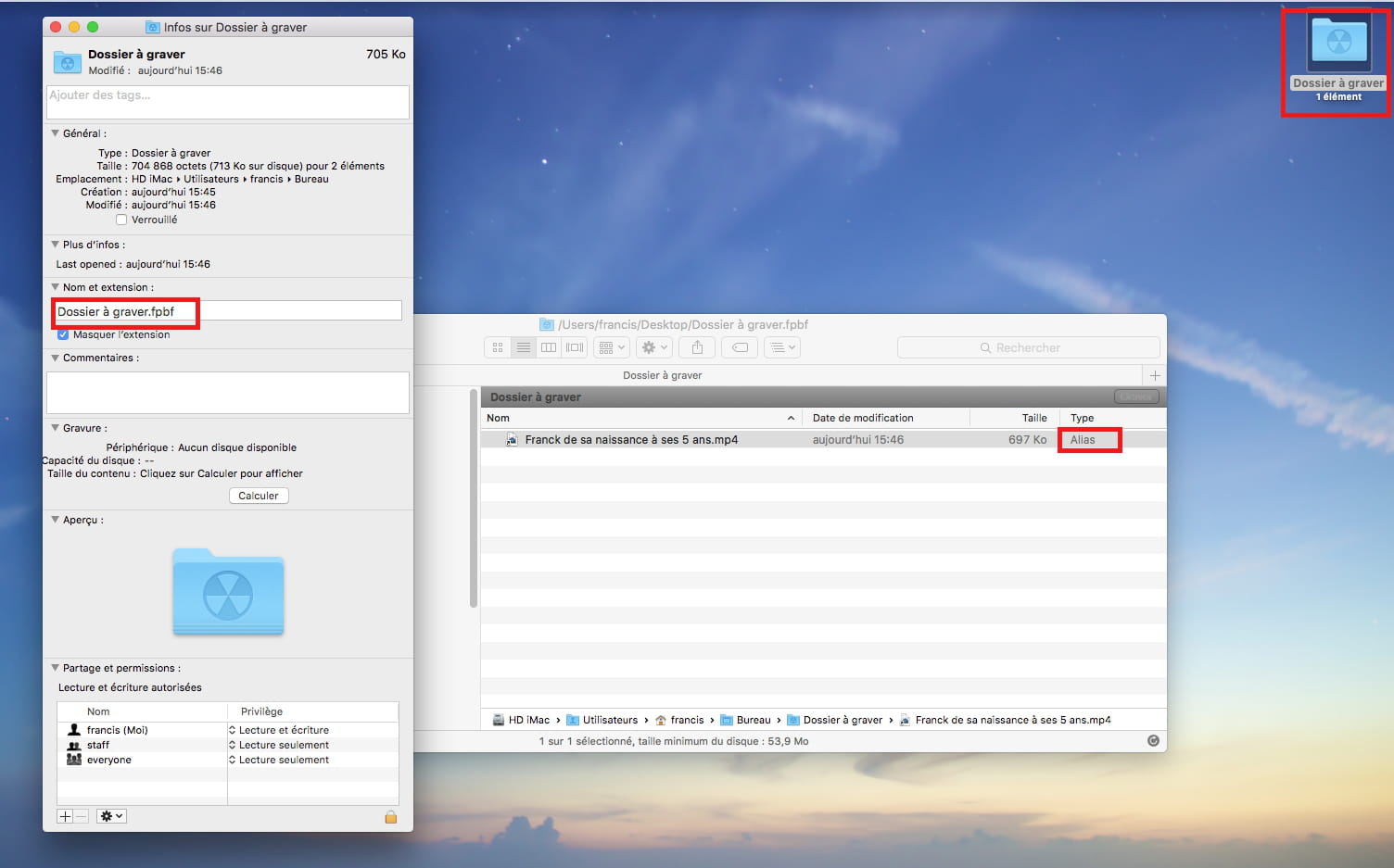
Here’s how the burning folder and its contents are presented:
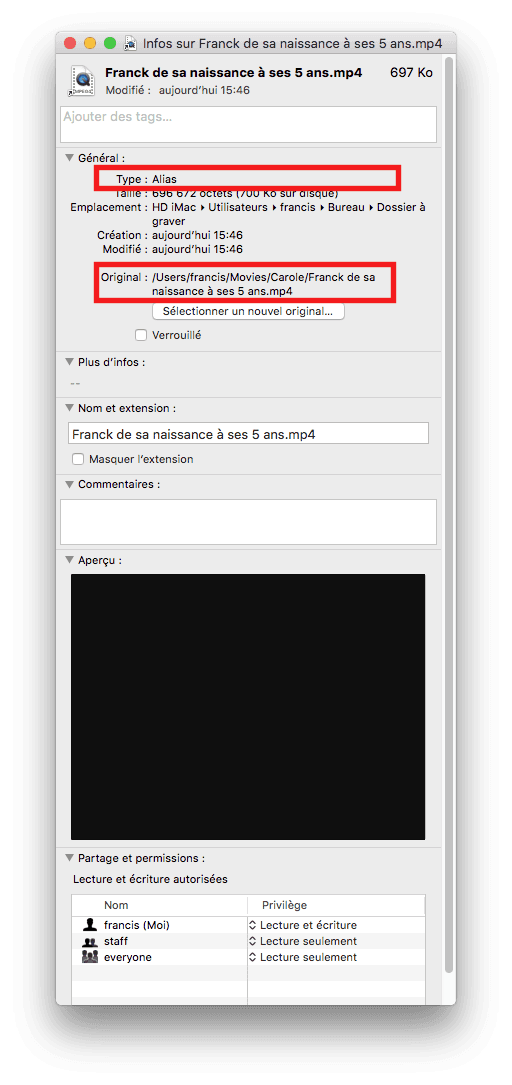
And here’s how the video file, actually just its alias, appears inside:
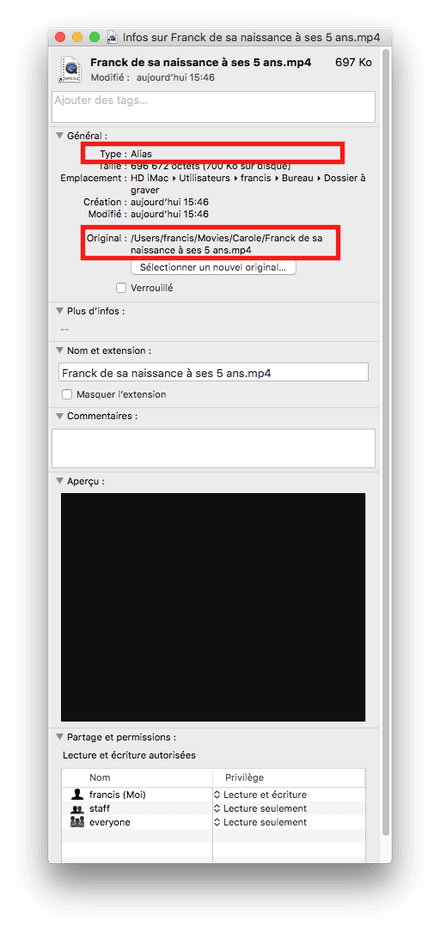
If then, an error in handling occurs before burning, one can end up with a blank DVD and no videos left on the Mac.
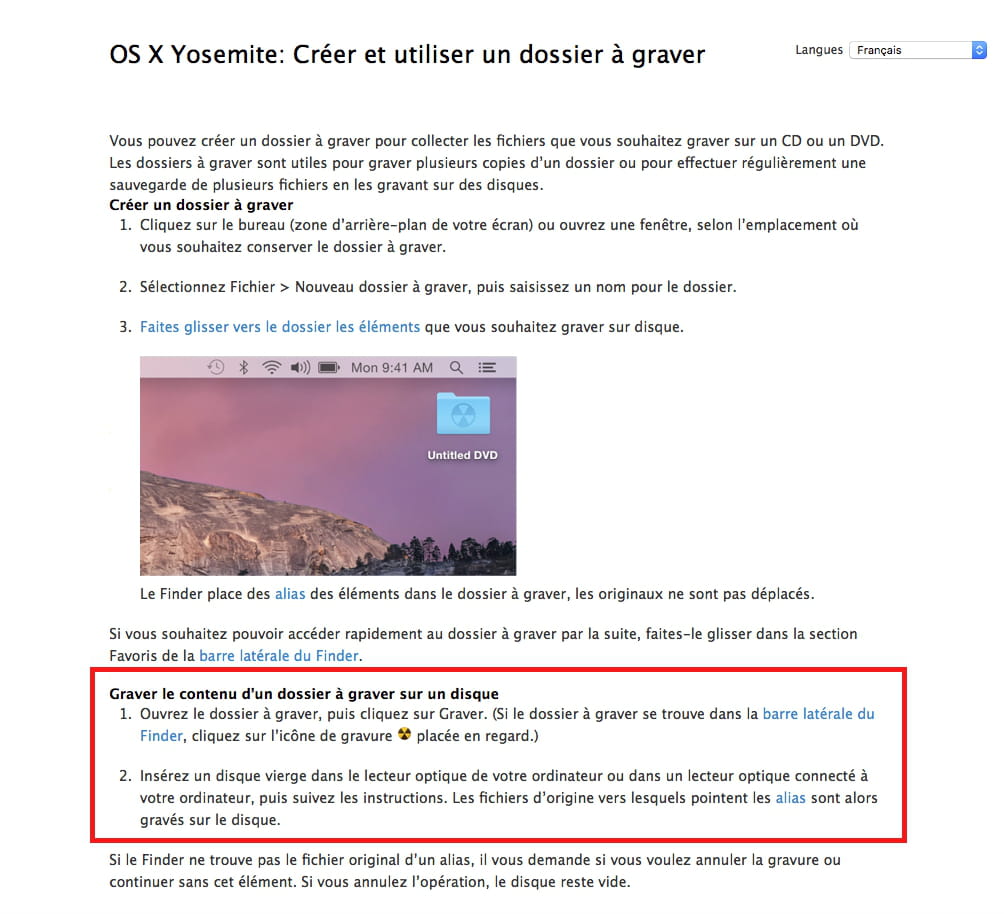
What your service provider most likely did was simply copy the "Burning Folder" onto a DVD, instead of "Burning the folder."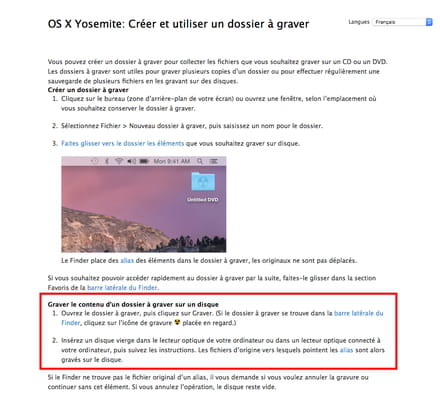
https://support.apple.com/kb/PH19034?locale=fr_FR&viewlocale=fr_FR
Best regards
Have a great day :-) - Francis
Always provide your exact system configuration and read the full response given -
Hello,
I have exactly the same problem with DVDs burned from 8mm. I can read the DVDs on my home player but it's empty for the Apple under El Capitan. I just tried to read it with a Mac Air and Yosemite... the DVD IS READABLE without any issues. This is therefore a major flaw of El Capitan in my opinion. The question that remains is "how to read the DVD with El Capitan"? Do I need another software or a specific maneuver?
Thank you. -
Hello,
I am continuing the discussion here:
https://forums.commentcamarche.net/forum/affich-33359834-lecture-dvd-fpbf-avec-el-capitan#3
Best regards
--
Have a good day :-) - Francis
Always indicate your exact system configuration and read the entire response given -
Hello,
I finally retrieved my DVDs.
They still appear empty on my iMac (Snow Leopard).
In the meantime, I got an Apple super drive external reader. Connected to my MacBook Pro (OS X Yosemite), I was finally able to read the DVDs! (no more fpbf extension).
I copied the files to an external hard drive and then connected it to my iMac, everything is readable. (I have a feeling the problem may come from the internal drive on my iMac????)
I was able to edit these files on my iMac as I wanted using QuickTime 7.
But another problem has arisen... iMovie refuses these files, so I will need to find another software to do my movie editing. If anyone knows of one that is easy to use...
Thank you. -
Hello,
I would really like to understand. I don't see how the Mac can read the content of a DVD differently from 2 different drives... unless... ??
In the case that the internal drive has a reading issue and doesn't see certain types of files, it would be interesting to see, (a screenshot?), the content of this DVD after possibly making hidden files visible. Onyx can make hidden files visible, but you can also do it with this command in Terminal:
defaults write com.apple.finder AppleShowAllFiles -boolean true ; killall Finder
and to return to normal with this command:
defaults write com.apple.finder AppleShowAllFiles -boolean false ; killall Finder
That said, it would also be interesting to know the exact type of these videos. Their suffix, in particular. We can analyze them with VideoSpec
http://videospec.free.fr
If these files are classic videos contained in .vob files, we can process them with Handbrake or ffmpeg
https://handbrake.fr/downloads.php
https://archive.framalibre.org/IMG/pdf/Tutoriel_Handbrake-Leclercq-cc-by-sa.pdf
http://ffmpegx.com
Finally, it might be possible to convert these videos with Miro Converter:
http://www.mirovideoconverter.com
There are editors other than iMovie, for example Final Cut Pro, which is expensive, but also third-party ones, for instance:
https://www.movavi.com/fr/mac-video-editor/?gclid=CNOi1svQicwCFY8y0wodR9QD2A
--
Have a nice day :-) - Francis
Always indicate your exact system configuration and read the entire response given. -
Hello,
As I mentioned earlier, I had this issue with 8mm films transferred to DVD in .fpbf format. They were unreadable under El Capitan on my Mac but were readable on the TV and on my MacBook through an external Apple drive.
After reading Com.Massoud's response, I connected my external drive to the big Mac and was pleased to see the files display and open. From there, with HandBrake, I was able to convert them to mp3 and import them into iMovie.
There seems to be a problem with the Mac's internal drive under El Capitan. My skill level does not allow me to make any hypotheses. In any case, thanks to Francis and Com.Massoud for helping me out of this mess.
Best regards