How to change my FB cover without posting it and without notifications?
Solved
vallyss
Posted messages
12
Status
Membre
-
Christiane -
Christiane -
Hello,
I would like to change my cover photo but without it being shared on my friends' homepage, just because I don't want everyone to know that "I've changed my cover photo!" Is it possible?
Thank you in advance for your answers.
I would like to change my cover photo but without it being shared on my friends' homepage, just because I don't want everyone to know that "I've changed my cover photo!" Is it possible?
Thank you in advance for your answers.
5 answers
Here’s how to change your Facebook profile picture without alerting all your friends:
- Indeed, you cannot choose the privacy level to "Only Me" when updating your profile picture.
- However, once you have published your Facebook profile picture, you just need to go to your timeline, find the post indicating that you have changed your profile picture, and make it private by clicking on the options (small globe) and setting it to "Only Me".
- This way, the profile picture is visible to everyone (no choice), but the information indicating that it has changed is only visible to you :)
Yes, I agree, selecting "me only" would hide the post from the news feed, but Facebook has blocked this option for the cover photo. It's possible for all types of posts (profile picture and others) but not for the cover photo... So I don’t see how to do it? Or maybe I missed something..
It is not possible to hide the cover photo; only in the news feed.
I’ve hidden my cover photo from the news feed to avoid drawing attention: https://www.zupimages.net/up/16/14/lq0i.jpg, but there will always be curious people who will go check it out and like what is public, thus making it visible to hackers.
That’s why I added a comment to my cover photo (see item 10).
Someone still couldn't help themselves or needs glasses lol! Too bad for them!
The dangers of the "like" button source Wikipedia:
"Like" Button
On August 20, 2011, a region of Germany, the State of Schleswig-Holstein, ordered that all websites hosted in this region remove the "like" button from their site. The data protection commissioner of the State, who implemented this regulation, justifies it by stating that this button violates German and European laws on data protection because it allows Facebook to collect data, including from users who are not members of the social network.
In summary, apart from not putting anything on your cover photo, which makes it unclickable, nothing prevents you from posting this photo on your wall and showing it to anyone you want with the audience selector (customized)
You can always try this, but I doubt it will work since it's about the cover photo: https://www.facebook.com/help/contact/345665165520196?id=345665165520196
Right to privacy of images
https://www.facebook.com/help/428478523862899
Or report this post: https://www.zupimages.net/up/16/14/1wkt.jpg
With that, good night and maybe see you tomorrow ;)
Knowledge increases when shared! (Socrates)
It is not possible to hide the cover photo; only in the news feed.
I’ve hidden my cover photo from the news feed to avoid drawing attention: https://www.zupimages.net/up/16/14/lq0i.jpg, but there will always be curious people who will go check it out and like what is public, thus making it visible to hackers.
That’s why I added a comment to my cover photo (see item 10).
Someone still couldn't help themselves or needs glasses lol! Too bad for them!
The dangers of the "like" button source Wikipedia:
"Like" Button
On August 20, 2011, a region of Germany, the State of Schleswig-Holstein, ordered that all websites hosted in this region remove the "like" button from their site. The data protection commissioner of the State, who implemented this regulation, justifies it by stating that this button violates German and European laws on data protection because it allows Facebook to collect data, including from users who are not members of the social network.
In summary, apart from not putting anything on your cover photo, which makes it unclickable, nothing prevents you from posting this photo on your wall and showing it to anyone you want with the audience selector (customized)
You can always try this, but I doubt it will work since it's about the cover photo: https://www.facebook.com/help/contact/345665165520196?id=345665165520196
Right to privacy of images
https://www.facebook.com/help/428478523862899
Or report this post: https://www.zupimages.net/up/16/14/1wkt.jpg
With that, good night and maybe see you tomorrow ;)
Knowledge increases when shared! (Socrates)
Thank you for this complete response... but we keep coming back to the same point: a post cannot be hidden from friends' news feeds just by "hiding from the timeline," unless the audience for that post is set to "only me."
I tested it with another post, which I had only "hidden from the timeline" (without selecting "only me"), but it was still visible to several of my friends in their news feeds (though this depends on which friends, as not all our posts are visible to all our friends, see this article:
http://www.sudinfo.be/957500/article/culture/medias/2014-03-12/facebook-choisit-vos-amis-qui-n-apparaissent-plus-jamais-dans-votre-flux-voici-p)
And since Facebook has blocked the "only me" option for the cover photo, I see no way to hide the cover photo from the news feed.
(I want to clarify that I do not want to hide my cover photo on my profile at all, just the notification that appears in my friends' news feeds!)
I tested it with another post, which I had only "hidden from the timeline" (without selecting "only me"), but it was still visible to several of my friends in their news feeds (though this depends on which friends, as not all our posts are visible to all our friends, see this article:
http://www.sudinfo.be/957500/article/culture/medias/2014-03-12/facebook-choisit-vos-amis-qui-n-apparaissent-plus-jamais-dans-votre-flux-voici-p)
And since Facebook has blocked the "only me" option for the cover photo, I see no way to hide the cover photo from the news feed.
(I want to clarify that I do not want to hide my cover photo on my profile at all, just the notification that appears in my friends' news feeds!)
A post cannot be hidden from friends' news feeds just by "hiding from timeline," unless the audience for that post is set to "only me."
It is clear that a post remains visible if you hide it without first using the audience set to "only me."
We're going in circles here. Let's revisit the trial I did yesterday with a friend. (response no 18)
I'll repeat your question:
I want to change my cover photo but without it being shared on my friends' homepage, just because I don't want everyone to know that "I've changed my cover photo!" Is that possible?
The answer is NO
The ideal would be to send a message @xxx in your instant chat and write to all your friends not to share your cover photo. :)
It is clear that a post remains visible if you hide it without first using the audience set to "only me."
We're going in circles here. Let's revisit the trial I did yesterday with a friend. (response no 18)
I'll repeat your question:
I want to change my cover photo but without it being shared on my friends' homepage, just because I don't want everyone to know that "I've changed my cover photo!" Is that possible?
The answer is NO
The ideal would be to send a message @xxx in your instant chat and write to all your friends not to share your cover photo. :)
But yes, there you go!! It's NOT possible, that's exactly what I thought… I'm just looking for people who have found a trick to circumvent this and who have managed to hide it from the news feed.
(but I absolutely don't mind if my friends share or like my cover photo, as long as the notification doesn't show up in their news feed)
and who would have succeeded in hiding it from the news feed.
I absolutely don't mind if my friends share or like my cover photo, as long as the notification doesn't show up in their news feed.
It's contradictory; how do you expect them to like and share it if you don't want it to appear in their news feed?
Have a good weekend :)
I absolutely don't mind if my friends share or like my cover photo, as long as the notification doesn't show up in their news feed.
It's contradictory; how do you expect them to like and share it if you don't want it to appear in their news feed?
Have a good weekend :)
Well, if they go to my profile, they can still see my cover photo and then click on it (and like, share if they want). But I just don’t feel like drawing attention to the fact that I just changed my cover photo (I think no one really cares... so I don’t understand why Facebook doesn’t allow us to hide the notification)
Have a good weekend too!
Hello :)
They won't see it, at least not in the news feed. I just changed mine and hid the post.
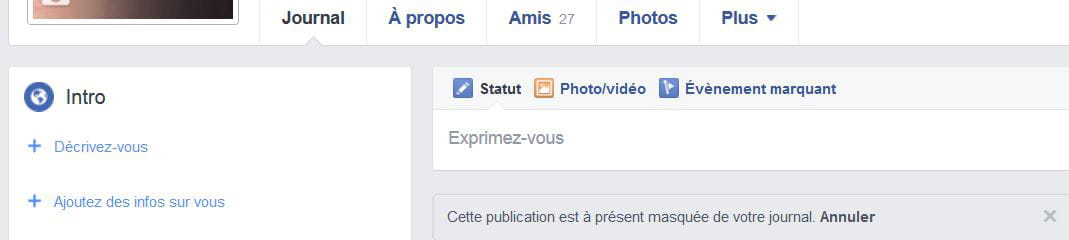
This post no longer appears in notifications.
To see what the public sees of your profile, click on "view profile as"
To see what friends see of you, click on "view as a specific person" and type the first few letters of their first name in the box.
But they will still see that the photo has changed lol!
Here’s what I added:
Here’s the result in the history of your posts, what you have hidden:
Have a nice Sunday :)
They won't see it, at least not in the news feed. I just changed mine and hid the post.
This post no longer appears in notifications.
To see what the public sees of your profile, click on "view profile as"
To see what friends see of you, click on "view as a specific person" and type the first few letters of their first name in the box.
But they will still see that the photo has changed lol!
Here’s what I added:
Here’s the result in the history of your posts, what you have hidden:
Have a nice Sunday :)
But no! Normally, if you click on "hide from timeline," the post can still appear in the news feed of friends on Facebook. It will only be hidden from our own Facebook profile (the timeline). This is explained on this page:
https://fr-fr.facebook.com/help/159724647510060
It can't be clearer in your link:
(for example, if you shared a photo or post with someone).
If you haven't shared the post, and before others do, after changing the photo, you need to immediately find that post on your wall, then use the audience selector, set it to "me only," and hide it from your timeline: https://www.zupimages.net/up/16/09/oaze.jpg
If it's visible, it's because it was shared before you intervened; or they shared the large photo at the top, which is still in public mode by default: https://www.zupimages.net/up/16/14/0d8o.jpg
There are people who don't put any photos in that spot; it stays blue and in this case, the image isn't clickable.
Have a good evening :)
(for example, if you shared a photo or post with someone).
If you haven't shared the post, and before others do, after changing the photo, you need to immediately find that post on your wall, then use the audience selector, set it to "me only," and hide it from your timeline: https://www.zupimages.net/up/16/09/oaze.jpg
If it's visible, it's because it was shared before you intervened; or they shared the large photo at the top, which is still in public mode by default: https://www.zupimages.net/up/16/14/0d8o.jpg
There are people who don't put any photos in that spot; it stays blue and in this case, the image isn't clickable.
Have a good evening :)
Yes, but precisely, as you said, Facebook has configured the cover photo to be public by default. So in the post that appears on our wall (when we change our cover photo), it's impossible to select "only me," that option is not available.
And regarding the visibility of the post, the link explains this: "If a post you have hidden was shared, the people it was shared with may still see it in other places on Facebook."
However, when we post a publication (or change our profile/cover photo), it is automatically shared with the people we selected (when we choose the audience: public, friends, only me) so these people will still be able to see it in their news feed and in other places on Facebook. That's how I interpret it...
And regarding the visibility of the post, the link explains this: "If a post you have hidden was shared, the people it was shared with may still see it in other places on Facebook."
However, when we post a publication (or change our profile/cover photo), it is automatically shared with the people we selected (when we choose the audience: public, friends, only me) so these people will still be able to see it in their news feed and in other places on Facebook. That's how I interpret it...
This is what I've been telling you from the beginning. Go back to 8.
The cover photo is by default in public mode; but when you see the post, for example: "vallyss changed their cover photo," that's when you need to select "only me" and hide that post. You shouldn't just hide it; you need to first and foremost set it to "only me."
For: this one is automatically shared with the people we select (when we select the audience: public, friends, only me), so these people will always be able to see it in their news feed and in other places on Facebook. That's how I interpret it...
No, if you say "only me" before hiding it.
Refer back to my explanations in image 10: profile preview as.
Here’s one of my posts in public mode: https://www.zupimages.net/up/16/14/46wo.jpg
I just used the audience selector with "only me" and hid it.
https://www.zupimages.net/up/16/14/sgrl.jpg
A friend clicked on it in her notifications.
The response: this content is no longer available.
She refreshed her page, and now, nothing in her notifications.
Go on Facebook and search for Mamy Arlette, and let me know if you see her.
I'm really bothered, but I can't do anything more, aside from reporting a bug to Facebook.
Thank you for using the "reply to thread" function at the bottom left of this page to facilitate the dialogue.
Good evening :)
The cover photo is by default in public mode; but when you see the post, for example: "vallyss changed their cover photo," that's when you need to select "only me" and hide that post. You shouldn't just hide it; you need to first and foremost set it to "only me."
For: this one is automatically shared with the people we select (when we select the audience: public, friends, only me), so these people will always be able to see it in their news feed and in other places on Facebook. That's how I interpret it...
No, if you say "only me" before hiding it.
Refer back to my explanations in image 10: profile preview as.
Here’s one of my posts in public mode: https://www.zupimages.net/up/16/14/46wo.jpg
I just used the audience selector with "only me" and hid it.
https://www.zupimages.net/up/16/14/sgrl.jpg
A friend clicked on it in her notifications.
The response: this content is no longer available.
She refreshed her page, and now, nothing in her notifications.
Go on Facebook and search for Mamy Arlette, and let me know if you see her.
I'm really bothered, but I can't do anything more, aside from reporting a bug to Facebook.
Thank you for using the "reply to thread" function at the bottom left of this page to facilitate the dialogue.
Good evening :)
Well, here it is, I just took the test: I posted something on Facebook, which I immediately hid from my timeline. Then I asked my friends if they could still see that post in their news feed. They confirmed to me that my post had NOT been removed from their news feed, it was still visible.
So unfortunately, I still haven't found a solution... (but thanks already to those who are trying to help me)
But yes! Even by hiding the profile publication, it can still appear in other places, particularly in the news feed of friends... It's explained on this page:
https://fr-fr.facebook.com/help/454273634631390
I don't know how to prevent this publication from appearing in their news feed.
https://fr-fr.facebook.com/help/454273634631390
I don't know how to prevent this publication from appearing in their news feed.
I'm taking back your link:
https://fr-fr.facebook.com/help/454273634631390
may remain visible in other places on Facebook to the people with whom they are shared
I understand that if it is visible, it has been shared.
Unless someone comes by, I don't see much else to add.
Hang in there! We'll manage to figure it out :)
https://fr-fr.facebook.com/help/454273634631390
may remain visible in other places on Facebook to the people with whom they are shared
I understand that if it is visible, it has been shared.
Unless someone comes by, I don't see much else to add.
Hang in there! We'll manage to figure it out :)