
My computer can't find my Wi-Fi. What should I do?
Solved
noemie79260
Posted messages
8
Status
Membre
-
Taha -
Taha -
Hello,
I have an HP PC running Windows 10, and I'm with Free.
My PC detects all the neighboring networks but not mine. However, my phone, my husband's phone, and our tablet are connected to our box's Wi-Fi!
When I go to the Wi-Fi settings, my box appears, but it says "not shared" underneath.
It asks for a network password, and I thought it was the password for my box, but I tried it, and it doesn't work.
What should I do?
Thank you for your help!
I have an HP PC running Windows 10, and I'm with Free.
My PC detects all the neighboring networks but not mine. However, my phone, my husband's phone, and our tablet are connected to our box's Wi-Fi!
When I go to the Wi-Fi settings, my box appears, but it says "not shared" underneath.
It asks for a network password, and I thought it was the password for my box, but I tried it, and it doesn't work.
What should I do?
Thank you for your help!
12 réponses
Hi,
what do you mean by still no Wi-Fi?
Are your other devices still connected to the Box's Wi-Fi?
Click on the start menu and choose "Settings," then click on this:
After that you should see the list of nearby Wi-Fi networks.
As shown below.

Make sure that the Wi-Fi button is set to "enabled" and check if your network name is in the list as shown in the capture above.
what do you mean by still no Wi-Fi?
Are your other devices still connected to the Box's Wi-Fi?
Click on the start menu and choose "Settings," then click on this:
After that you should see the list of nearby Wi-Fi networks.
As shown below.

Make sure that the Wi-Fi button is set to "enabled" and check if your network name is in the list as shown in the capture above.



Still no wifi on my PC, everywhere else there’s no problem.
When I go where you indicated, my network name is not there and it is indeed activated.
Right below the last wifi network name that I can capture nearby, there is: manage wifi settings and when I click there, my network name appears.
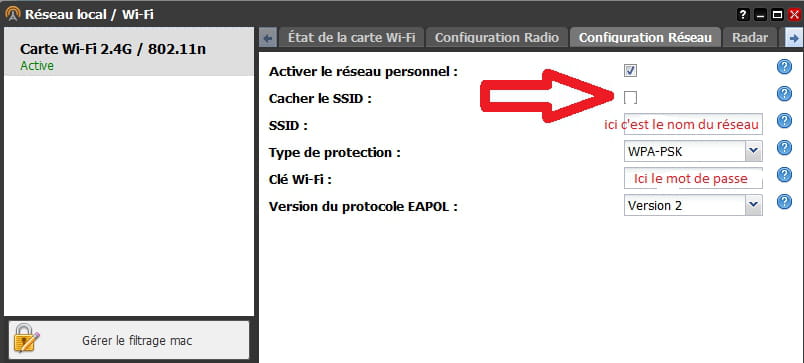
You need to change the channel bandwidth to 20MHz in the router configuration.