
Boot Configuration in BIOS on Asus K73S
pjlt
Posted messages
284
Status
Member
-
tribun Posted messages 64900 Registration date Status Member Last intervention -
tribun Posted messages 64900 Registration date Status Member Last intervention -
Hello,
Wishing to reinstall Windows 7 on my laptop, I am struggling, in vain, to understand the "Boot" tab of my BIOS screen.
It is presented in various lines as described below:
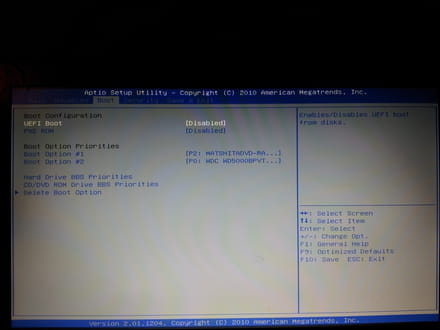
UEFI Boot [Enabled] or [Disabled]
PXE Rom [Enabled] or [Disabled]
Boot option priorities
Boot option #1 P2: "CD/DVD drive"
Boot option #2 P0: "hard drive"
Hard Drive BBS Priorities
CD/DVD Drive BBS Priorities
>Delete Boot Option
I do not understand the meaning of UEFI Boot and PXE Rom
Regarding the priority choices for Boot, I do not understand why there are two lines: #1 and #2 offering each options marked P0 or P2 on CD/DVD or HDD?
As far as I remember, I seem to have booted on this laptop from a USB port. I can no longer find any option in this regard?
When I boot from the Windows 7 installation DVD, it only offers me to install the OS or check the memory. If I remember correctly, the first visible screen offered other options, among others, repair?
Could someone enlighten me?
Thank you in advance for the help
pjlt
Configuration: Windows 7 / Firefox 41.0
Wishing to reinstall Windows 7 on my laptop, I am struggling, in vain, to understand the "Boot" tab of my BIOS screen.
It is presented in various lines as described below:

UEFI Boot [Enabled] or [Disabled]
PXE Rom [Enabled] or [Disabled]
Boot option priorities
Boot option #1 P2: "CD/DVD drive"
Boot option #2 P0: "hard drive"
Hard Drive BBS Priorities
CD/DVD Drive BBS Priorities
>Delete Boot Option
I do not understand the meaning of UEFI Boot and PXE Rom
Regarding the priority choices for Boot, I do not understand why there are two lines: #1 and #2 offering each options marked P0 or P2 on CD/DVD or HDD?
As far as I remember, I seem to have booted on this laptop from a USB port. I can no longer find any option in this regard?
When I boot from the Windows 7 installation DVD, it only offers me to install the OS or check the memory. If I remember correctly, the first visible screen offered other options, among others, repair?
Could someone enlighten me?
Thank you in advance for the help
pjlt
Configuration: Windows 7 / Firefox 41.0
1 answer
-
See this for installing Win 7.
https://www.youtube.com/watch?v=s4Un_QpDoRQ
--
Who loves instruction! find the knowledge that comes from reflection!
P.S. Frequently create a restore point! it solves quite a few problems.
