Print the same page (PDF) twice on the same sheet.
Solved
®omain
Posted messages
244
Status
Member
-
pop -
pop -
Hello,
I need to print the same page twice. I can print 2 different pages from the same document.
When I select "print" from the menu, 2 copies and 2 pages per sheet in either the menu or the print properties, I end up with my A5 page printed in landscape format on the left side of 2 different A4 sheets.
Is there a simpler solution than duplicating the desired page in a file?
Thank you
Configuration: Windows XP / Firefox 17.0
I need to print the same page twice. I can print 2 different pages from the same document.
When I select "print" from the menu, 2 copies and 2 pages per sheet in either the menu or the print properties, I end up with my A5 page printed in landscape format on the left side of 2 different A4 sheets.
Is there a simpler solution than duplicating the desired page in a file?
Thank you
Configuration: Windows XP / Firefox 17.0
3 answers
-
Good evening,
I am taking the liberty of resurfacing this post because after several searches, I never clearly found on the forums how to answer this famous question:
<< How to print the same PDF page twice or more on a single sheet using a file that contains only one page. >>
I decided to look for it myself by messing around with Adobe software, and I am pleased to announce that it is possible!!!!
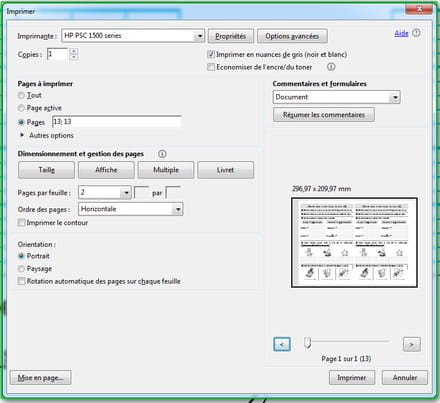
Here is the solution: you just need to duplicate the page number you want to print by separating those two identical numbers with a semicolon in "Pages to Print / Pages" in the Acrobat Reader print options. This will artificially duplicate that page as if the file you are using actually contained... that page twice!
Then, all you have to do is click on the "Multiple" option in "Page Sizing & Handling" and choose 2 pages per sheet.
I am sharing a small screenshot for clarity!
Here, I wanted to print page 13 twice on the same sheet. So I wrote 13; 13 in the "Pages" box. However, if your document contains only one page, you will write 1; 1 in that box.