
PDF file cannot be opened
brucine Posted messages 25274 Registration date Status Member Last intervention -
Hello,
I don’t know why I can’t open my PDF files anymore!
I’m struggling... I’m using Windows 10. here is the error message:
"Windows can’t find 'C:\Users\admin\Desktop\the file name.pdf'. Make sure you entered the correct name, and try again"
Could you help me, that would be very kind!
Looking forward to hearing from you, thank you in advance and best regards.
Brigitte
2 answers
-
Good evening,
The PDF file has probably been deleted, moved, or corrupted. Check its existence in the folder
C:\Users\admin\Desktop,Use Windows Search or restore it from a backup.
-
Hello and thank you for your response.
Whether my PDF files are on the desktop or in other folders... I have the same problem. Windows does not allow them to be opened.Thank you for your kind response.
Have a great day!
-
Hello,
We still need to determine what is supposed to open them, a software, the browser, the first one maybe to reinstall?
A number of programs are sneaky and will, by default or misconfigured settings, try to open files on a Cloud (for example OneDrive) where they of course will not find them.
What happens if, assuming the file extension is pdf, you right-click on one of these files, for example on the desktop, open with?
If the browser is not proposed by default, choose another application, and if it still doesn't appear, scroll down to Pick another app on your PC and choose in the Programs or Programs (x86) folder the browser's exe file.
Indirectly but not very practical, open the browser, File, Open, and browse to the respective pdf file will yield the same result regarding the possible incorrect functioning of the software used.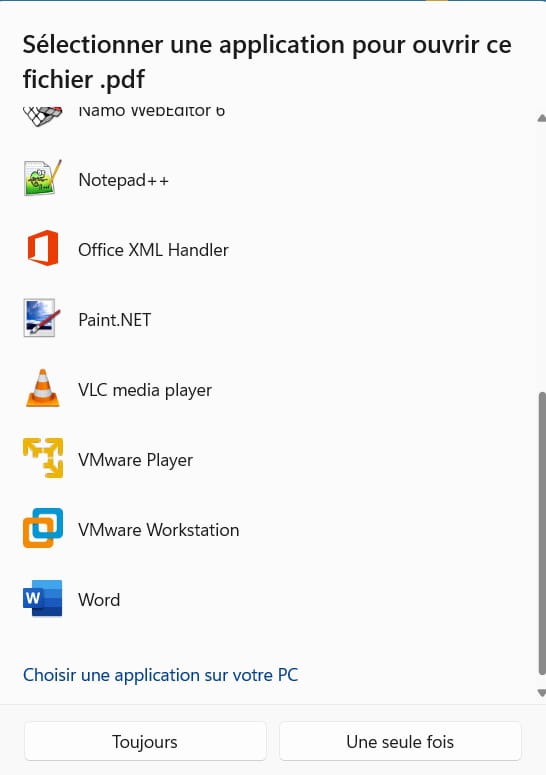
-
