
Unwanted video on Android home screen
SolvedMPMP10 Posted messages 47554 Registration date Status Member Last intervention -
Hello,
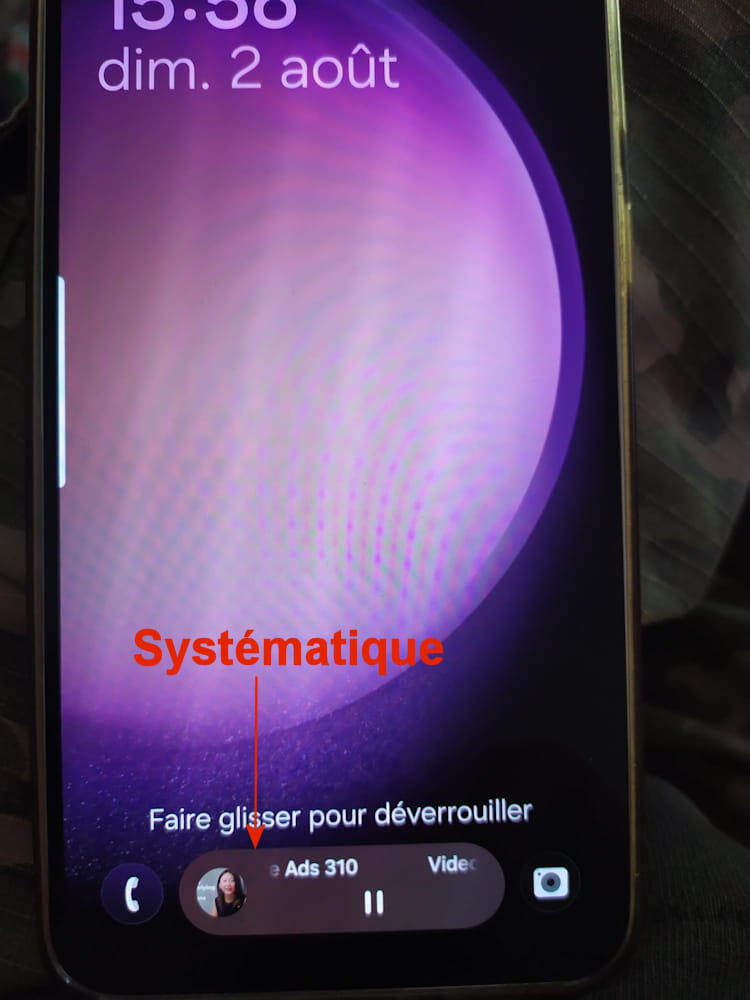
For a few days now, when I turn on my Samsung S23, there is a video at the bottom of the screen before I enter my PIN.
How can I remove it?
Thanks!
4 answers
-
Well, the culprit is named "AI Wallpapers" (size 0 bytes) yet edited by Google LLC....
After 1/2 hour spent with an AI, here is the solution that works!
It's a bit long, but it works:
1. Disable online processing (The most effective solution)
Since the "AI Wallpapers" module from Google suffers from a communication bug with the servers behind this message "Video Ad - YouTube Ads 310", blocking data transfer to external servers will instantly break the corrupted ad loop.
Stay in this Galaxy AI menu. Scroll to the very bottom of the list of assistants. You will see an option named Process data on device only (or a similar online data privacy related mention).
Enable the switch. This forces your S23 to work locally and immediately cuts the faulty connection to the public Google network.
2. Reset the "Creation Tools"
In the list you shared with me, the option that encompasses the management of images and system wallpaper is called Creation Tools.
Tap Creation Tools. If you see a general switch, disable it temporarily.
If the menu offers options related to storage or module downloads, disable them as well.
3. How Samsung handles AI for wallpapers (For information)
To verify that your current wallpaper is not using the faulty AI in the background:
Go to your home screen and long-press on an empty area. Tap Wallpaper and style > Wallpaper changes.
It is here, in the section called Creative, that you will find the Generative option (managed by the AI Wallpapers module that blocks).
Just make sure to choose a classic wallpaper (in "My wallpapers" or your personal photos) so as not to call on the AI anymore.
After activating the data processing on device only at the bottom of your Galaxy AI menu, perform a full restart of your S23. The fake ad on your lock screen should no longer reappear.
And there you go, after a full reboot of the phone, the problem is solved!
-
Good evening,
To remove unwanted videos or advertisements from your Samsung S23 home screen, disable or uninstall the malicious app responsible via the Settings or the Apps manager.
-
Good evening,
Perhaps here!
In principle, the image corresponds to a known issue where video content or news appears on the lock screen, often via the dynamic wallpaper service or a similar service.
Link: How to disable the dynamic lock screen on my Galaxy smartphone? Last updated: 13/06/2024
Or perhaps by disabling this!
Link: How to use Always On Display
-
@MPMP10:
I’ve disabled what corresponds to the two links you gave me, but there’s no change.
@Panth33ra:
The undesirable display shows "Video Ad -YouTube Ads 310". I thought it might be due to the YouTube app, so I disabled it, but again, there’s no change.
It’s possible that this undesirable display indicates "YouTube ads" and that it isn’t the YouTube app, but in any case, neither of these avenues worked…
Any other suggestions?
Thanks


