
Pin Gmail to the taskbar
brucine Posted messages 25179 Registration date Status Member Last intervention -
Hello
Pépé still needs you
Since I switched my browser from Edge to Google Chrome I can no longer pin my Gmail to the taskbar. I would have liked to take a screenshot of the proposed solutions when I right-click on Gmail, but with this new browser I can't even use the screenshot tool anymore, finally Edge wasn't so bad.
Thanks for any help
gbko
6 answers
-
-
Hello,
the screenshot function has nothing to do with the browser; it is performed by Windows. If we are talking about a Windows machine https://support.microsoft.com/fr-FR/Windows/Apps/use-snipping-tool-to-capture-screenshots
And there you go, there you go, there we go ....
But alas, how tedious the line spacing is !! -
Hello my friends
I apologize, I always forget to include the essential, I run on 1 PC with Windows 11 and a recent browser which is Google Chrome. Indeed, things that seemed simple when I was using Edge, it was easy to pin to the taskbar, but with Google Chrome it’s different I can’t manage (the pin option does not exist). Regarding the impossibility of taking a screenshot, it’s because as soon as I request the screenshot, Google erases the part I want to copy and returns to the home screen.
excuse me this may seem simple to an expert but not to me. If there is a simple solution, I’m open to it, or I’ll go back to Edge hoping Avast doesn’t pollute my screen all the time.
gbko
-
Hello,
Windows already has a sufficient antivirus and there’s no need to install a program like Avast, which behaves more like malware.
Avast is only good at causing trouble and can even crash at times.
-
Hello,
There is no reason Avast or other nuisance notifications should concern one browser and not the other if we don’t take precautions to avoid them (sites we browse, notification permissions in the browser, script manager extension).
We don’t see what Google (Chrome, we assume) has to do with the screenshots, but as mentioned, standard capture utilities don’t allow capturing from a screen where a context screen is open: you must proceed with the Windows capture application whose link is in <2> but which you normally don’t need to search for; the shortcut is by default in the Start menu, or you can do
Windows+Shift+S, choose capture area, rectangle, “draw” the portion of the screen, and the capture is automatically placed in the clipboard.
Windows is full of quirks; the default save folder is in one of the user folders which is hidden, you can always find it by searching *.jpg in Explorer, it is necessarily dated today.
To pin to the taskbar in Windows 11 as shown in the second link in <1> you have to cheat: create a desktop shortcut, then right-click pin to taskbar.
It’s no faster to put this shortcut in the favorites that are designed for?
-
-
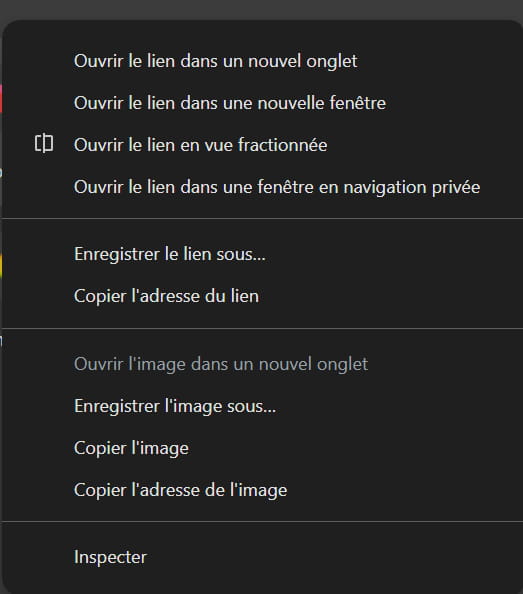
here is the result that shows that now I know how to take a screenshot and precisely here is the result when I right-click on Gmail and this shows that I do not see the option to pin to the taskbar
gbko
Or also to put a shortcut directly on the desktop!
You can do this.
On the Gmail.com login page.
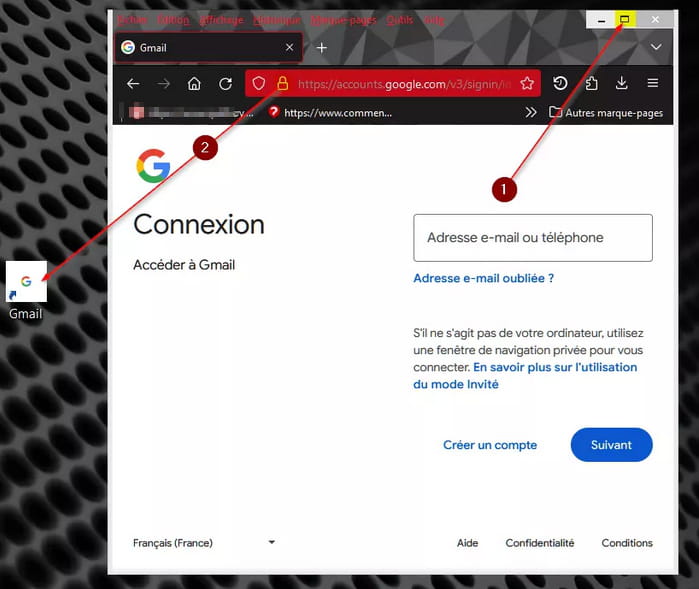
1. Minimize the browser page by clicking on the two stacked rectangles at the top right.
2. Drag the padlock at the top with the left mouse button (don’t release the left button…) onto your desktop.
Then, finally, just click once more on the two stacked rectangles at the top right to return the browser page to full screen.
Mercier Brucine
I tried in a solution recommended by MPMP10 By putting more tools Unfortunately I do not see the option to create a shortcut? For the screenshot I need time to study the proposed text I will respond shortly
thank you
gbko
-
See the procedure here, it might be more expressive:
https://www.supergeek.fr/blog/raccourci-google-bureau/
Alternatively, you select the address with the mouse once you have opened the Gmail link, go to the desktop, right-click, new, shortcut, paste, and for the name asked afterwards put Gmail; the drawback is, even if you can change it later, that the icon will be the browser’s icon, not the site's.
-



