
HELP: assign a number to a word in another cell
Raymond PENTIER Posted messages 58220 Registration date Status Contributor Last intervention -
Hello,
I am contacting you because I am currently creating a mileage expense table. I cannot find a corresponding formula.
I want a function of the city name entered in the cell of the following column to automatically display the corresponding number.
Examples
"Column C: Column D:
Paris 45
Amiens 37
Lille 12
Knowing that for column C I have created a data validation list to simplify my work.
If someone could provide the formula, that would help me a lot. I tried IF, IFs, IFS, VALUE, OR and I couldn't get it to work even by mixing them together.
Thank you in advance
3 answers
-
Hello
a lead
=VLOOKUP(F2;$C$2:$D$4;2;0)
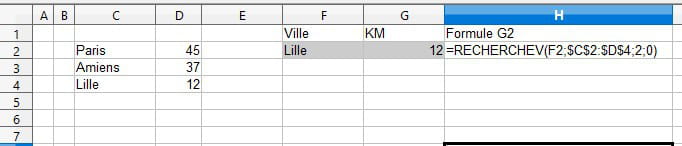
-
Hello, and welcome to the new member.
Treasure the formula of our friend yclik carefully:
The VLOOKUP() function is one of the most useful and most frequently used ...
It's well, retirement! Especially in the Antilles ...
Raymond (INSA, AFPA) -
Hello.
So? Have you solved your problem or are you still looking?
That's good, retirement! Especially in the Antilles...
Raymond (INSA, AFPA)

