Firefox bug

Good evening.
Recently, Firefox keeps going back to a tab with a forum that I haven't asked it to, and I don't know why. It's a forum that I visit often.
When I open Firefox, I automatically open my email on tab 1 and this forum on tab 2. If I reverse the order of opening at startup, it doesn't change; Firefox goes back to this forum.
Do you have any idea what the problem might be?
3 answers
-
Hello,
https://www.commentcamarche.net/telecharger/utilitaires/19335-resetbrowser/
Precaution: Save Firefox and Chrome Bookmarks
Although favorites are retained, it is always safer to have a copy.

-
Hello,
The question is unclear, it's probably not a bug, and we understand that this automatic startup is the desired behavior, although we need to appreciate its extent; in that case, the reset will remove it.
Personally, I prefer to use bookmarks; it’s not much longer, but to each their own.
The variety of automatic startups is not vast.
Malware or extension, in which case it’s indeed necessary to reset, reconfigure, or remove the extension in question.
Customized Firefox startup shortcut associated with a specific address.
Customized homepage without content like "recommended articles" (doing this for new tabs will by definition not be automatic since a new tab has to be opened).
Opening previous windows and tabs.
In this last situation, I don't know if Firefox opens exactly in the order it was left or arranges the tabs according to a particular logic (first opened, alphabetical order of a bookmark...).
Perhaps it would be useful to specify which technique is used for this automatic opening. -
-
@pan european
Here's the problem:
I used "resetbrowser" and Bitdefender blocked it while I was using it.
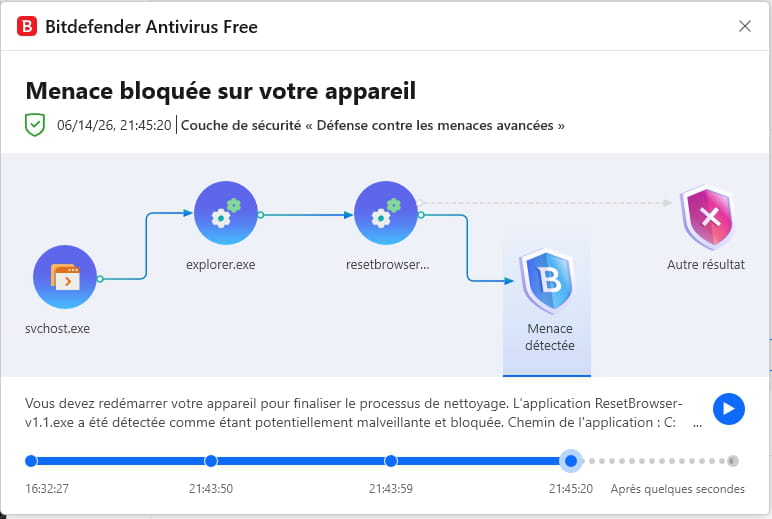
Then I got this window:
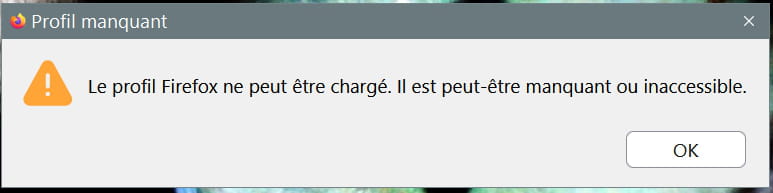
I properly uninstalled Firefox with Revo uninstaller, then downloaded Firefox from the Mozilla site. I'm trying to install it but I still get this window that says: The Firefox profile cannot be loaded. It may be missing or inaccessible.
So I no longer have Firefox on my PC. How can I reinstall it?
-
-
Moderator
Hello,
Uninstall it again with Revo Uninstaller
Run it as administrator
Uninstall Mozilla Firefox
Follow the tutorial to uninstall everything properly including residual folders and keys.
For the residual scan, check --> advanced mode
Restart the pc.
Press Windows + R
Type --> control panel and OK
File Explorer Options
View tab
Check --> show hidden files, folders, and drives
Apply and OK.
Go delete the mozilla folder in these 3 directories:
Press Windows + E
--> C:\users\your username\AppData\Roaming
--> C:\users\your username\AppData\Local
--> C:\Programs
Reinstall --> Firefox -
I followed the Mozilla tutorial and was able to reinstall it again.
https://support.mozilla.org/en-US/kb/how-run-firefox-where-profile-inaccessible
Now, I am reinstalling my extensions and bookmarks and will let you know in a few days if my initial problem is resolved.