Prohibit Excel formulas deletion 10

Raymond PENTIER Posted messages 58229 Registration date Status Contributor Last intervention -
Hello,
can you tell me how I can protect the formulas I created in EXCEL 10 so that no one can delete them, and once created, is it for the entire file or just for the cell?
And can we create a formula or something to know who has used the file (in order to identify who may have made errors in the file)?
4 answers
-
Hello,
A quick visit here: Lock or unlock specific areas of a protected worksheet | Microsoft Support
Best regards.
The Penguin-
Hello,
I followed the link you sent me.
As for protecting the sheet, I've already done that, but I didn't see how to prevent someone from deleting the formula. I tried:
- Data
- Data Validation
- Unchecking "Ignore blank"
but that didn't work; I was able to delete the formula.
I'm really trying to prevent this deletion, but I don't know how to do it.
Thanks anyway.
-
-
-
Hello Patricia.
When you open the spreadsheet, go to FILE/Information and on the right you can see who made the last modification.
Best regards.
Retirement is great! Especially in the Caribbean...
Raymond (INSA, AFPA)-
-
Hello Raymond
can you help me with the issue of preventing the deletion of formulas, I'm looking to stop formulas from being deleted in my spreadsheet
I've already tried to do
- Data
- data validation
- uncheck "Ignore blank"
but it didn't work, I was able to delete the formula
I'm really trying to prevent this deletion but I don't know how to do it
do you know
-
-
Hello,
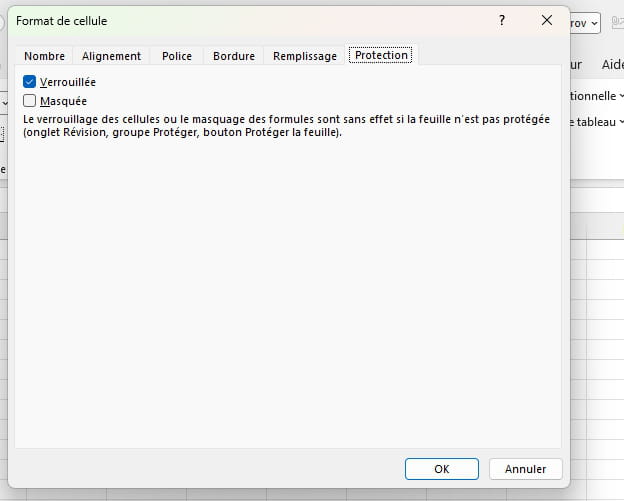
Click on the sheet and press Ctrl and A. This will select all the cells. Right-click on the sheet (anywhere) and click on "Format Cells." Click on the "Protection" tab and uncheck the "Locked" box. Click "OK."
Select the formula or formulas you want to protect. Right-click on the sheet (anywhere) and click on "Format Cells." Click on the "Protection" tab and check the "Locked" box.
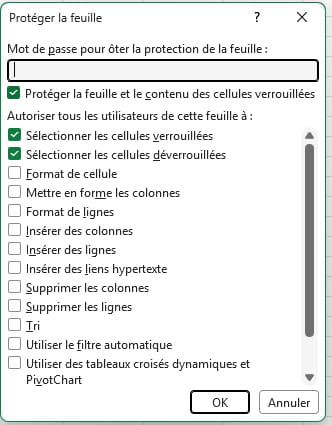
When the cells containing the formulas are locked, right-click on the sheet tab and click on "Protect." If you wish, set a password. Confirm.
Daniel