
Add a Gmail shortcut to the Windows taskbar

pistouri Posted messages 19010 Registration date Status Contributor Last intervention -
Hello, I would like to install the same "Gmail" shortcut that is on my desktop (PC) onto the taskbar. Is that possible, and if so, how? (Dragging from the desktop to the taskbar is not possible). Thank you for your help, and happy holidays.
2 answers
-
Hello,
With the quick launch bar, it would be possible, but do you want it?
If you have Windows 11, you need to start by installing Explorer Patcher from this source:https://github.com/valinet/ExplorerPatcher/releases
Then right-click on the taskbar, then Toolbars and New toolbarIn Folder type: %AppData%\Microsoft\Internet Explorer\Quick Launch
Then click on the Select a folder button
The quick launch bar is added
Right-click on the taskbar and Lock the taskbar (to unlock it).
Right-click on the new toolbar and uncheck "Show text" and "Show title"
Move the quick launch bar just to the right of the Start button, then move the left bar to the right.
Adjust the size, then right-click on the toolbar and Lock the taskbar.
-
pistouri Posted messages 19010 Registration date Status Contributor Last intervention Ambassador 8 732
Hello,
Add a Gmail shortcut to the taskbar with W10 or W11:
With the browsers Firefox, Google Chrome, Edge.
The 2 URL addresses below work to create a shortcut.
Without logging into Gmail:
https://workspace.google.com/intl/fr/gmail/#inbox
Once logged into Gmail: (On the inbox).
https://mail.google.com/mail/u/0/#inbox
To type in the address bar (URL) in each of the browsers.
Firefox:
Have at least version 143 of Firefox released in September 2025, option to pin any site to the taskbar.
Open Firefox.
In the address bar, copy and paste:
https://workspace.google.com/intl/fr/gmail/#inbox
Or
https://mail.google.com/mail/u/0/#inbox
Located on the right of the address bar, click on the icon or the small logo shaped like a rectangle with a downward arrow, it says --► Add the tab to the taskbar
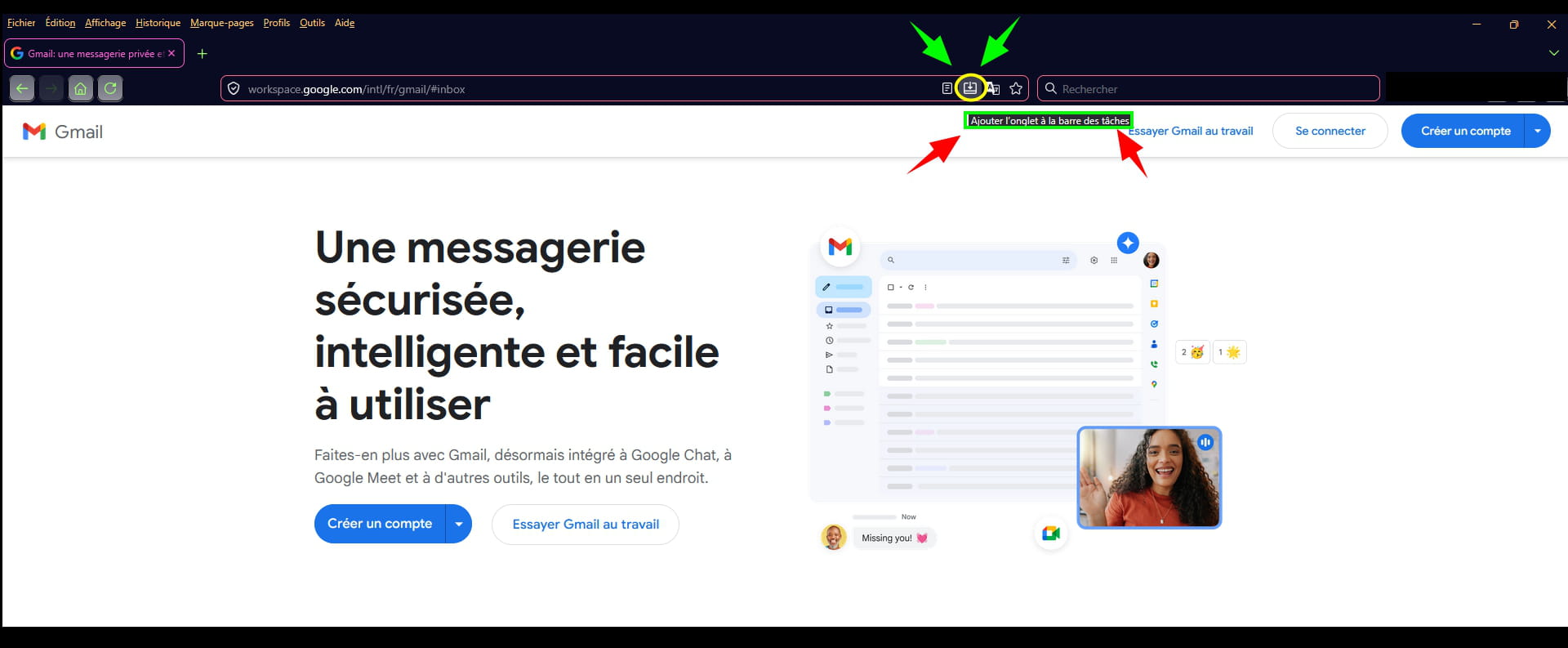
Or if logged in, and positioned on the inbox:
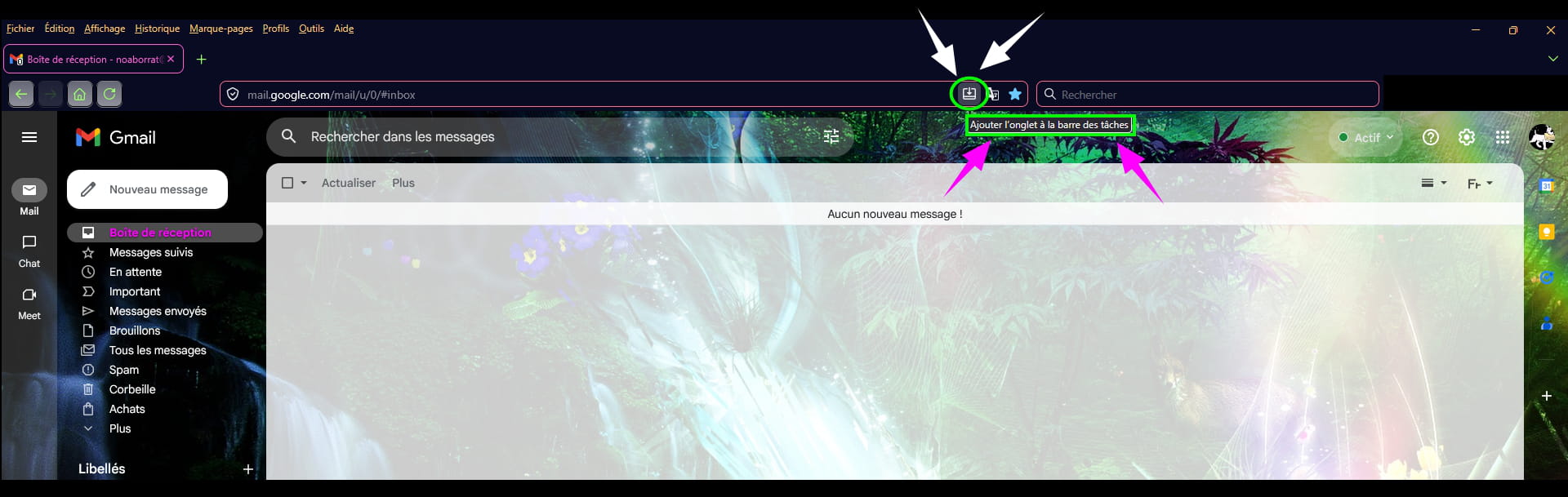
Wait a few seconds.
A notification at the bottom of the screen above the clock will appear.
--► Do you want to pin Google Workspace to your taskbar?
Click on --►YES
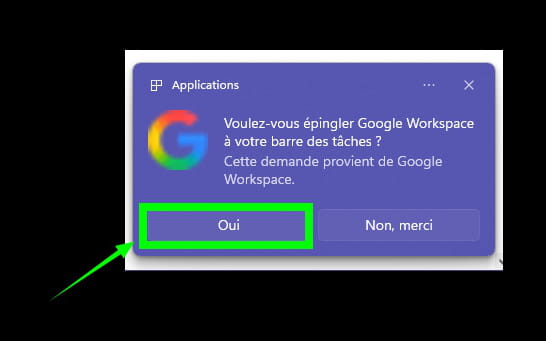
The Gmail shortcut is added to the taskbar.
Google Chrome:
Open Google Chrome.
In the address bar, copy and paste:
https://workspace.google.com/intl/fr/gmail/#inbox
Click on the 3 small horizontal dots located at the top right.
Click on the line --►Cast, save and share
Click on --►Create a shortcut...
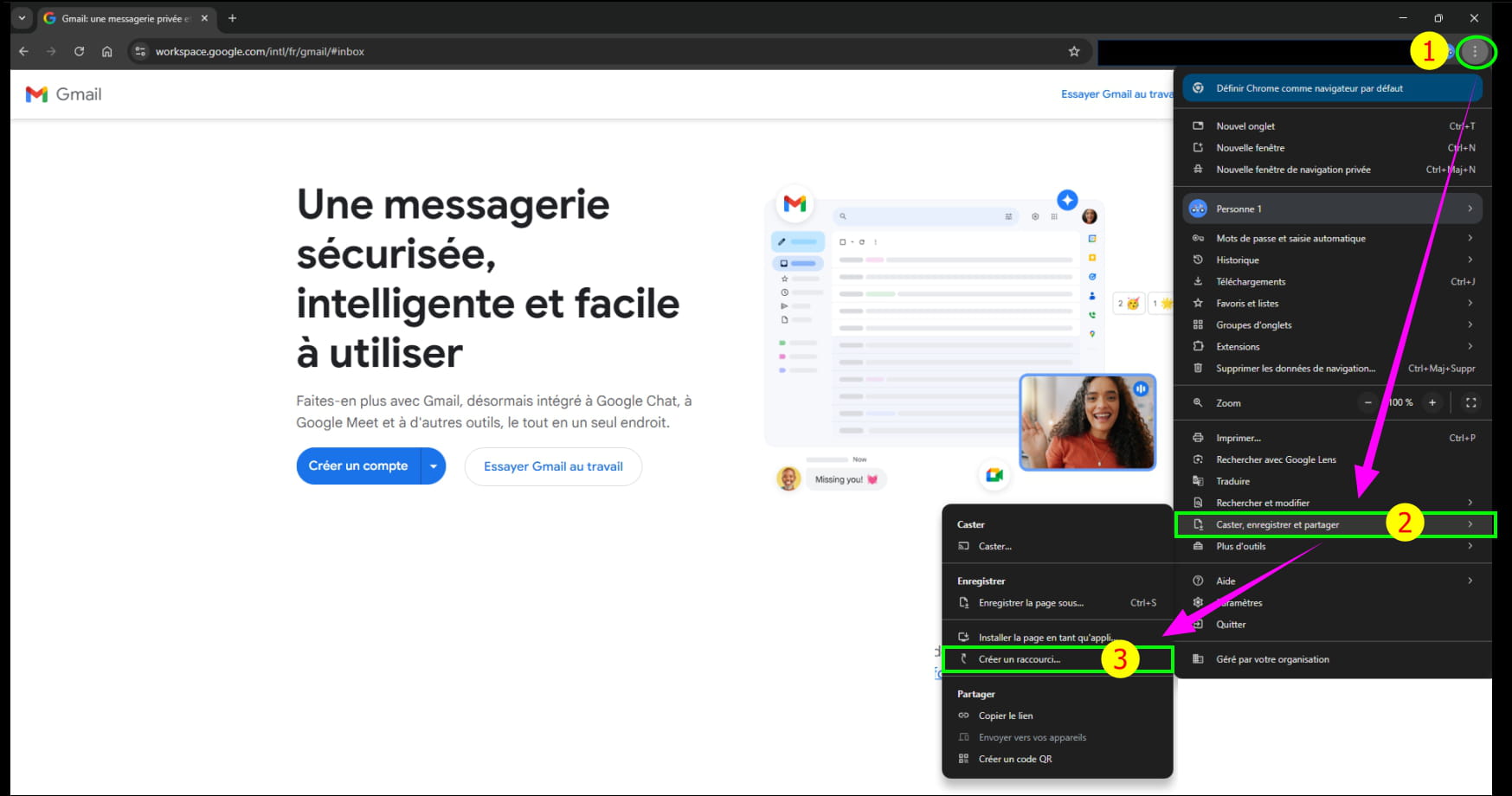
In the following dialog box titled '' Create a shortcut to this page ''
Click on --►Create
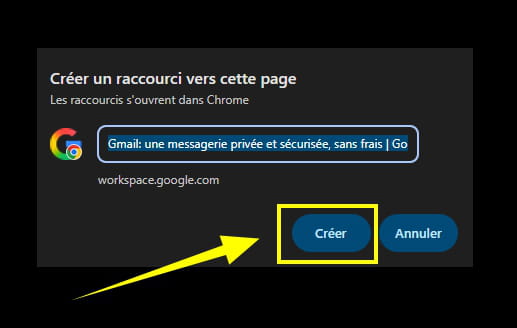
A Gmail shortcut is created on the Desktop.
Right-click on the Gmail shortcut.
Click on --►Pin to taskbar
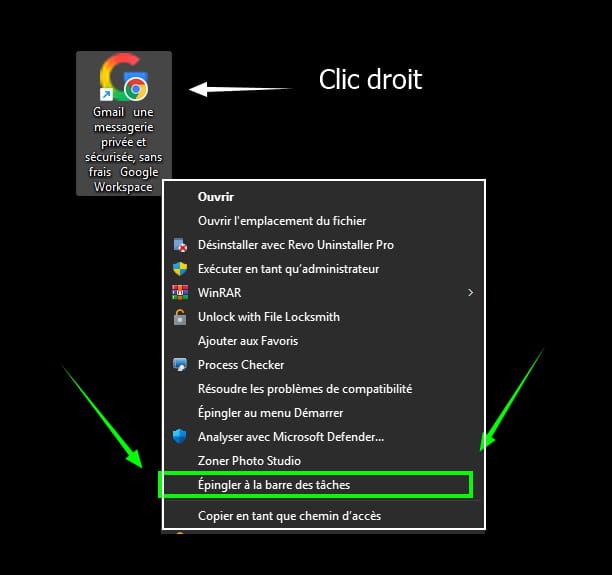
The Gmail shortcut is added to the taskbar.
Microsoft Edge:
Open Edge.
In the address bar, copy and paste:
https://workspace.google.com/intl/fr/gmail/#inbox
Then log in.
Click on the 3 small horizontal dots located at the top right.
Click on the line --►More tools
Click on --►Pin to taskbar
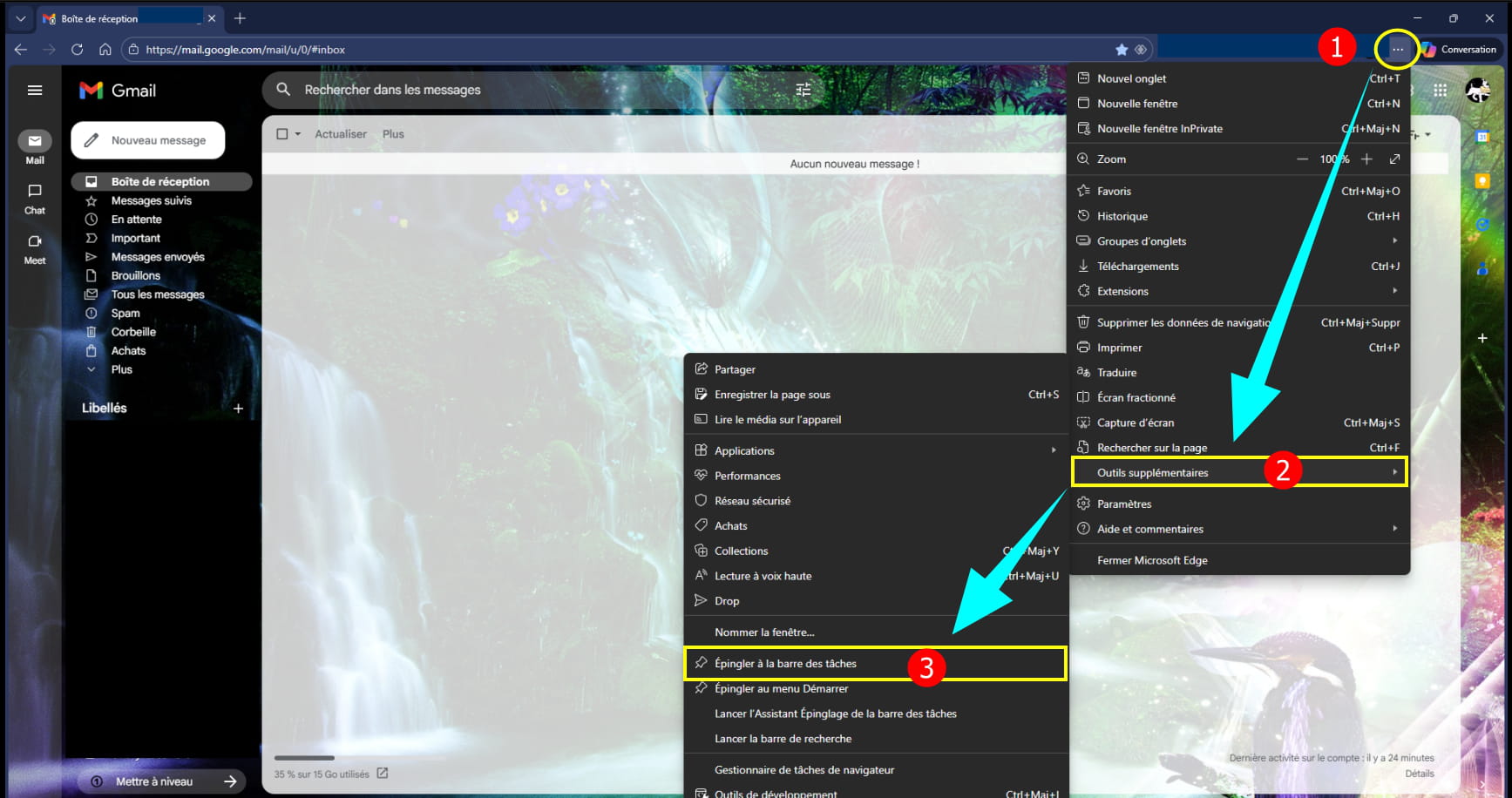
The Gmail shortcut is added to the taskbar.
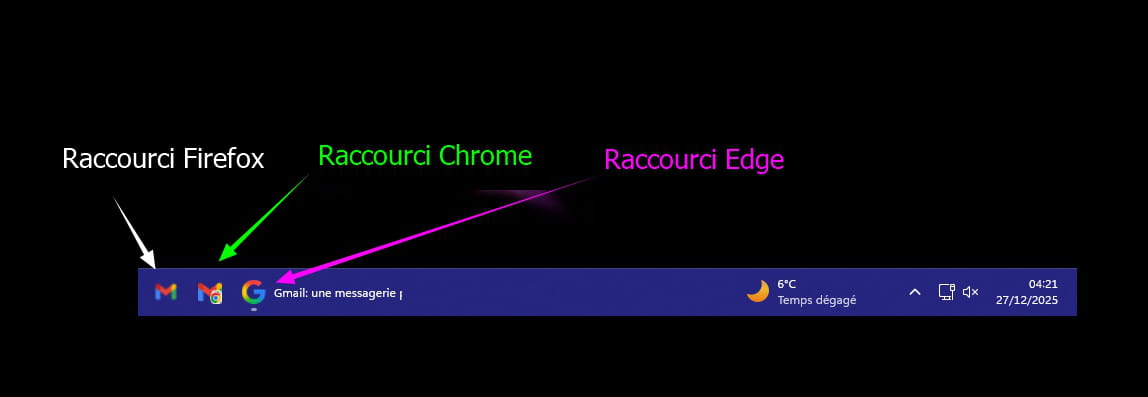
Remove the Gmail shortcut from the taskbar:
Right-click on the Gmail or Google Workspace icon, or simply on the letter G.
Click on --►Unpin from taskbar

-
Hi,
Not even seen, and saw too late that there was already a tutorial on CCM.
Sure, it's a bit outdated, and it deserves to be corrected.
==► Pin Gmail to the Windows taskbar
But we would probably prefer something fresh rather than reheated...
:-)
-

