
Steam won't launch
Solvedmacbernic Posted messages 2231 Registration date Status Member Last intervention -
Hello,
I have a problem since this morning, unable to launch Steam
after some research, I tried:
-running it as an admin
-resetting the PC
-this solution:
- Type "'PowerShell" in the Search Bar > Right-click on the app > Select '''Run as administrator''.
- Now let's type the following commands.
WARNING: Type the entire command on the first line > Press ENTER > Wait for the command to complete > Execute the next command in the list.
netsh int tcp set supplemental internet congestionprovider=ctcp
- Restart your computer > Open Steam.
nothing seems to work, can anyone help me please? (I am on Windows 11)
it starts by updating Steam and/or verifying files and then nothing
4 answers
-
Hello,
I just launched Steam --> an update starts, Steam restarts and the window stays black with the logo spinning.... when I right-click on the Steam logo in the taskbar, there is another window open behind the first one asking for validation of the Steam service update... we confirm everything and it starts ;))
This might help you....
@+
-
Hello,
It might be a problem with their own servers!
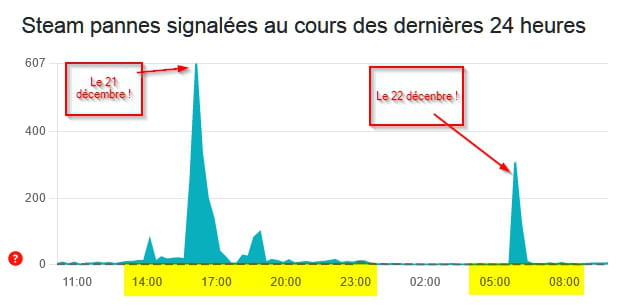
https://downdetector.fr/statut/steam/
https://www.totalbug.com/steam/
https://help.steampowered.com/fr/faqs/view/29A6-F529-F956-6292
https://help.steampowered.com/fr/faqs/view/21F5-8D5D-0141-7A5E
https://help.steampowered.com/fr/faqs/view/669A-2F68-D1D1-A5EC
https://help.steampowered.com/fr/
That will be all from my side, happy end of year celebrations.
-
flo88 Posted messages 28494 Registration date Status Contributor Last intervention Ambassadeur 5 171
Hello
The first reflex when a gaming platform doesn't start is to check for any incidents on the platform's servers, which seems to be the case here given what MPMP10 found.
Secondly, it's to check your credentials, as this is the main cause of blockage.
And finally, as a last resort, reinstall Steam from the publisher's website, as resetting the PC for that is nonsense.
-
hello, I'll see if it changes by tomorrow then, because on another site it says there are 200,000 people connected
I admit that the reset was a bit extreme, but I've already reinstalled Steam 4 times (before AND after the reset....)
As I said, I have the launch window that says updating... then nothingHello everyone,
I have been connected to their platform for a few minutes now...!

Everything is working, no slowdown.
Hello,
You save or move the folder containing your games so you don't have to re-download everything, you uninstall Steam and reinstall it. Then if it works, you put the games back in the right place and that's it.
-



