
USB access to my phone with Explorer shows empty folder
SolvedMaminadesiles -
Hello
I want to access the files on my smartphone (USB cable) with the Windows 11 file explorer.
The phone is recognized but indicates: empty folder.
What settings should I modify to restore this function?
Thank you in advance
3 answers
-
Hello,
When the smartphone is connected to the computer and unlocked, pull down the notifications from the top of the screen. You will see something that looks like this:
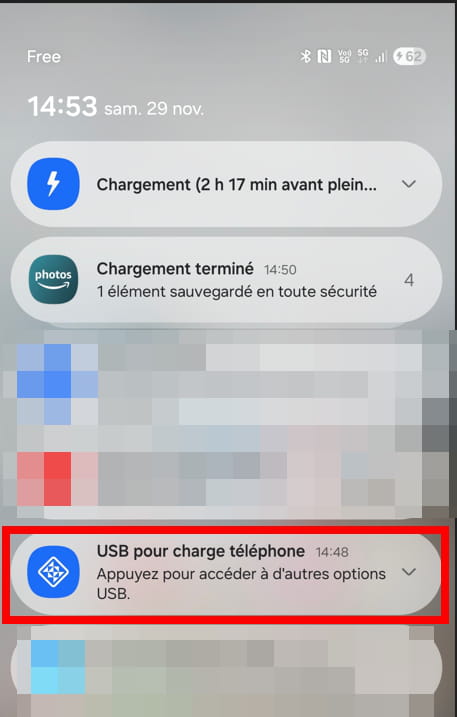
Click on the line to see all the options and choose: File Transfer / Android Auto.
What is well conceived is clearly stated,
And the words to say it come easily.
(Boileau) -
Hello,
Thank you Pierr10
Indeed, this procedure solves my problem; however, it seems that I have to repeat it every time I connect the smartphone. It seems to me that before, this procedure was not necessary, and file display happened by default as soon as the phone was connected.
Well, it's not too bothersome, and I thank you for responding quickly and effectively.
-
Hello,
Specify for which smartphone?
You should have on your mobile, the command:
Allow access? If it has been allowed, the connected device will have access to the data stored on your phone. DENY - ALLOW...after connecting it to your PC. That's what appears on my Sony Xperia.

